For other models
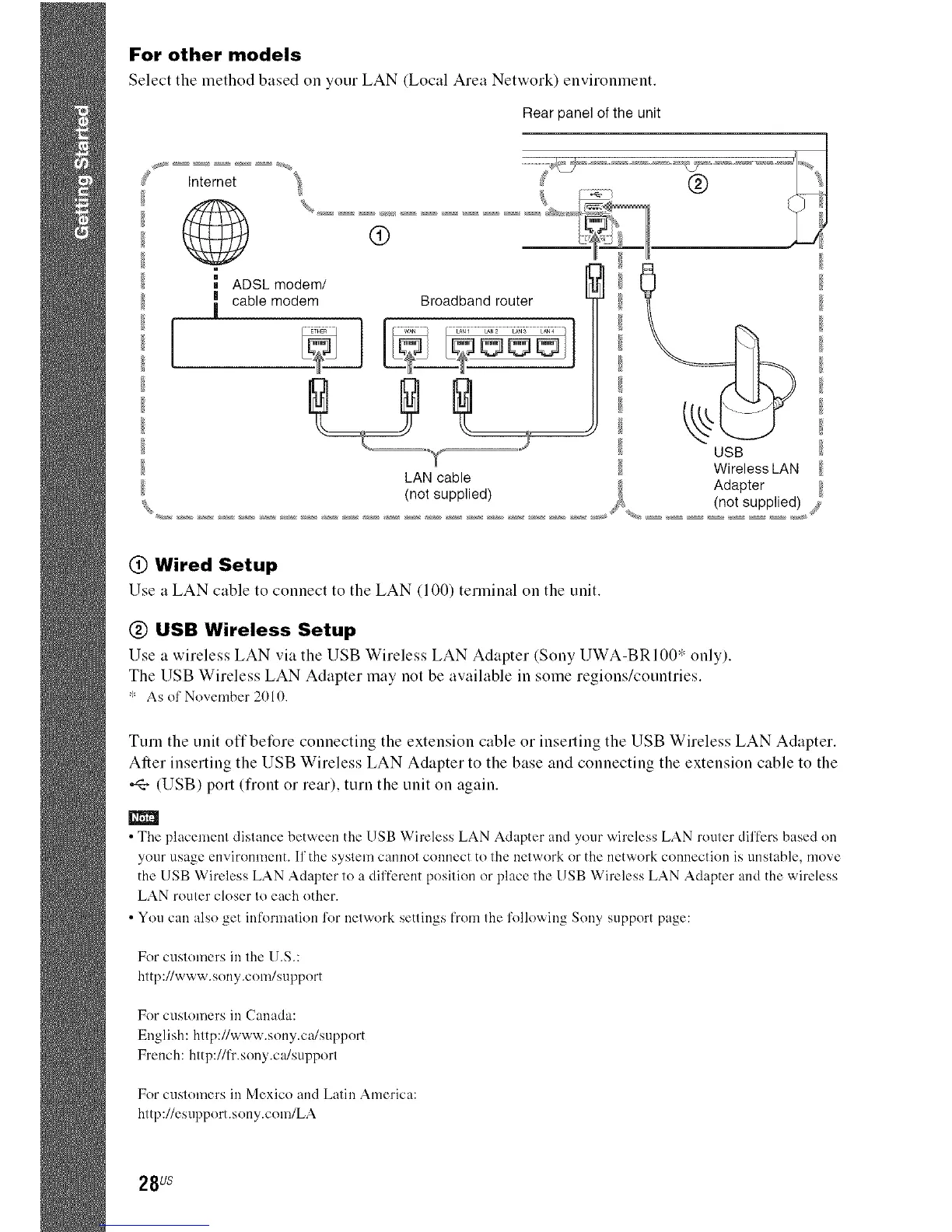
Select the method based on your LAN (Local Area Network) environment.
J
Rear panel of the unit
Internet
,A'
m
ADSL modem/ I_l
; cable modem Broadband router '-"_
®
USB
Wireless LAN
LAN cable
,. Adapter
(not suppued) _ (not supplied) ,y
@ Wired Setup
Use a LAN cable to connect to the LAN (100) terminalon the unit.
@ USB Wireless Setup
Use a wireless LAN via the USB Wireless LAN Adapter (Sony UWA-BRI00* only).
The USB Wireless LAN Adapter may not be available in some regions/countries.
* As ol' November 2010.
Turn the unit offbetBre connecting the extension cable or inserting the USB Wireless LAN Adapter.
After inserting the USB Wireless LAN Adapter to the base and connecting the extension cable to the
(USB) port (front or rear), tuna the unit on again.
m
•The placement distance between the USB Wireless LAN Adapter and your wireless LAN router differs based on
your usage environment. If'the system cannot connect to the network or the network connection is unstable, move
the USB Wireless LAN Adapter to a different position or place the USB Wireless LAN Adapter and the wireless
LAN router closer to each other.
• You can also get information for network settings from the following Sony support page:
For cuslomers in lhe U.S.:
http://www.sony.com/support
For Cl.IS1OUlersill Canada:
English: hltp://www.sony.ca/support
French: http://fr.sony.ca/support
For cuslomers in Mexico and Latin America:
http://esupport.sony.com/LA
28 us



 To Next Page