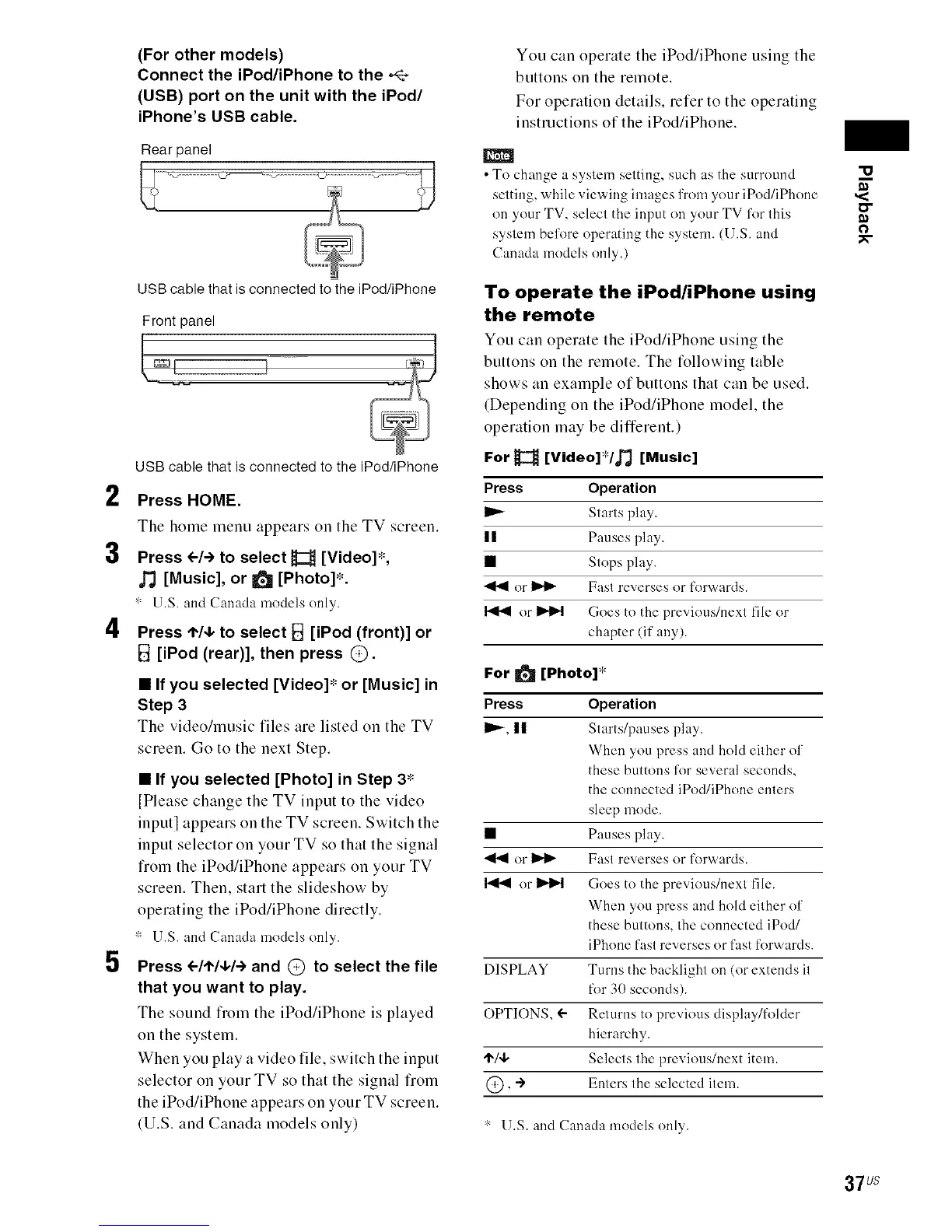
(For other models)
Connect the iPod/iPhone to the ,4_
(USB) port on the unit with the iPod/
iPhone's USB cable.
Rear panel
USBcable that isconnected to theiPod/iPhone
Front panel
USB cable that is connected to the iPod/iPhone
2 Press HOME.
The home menu appears on the TV screen.
3 Press el-) to select _C_ [Video]*,
J_ [Music], or _ [Photo]*.
* U.S. and Canadamodels only.
4 Press t"/4, to select I_! [iPod (front)] or
B [iPod (rear)], then press @.
5
• If you selected [Video]* or [Music] in
Step 3
The video/music files are listed on the TV
screen. Go to the next Step.
• If you selected [Photo] in Step 3*
[Please change the TV input to the video
input] appears on the TV screen. Switch the
input selector on your TV so that the signal
from the iPod/iPhone appears on your TV
screen. Then, start the slideshow by
operating the iPod/iPhone directly.
* U.S. and Canada models only.
Press <--/,1,/4,/-)and @ to select the file
that you want to play.
The sound from the iPod/iPhone is played
on the system.
When you play a video file, switch the input
selector on your TV so that the signal from
the iPod/iPhone appears on your TV screen.
(U.S. and Canada models only)
You can operate the iPod/iPhone using the
buttons on the remote.
For operation details, refer to the operating
instructions of the iPod/iPhone.
m
• To change a system setting, such as the surround "U
setting, while viewing images from your iPod/iPhone ,<
on your TV, select the input on your TV l'orthis _"
system bel'ore operating the system. (U.S. and _--
Canada models only.)
To operate the iPod/iPhone using
the remote
You can operate the iPod/iPhone using the
buttons on the remote. The following table
shows an example of buttons that can be used.
(Depending on the iPod/iPhone model, the
operation may be different.)
For _ [Video]*/_ [Music]
Press Operation
Starts play.
II Pauses play.
• Stops play.
or _ Fast reverses or forwards.
or _ Goes to the previous/next file or
chapter (if any).
For _ [Photo]*
Press Operation
I_-, n Starts/pauses play.
When you press and hold either of
these buttons for several seconds,
the connected iPod/iPhone enters
sleep mode.
• Pauses play.
or _ Fast reverses or forwards.
or _ Goes to the previous/next file.
When you press and hold either of
these buttons, the connected iPodi
iPhone fast reverses or fast forwards.
DISPLAY Turns the backlight on (or extends it
for 30 seconds).
OPTIONS, ÷ Returns to previous display/folder
hierarchy.
'1"/4, Selects the previous!next item.
@, -) Enters the selected item.
* U.S. and Canada models only.
37us



 To Next Page