BrowsingWebsites
You can connect to the Internet and enjoy
websites like the Sony homepage using the
system.
1 Prepare for Internet browsing.
Connect the system to a network (page 27).
2
3
4
Press HOME.
The home menu appears on the TV screen.
Press 1-/-) to select _ [Network].
Press ,1,/4,to select [Internet Browser],
then press @.
The [hltenlet Browser 1display appears.
m
• Some websites may not display correctly, or not
function.
To enter a URL
Select [URL entry] from the options menu.
Enter the URL using the software keyboard,
then select [Enter].
To set the default start page
While the page you want to set is displayed,
select [Set as start page] fiom theoptions menu.
To quit Internet Browser
Press HOME.
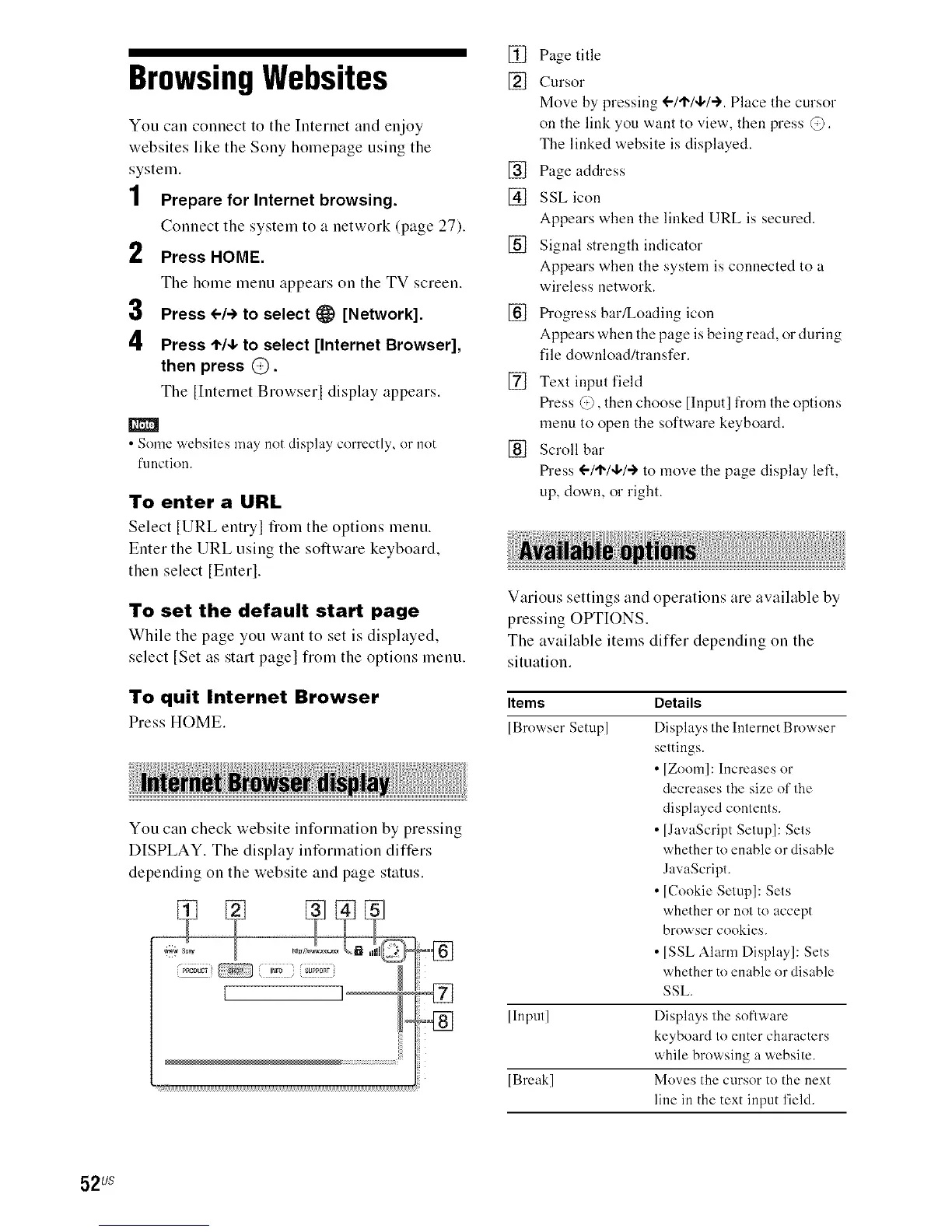
You can check website int_rmation by pressing
DISPLAY. The display intBrmation differs
depending on the website and page status.
[] Page title
[] Cursor
Move by pressing !-1'1"14,1"-I'.Place the cursor
on the link you want to view, then press @.
The linked website is displayed.
[] Page address
[] SSL icon
Appears when the linked URL is secured.
[] Signal strength indicator
Appears when the system is connected to a
wireless network.
[]
IS"ogress bar/Loading icon
Appears when the page is being read, or during
file download/transfer.
[] Text input field
tS"ess @, then choose [Input] fi'om the options
menu to open the software keyboard.
[] Scroll bar
tS"ess 1-/t"/4,/-) to move the page display left,
up, down, or right.
1
Various settings and operations are available by
pressing OPTIONS.
The available items differ depending on the
situation.
Items Details
[Browser Setup] Displays the Internet Browser
settings.
• [Zoom]: Increases or
decreases the size of the
displayed contents.
• [JavaScript Setup]: Sets
whether to enable or disable
JavaScript.
• [Cookie Setup]: Sets
whether or not to accept
browser cookies.
• [SSL Alarm Display]: Sets
whether to enable or disable
SSL.
[Input] Displays the software
keyboard to enter characters
while browsing a website.
[Break] Moves the cursor to the next
line in the text input field.
52us



 To Next Page