EasyManua.ls Logo

Sony CCD-TR44 - Getting Started; Charging and Installing the Battery Pack

Sony CCD-TR44
56 pages
Print Icon
To Next Page IconTo Next Page
To Previous Page IconTo Previous Page
Loading...
Getting
Started
Charging
and
Installing
the
Battery
Pack
Before
using
your
camcorder,
you
first
need
to
charge
and
install
the
battery
pack.
To
charge
the
battery
pack,
use
the
supplied
AC
power
adaptor.
Charging
the
Battery
Pack
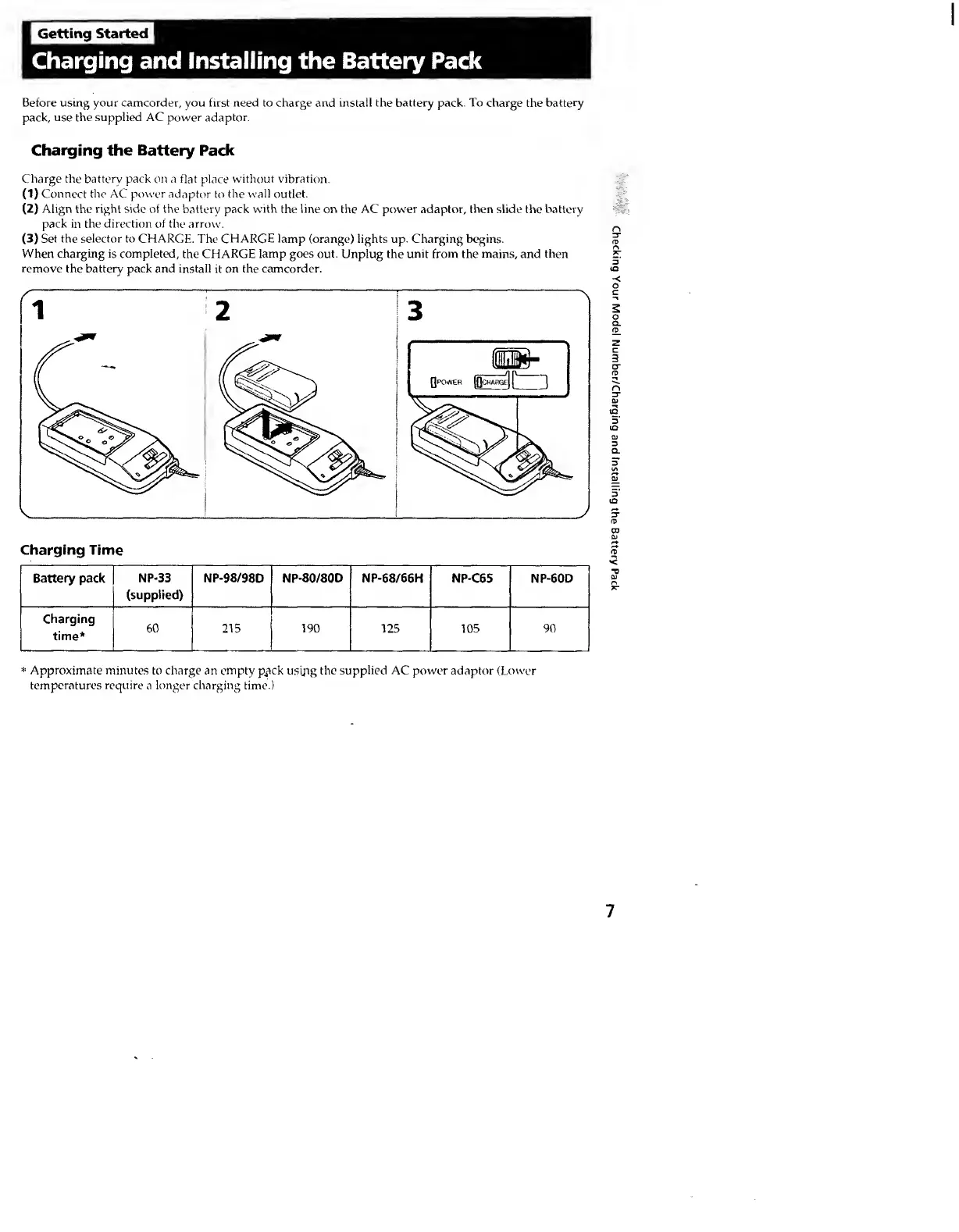
Charge
the
battery
pack
on
a
flat
place
without
vibration.
(1)
Connect
the
AC
power
adaptor
to
the
w'all
outlet.
(2)
Align
the
right
side
of
the
battery
pack
with
the
line
on
the
AC
pow'er
adaptor,
then
slide
the
battery
pack
in
the
direction
of
the
arrow.
(3)
Set
the
selector
to
CHARGE,
The
CHARGE
lamp
(orange)
lights
up.
Charging
begins.
When
charging
is
completed,
the
CHARGE
lamp
goes
out.
Unplug
the
unit
from
the
mains,
and
then
remove
the
battery
pack
and
install
it
on
the
camcorder.
Charging
Time
Battery
pack
NP-33
(supplied)
NP-98/98D
NP-80/80D
NP-68/66H
NP-C6S
Charging
time*
60
215
190
125
105
mom
*
Approximate
minutes
to
charge
an
empty
ck
usijig
the
supplied
AC
power
adaptor
(Lower
temperatures
require
a
longer
charging
time.)
7
Checking
Your
Model
Number/Charging
and
Installing
the
Battery
Pack