EasyManua.ls Logo

Sony CCD-TR44 - Camera Recording

Sony CCD-TR44
56 pages
Print Icon
To Next Page IconTo Next Page
To Previous Page IconTo Previous Page
Loading...
Camera
Recording
Make
sure
that
a
power
source
and
a
cassette
is
inserted.
When
you
use
the
camcorder
for
the
first
time,
power
on
it
and
reset
the
date
and
time
to
your
time
(p.
33)
before
you
start
recording.
When
you
reset
the
date
and
time,
the
date
is
automatically
recorded
for
10
seconds
after
you
start
recording
(AUTO
DATE
feature).
This
feature
works
only
once
a
day
Before
you
record
one-time
events,
you
may
want
to
make
a
trial
recording
to
make
sure
that
you
are
using
the
camcorder
corrcxrtly
(
1
)
While
pressing
the
small
green
button
on
the
POWER
svc
itch,
turn
it
to
CAMERA.
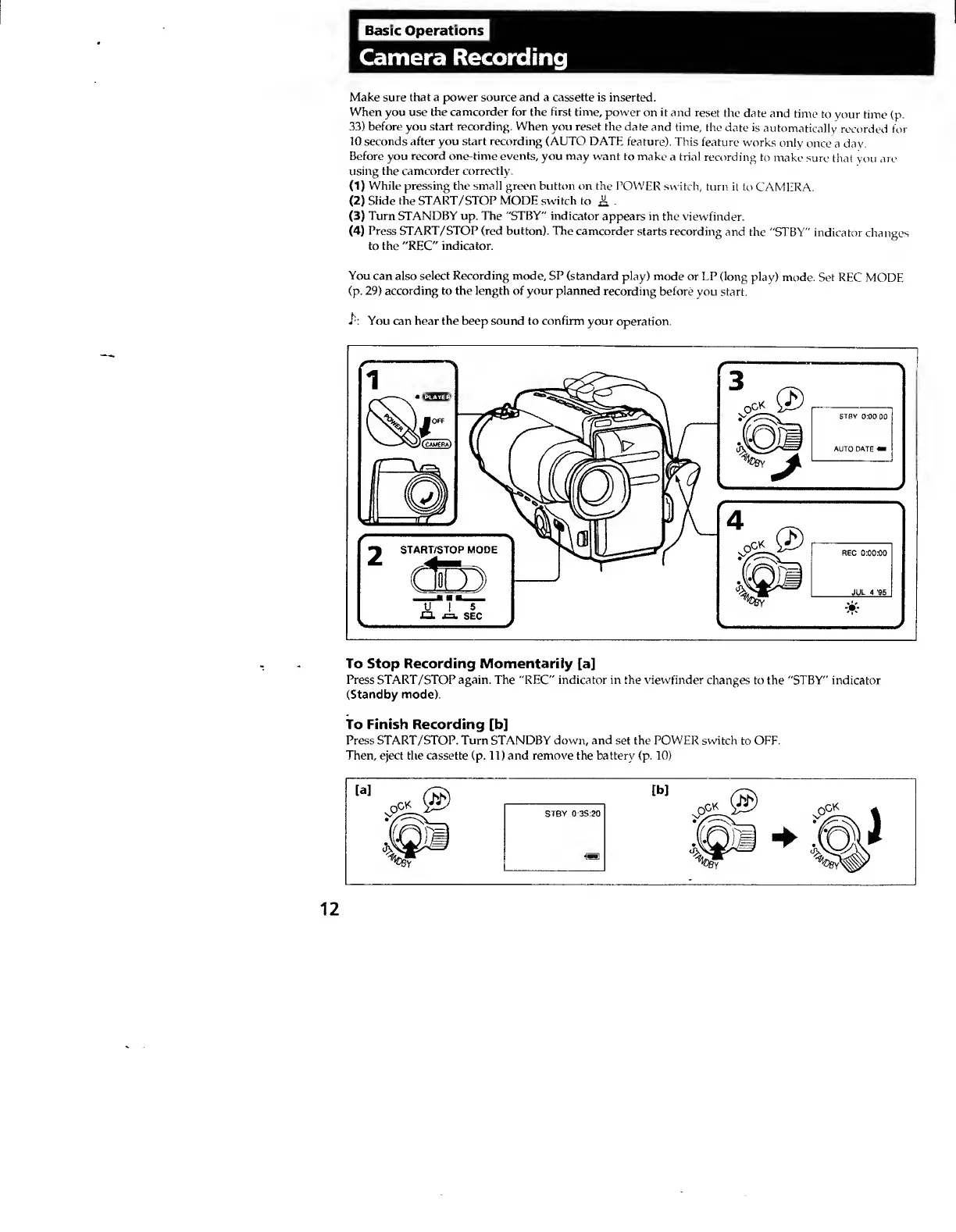
(2)
Slide
the
START/STOP
MODE
switch
to
A
(3)
Turn
STANDBY
up.
The
"STBY"
indicator
appears
in
the
viewfinder.
(4)
Press
START/STOP
(red
button).
The
camcorder
starts
recording
and
the
"STBY"
indicator
changes
to
the
"REC"
indicator.
You
can
also
select
Recording
mode,
SP
(standard
play)
mode
or
LP
(long
play)
mode.
Set
REC
MODE
(p.
29)
according
to
the
length
of
your
planned
recording
before
you
start.
You
can
hear
the
beep
sound
to
confirm
your
operation.
To
Stop
Recording
Momentarily
[a]
Press
START/STOP
again.
The
"REC"
indicator
in
the
viewfinder
changes
to
the
"STBY"
indicator
(Standby
mode).
To
Finish
Recording
[b]
Press
START/STOP.
Turn
STANDBY
down,
and
set
the
POWER
switch
to
OFF.
Then,
eject
the
cassette
(p.
11)
and
remove
the
battery
(p.
10)
12