Quick Reference
Quick Reference
95
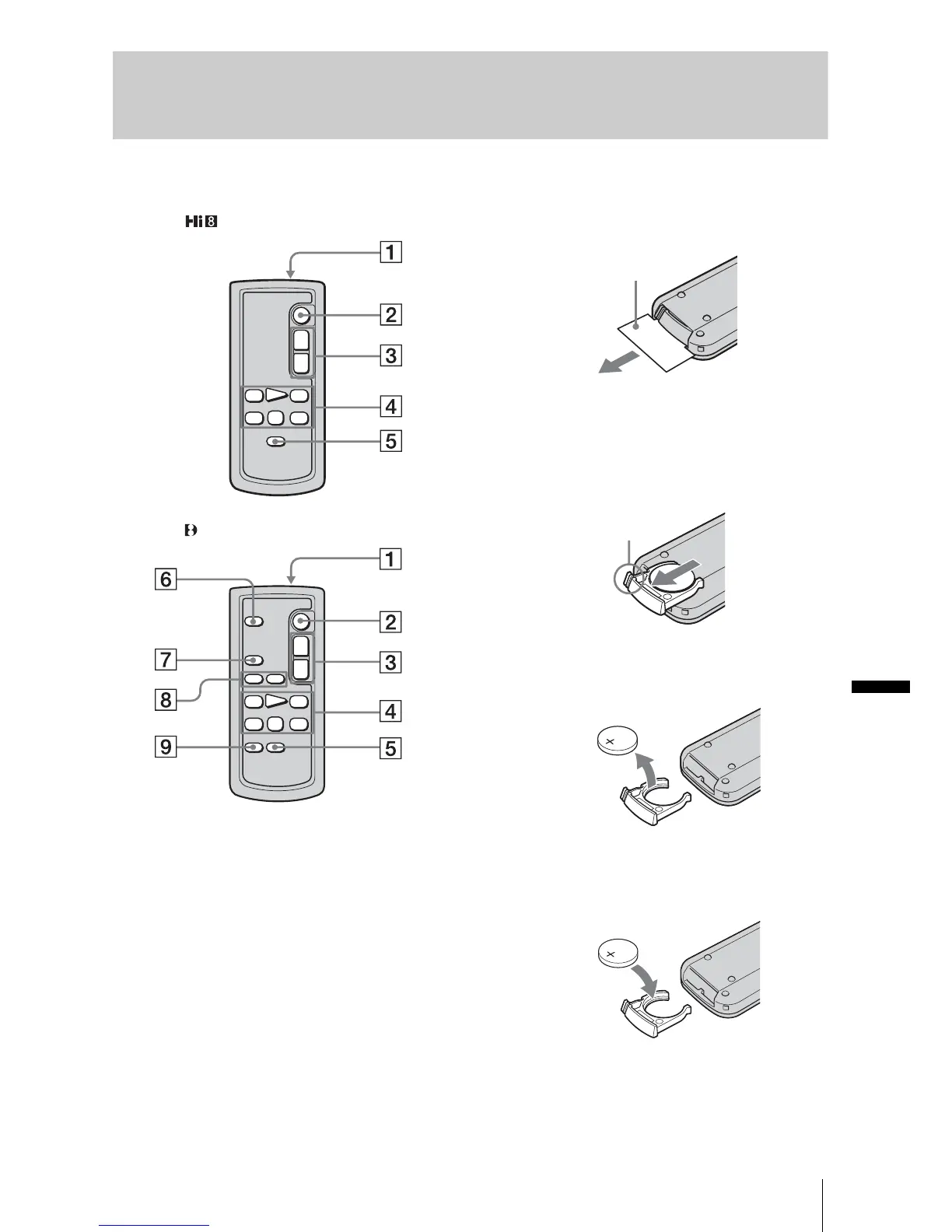
Remote Commander
Remove the insulation sheet before using the
Remote Commander.
A Transmitter
After turning on your camcorder, point
towards the remote sensor to control your
camcorder.
B REC START/STOP button (p. 21)
C Power zoom button (p. 23)
D Video control buttons (Rewind, Playback,
Fast-forward, Pause, Stop, Slow) (p. 34)
E DISPLAY button (p. 37, 40)
F PHOTO button (p. 25)
G SEARCH M. button (p. 41, 42)
H ./> buttons (p. 41, 42)
I ZERO SET MEMORY button (p. 40)
To remove the insulation sheet
To change the button-type battery
1
While pressing on the tab, inset your
fingernail into the slit to pull out the
battery case.
2 Remove the button-type lithium battery.
3 Place a new button-type lithium battery
with the + side facing up.
4 Insert the battery case back into the
Remote Commander until it clicks.
For TRV228/428:
For TRV265:
Insulation sheet
Tab
,continued














 To Next Page