1-3
CCD-TRV128/TRV228/TRV228E/TRV328/TRV428/TRV428E
1-4. LCD TYPE CHECK
The LCD type can be checked with data value by connecting the adjustment remote commander.
Note: About PD-204 board and LCD module, discriminate LCD type on the machine, and replace the same type.
Preparations:
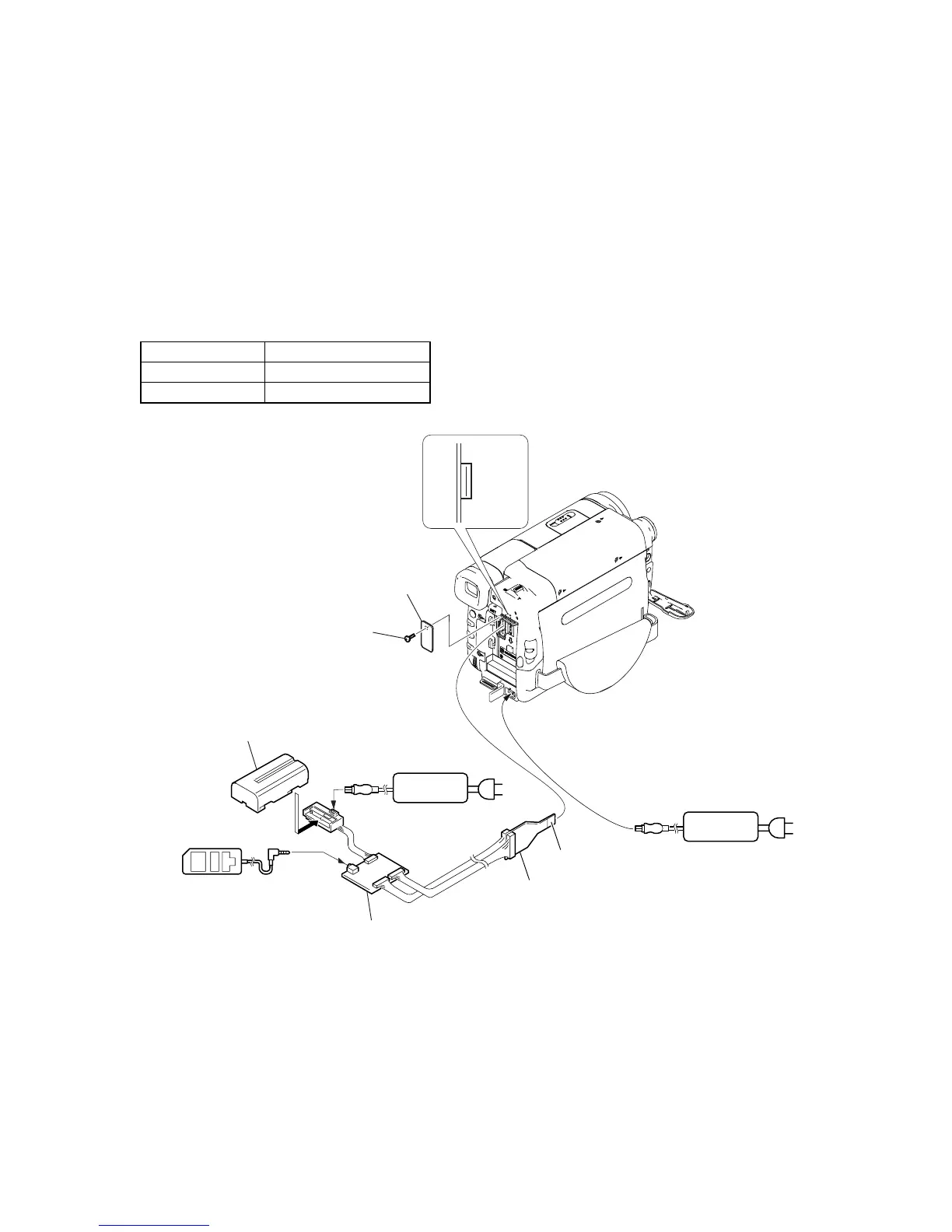
1) Connect the equipment for adjustments according to Fig. 1.
2) Connect the adjustment remote commander to VC-341 board CN007 via I/F unit for LANC control (J-6082-521-A) and CPC jig connector
(J-6082-539-A).
To operate the adjustment remote commander, connect the AC power adaptor to the DC IN jack of I/F unit for LANC control, or connect
the L series Info-LITHIUM battery to the battery terminal of I/F unit for LANC control.
Checking method:
1) Select page: 3, address: CC.
2) By checking the data value of display data, the type of LCD can be discriminated.
Data LCD type
64 to 67 TYPE C
40 to 43 TYPE S
CN007
16
1
AC adaptor
AC IN
AC adaptor
CPC lid
Screw (M2)
I/F unit for LANC control
(J-6082-521-A)
CPC jig connector
(J-6082-539-A)
L serices Info
LITHIUM battery (7.2Vdc)
Adjustment
remote commander (RM-95)
Conductor side
LANC jack
AC IN














 To Next Page