30
5 Press START/STOP.
An about 3 second-movie is recorded as a
12 second-slow-motion-movie.
When [Recording···] disappears, recording
is finished.
Touch to cancel the smooth slow
recording.
To change the setting
Touch (OPTION) t tab, then
select the setting you want to change.
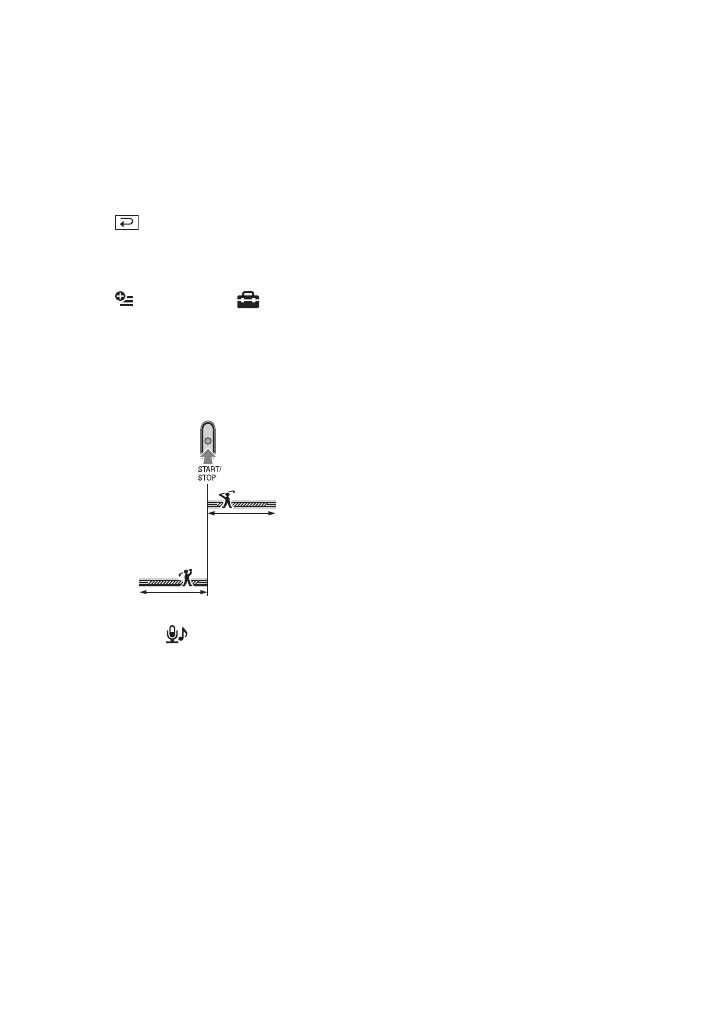
• [TIMING]
Select the recording start point after
START/STOP is pressed. The default
setting is [3sec AFTER].
• [RECORD SOUND]
Select [ON] ( ) to superimpose sounds
such as conversation on the slow motion
pictures (The default setting is [OFF]).
Your camcorder records sounds for about
12 seconds while [Recording···] is
displayed in step 5.
b Notes
• Sounds are not recorded during the about 3
second-movie shooting.
• Image quality of [SMTH SLW REC] is not as
good as that of normal recording.
[3sec AFTER]
[3sec BEFORE]






 To Next Page