63
Customizing your camcorder
B LCD PANEL
Shows displays such as the time code on
the LCD screen.
V-OUT/PANEL
Shows displays such as the time code on
the TV screen and the LCD screen.
DISP OUTPUT
CLOCK/ LANG
(Items to set clock and language)
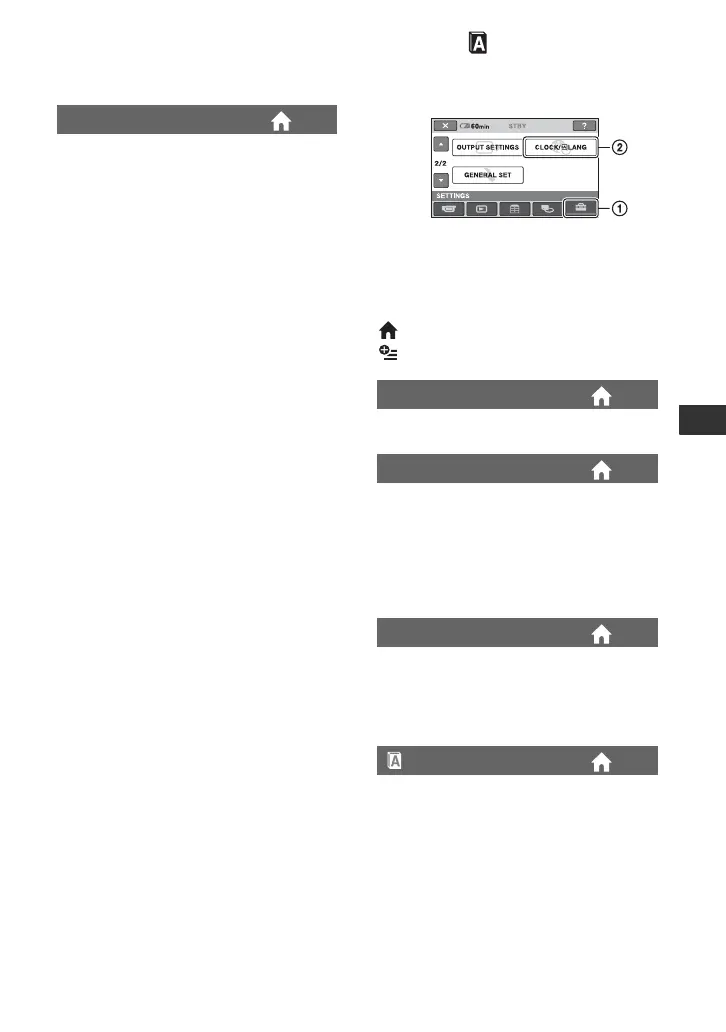
Touch 1, then 2.
If the item is not on the screen, touch v/V
to change the page.
How to set
(HOME MENU) t page 52
(OPTION MENU) t page 65
See page 17.
You can adjust a time difference without
stopping the clock.
Set your local area using v/V when using
your camcorder overseas.
Refer to the world time difference on page
109.
You can change this setting without
stopping the clock.
Set to [ON] to move the time forward
1 hour.
You can select the language to be used on
the LCD screen.
z Tips
• Your camcorder offers [ENG[SIMP]]
(simplified English) for when you cannot
find your native tongue among the
options.
CLOCK SET
AREA SET
SUMMERTIME
LANGUAGE SET






 To Next Page