64
GENERAL SET
(Other setup items)
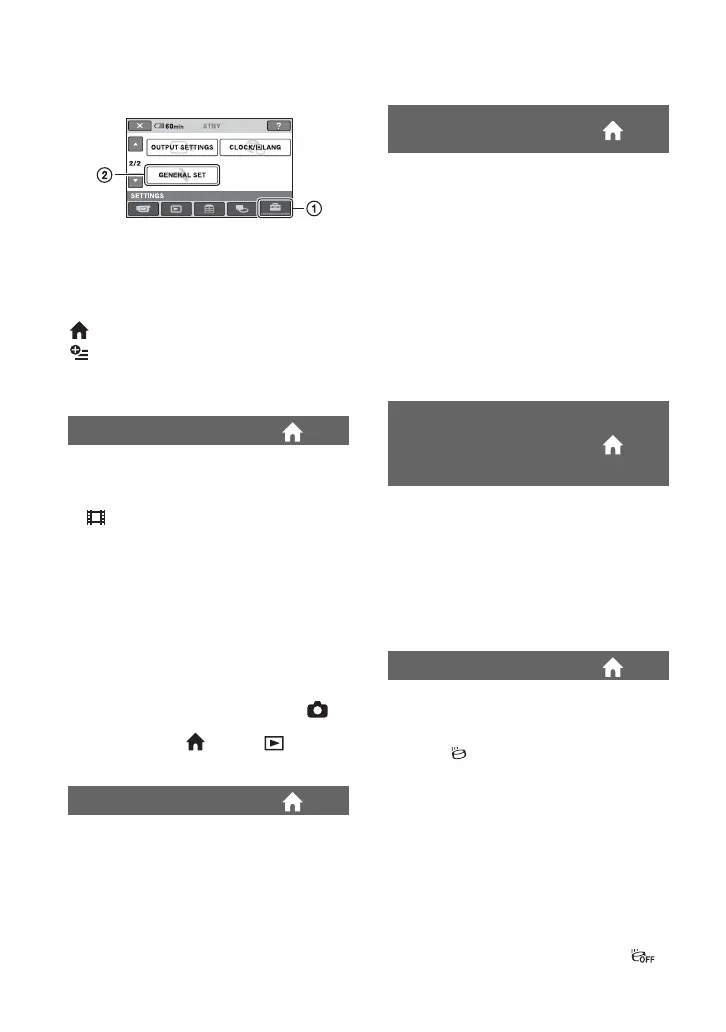
Touch 1, then 2.
If the item is not on the screen, touch v/V
to change the page.
How to set
(HOME MENU) t page 52
(OPTION MENU) t page 65
The default settings are marked with B.
The default setting is [ON], allowing you to
view the demonstration in about 10
minutes, after you turn the POWER switch
to (Movie).
z Tips
• The demonstration will be suspended in
situations such as those described below.
– When you press START/STOP or PHOTO.
– When you touch the screen during the
demonstration (The demonstration starts
again after about 10 minutes).
– When you remove or insert a “Memory Stick
Duo.”
– When you turn the POWER switch to
(Still).
– When you press (HOME)/ (VIEW
IMAGES) button.
See page 115.
DEMO MODE
CALIBRATION
B 5 min
The camcorder is automatically turned off
when you do not operate your camcorder
for more than approximately 5 minutes.
NEVER
The camcorder is not automatically turned
off.
b Notes
• When you connect your camcorder to a wall
socket, [A.SHUT OFF] is automatically set to
[NEVER].
The default setting is [ON], allowing you to
use the supplied Remote Commander
(p. 122).
z Tips
• Set to [OFF] to prevent your camcorder from
responding to a command sent by another VCR
remote control unit.
[DROP SENSOR] is set to [ON] as the
default setting. When the drop sensor has
detected that the camcorder has been
dropped ( appears), recording or playing
back recorded images may be disabled to
protect the internal hard disk.
b Notes
• Set the drop sensor to [ON] (default setting)
when you use the camcorder. Otherwise when
you drop the camcorder, you may damage the
internal hard disk.
• In a non-gravity situation, the drop sensor
activates. When you record images during
activity such as roller-coasting or skydiving,
you can set [DROP SENSOR] to [OFF] ( )
so as not to activate the drop sensor.
A.SHUT OFF (Auto shut
off)
REMOTE CTRL (Remote
control) (except for
DCR-SR32E/SR33E/
SR42E)
DROP SENSOR






 To Next Page