31
Recording/Playback
Recording/Playback
Playback
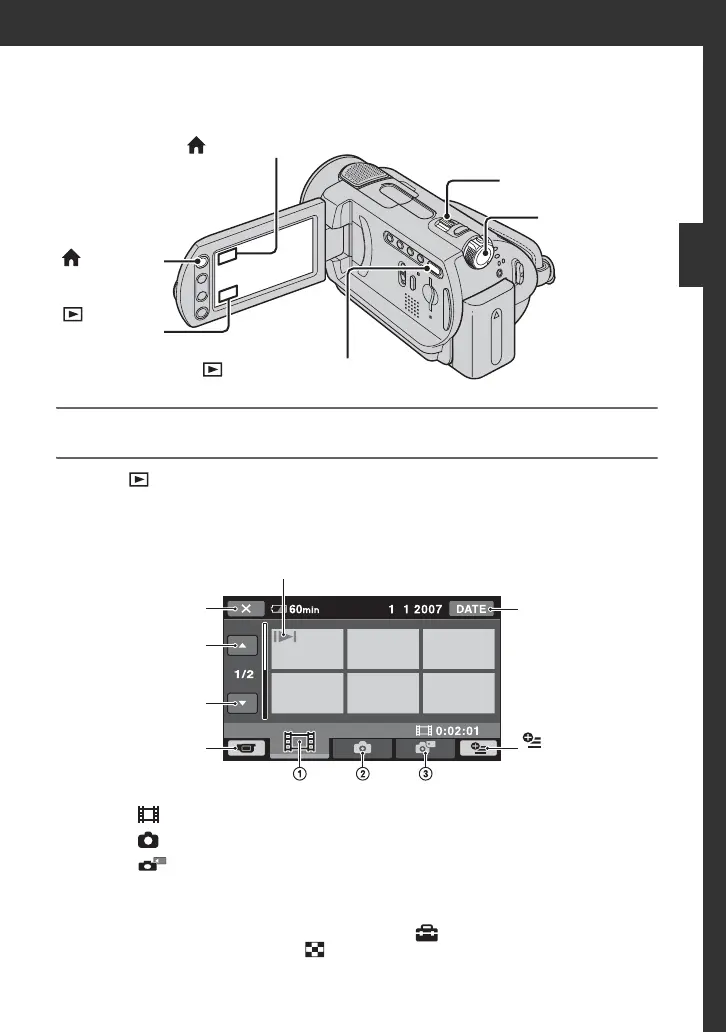
1 Turn the POWER switch A to turn on your camcorder.
2 Press (VIEW IMAGES) B (or C) button.
The VISUAL INDEX screen appears on the LCD screen. (It may take some time to
display the thumbnails.)
1 : Displays movies.
2 : Displays still images on the hard disk.
3 : Displays still images on a “Memory Stick Duo.”
z Tips
• Moving the power zoom lever F let you select whether to display 6 or 12 images on the
VISUAL INDEX screen. To fix this number, touch (SETTINGS) on the HOME MENU
t [VIEW IMAGES SET] t [ DISPLAY] (p. 61).
POWER
switch A
Power zoom lever F
(HOME) E
(VIEW IMAGES) B button
(HOME) D
(VIEW
IMAGES) C
button
Previous
6 images
Next
6 images
Searches for images
by date (p. 33)
Appears with the image on each of the tab that was lastly played back/
recorded (B for the still image).
Returns to the
recording screen
(OPTION)
Returns to the
recording screen






 To Next Page