38
Editing
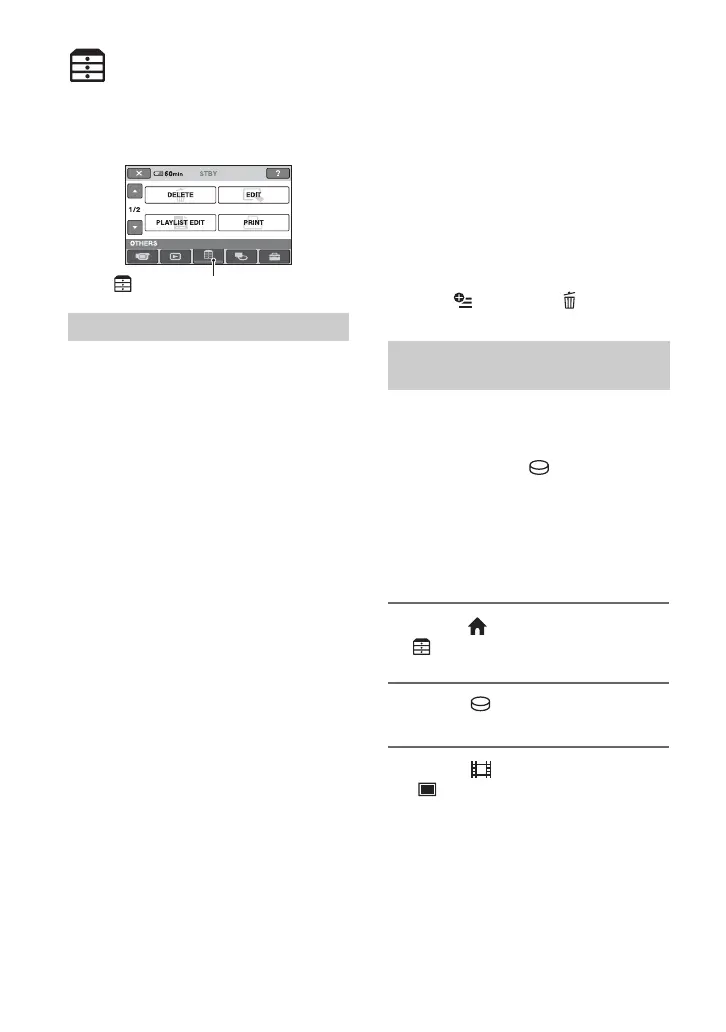
(OTHERS) category
This category enables you to edit the
images, to print still images and to connect
your camcorder to a computer.
DELETE
You can delete images on the hard disk or a
“Memory Stick Duo” (p. 38).
EDIT
You can edit the images on the hard disk or
a “Memory Stick Duo” (p. 40, 41).
PLAYLIST EDIT
You can create and edit a Playlist (p. 42).
PRINT
You can print still images on a connected
PictBridge printer (p. 46).
COMPUTER
You can connect your camcorder to a
computer (p. 73).
Deleting images
You can delete images recorded on the hard
disk or a “Memory Stick Duo” using your
camcorder.
b Notes
• You cannot restore images once they are
deleted.
z Tips
• You can select up to 100 images at one time.
• You can delete a image when viewing it by
selecting (OPTION) t tab t
[DELETE].
You can free hard disk space by deleting
image data from the camcorder.
You can check the free hard disk space of
the camcorder using [ INFO] (p. 50).
b Notes
• Important data should be saved on external media
(p. 37).
• Do not try to delete the files on the hard disk of
the camcorder using a computer.
1 On the (HOME MENU), touch
(OTHERS) t [DELETE].
2 Touch [ DELETE].
3 Touch [ DELETE] (movies) or
[ DELETE] (still images),
according to the type of image
you want to delete.
Item list
(OTHERS) category
Deleting the images on the hard
disk






 To Next Page