60
VIEW IMAGES SET
(Items to customize the display)
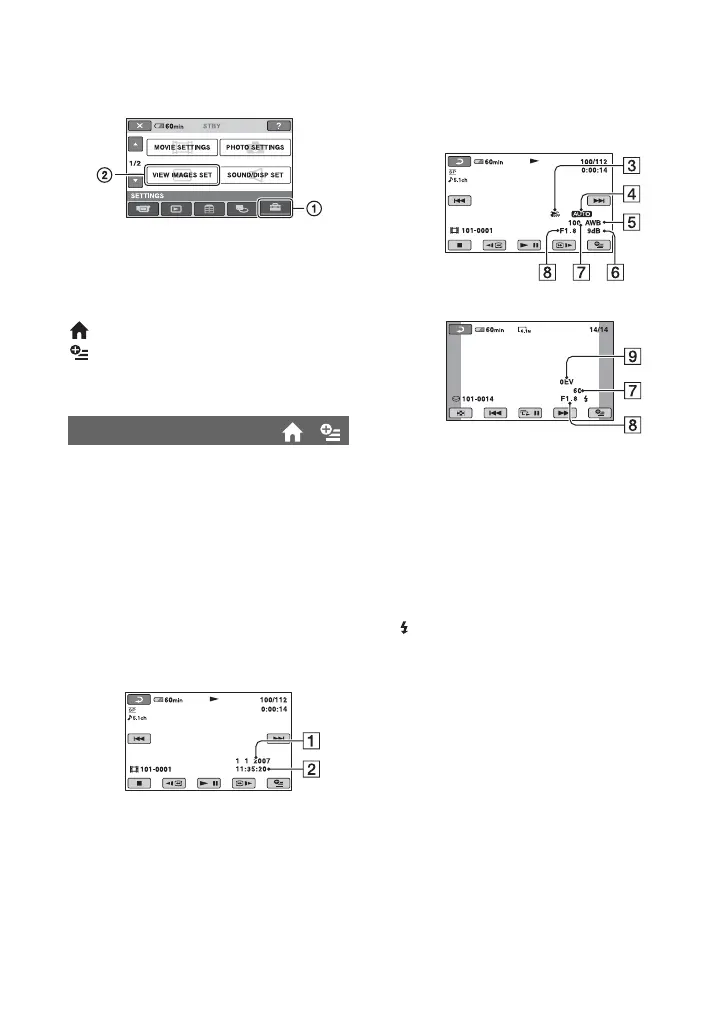
Touch 1, then 2.
If the item is not on the screen, touch v/V
to change the page.
How to set
(HOME MENU) t page 52
(OPTION MENU) t page 65
The default settings are marked with B.
During playback, displays the information
(data code) recorded automatically at the
time of recording.
B OFF
Data code is not displayed.
DATE/TIME
Displays the date and time.
CAMERA DATA (below)
Displays camera setting data.
DATE/TIME
ADate
BTime
DATA CODE
CAMERA DATA
CSteadyShot off
DBrightness
EWhite balance
FGain
GShutter speed
HAperture value
IExposure
z Tips
• appears for an image recorded using a flash
(except for DCR-SR32E/SR33E/SR42E).
• The data code is displayed on the TV screen if
you connect your camcorder to a TV.
• The indicator toggles through the following
sequences as you press DATA CODE on the
Remote Commander: [DATE/TIME] t
[CAMERA DATA] t [OFF] (no indication)
(except for DCR-SR32E/SR33E/SR42E).
• Depending on the hard disk condition, bars [--:--
:--] appear.
Movie
Still image






 To Next Page