49
Utilizing recording media
Utilizing recording media
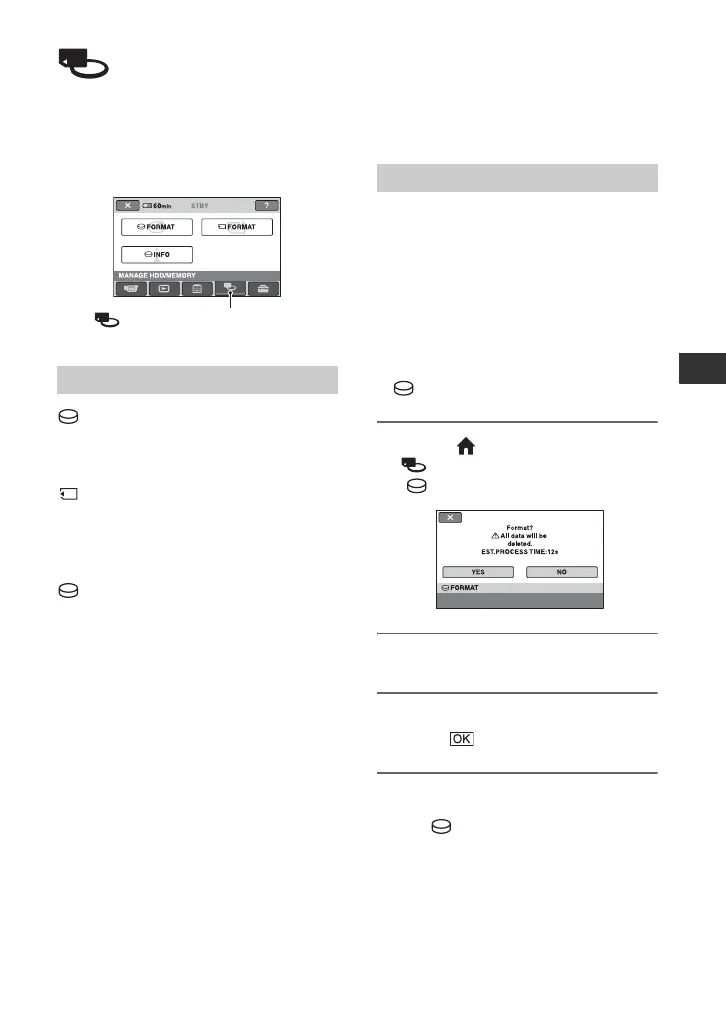
(MANAGE HDD/
MEMORY) category
This category enables you to use the hard
disk or a “Memory Stick Duo” for various
purposes.
FORMAT
You can format the hard disk and recover
recordable free space (p. 49).
FORMAT
You can format the “Memory Stick Duo”
and recover the recordable free space
(p. 50).
INFO
You can display the hard disk capacity
(p. 50).
Formatting the hard
disk or the “Memory
Stick Duo”
You can delete all the images on the hard disk
of the camcorder to recover recordable free
space to allow you to write in.
Connect your camcorder to the wall socket
using the supplied AC adaptor for this
operation (p. 13).
b Notes
• To avoid the loss of important images, you should
save them (p. 37) before performing
[FORMAT].
1 On the (HOME MENU), touch
(MANAGE HDD/MEMORY) t
[FORMAT].
2 Touch [YES] t [YES].
3 When [Completed.] appears,
touch .
b Notes
• While [ FORMAT] is activated, do not
remove the AC Adaptor or the battery pack.
Item list
(MANAGE HDD/MEMORY)
category
Formatting the hard disk






 To Next Page