– 7 –
SECTION 3
SERVICE MODE
3-1. GENERAL
This set has the test mode of the built-in microprocessor which
allows various check items required repairing.
3-2. SETTING THE TEST MODE
Press the POWER key and the EFFECT key at the same time and
turn on the power. (Insert the DC plug.)
3-3. RELEASING THE TEST MODE
Press the POWER key to turn off the power. (Remove the DC plug.)
3-4. TEST MODE
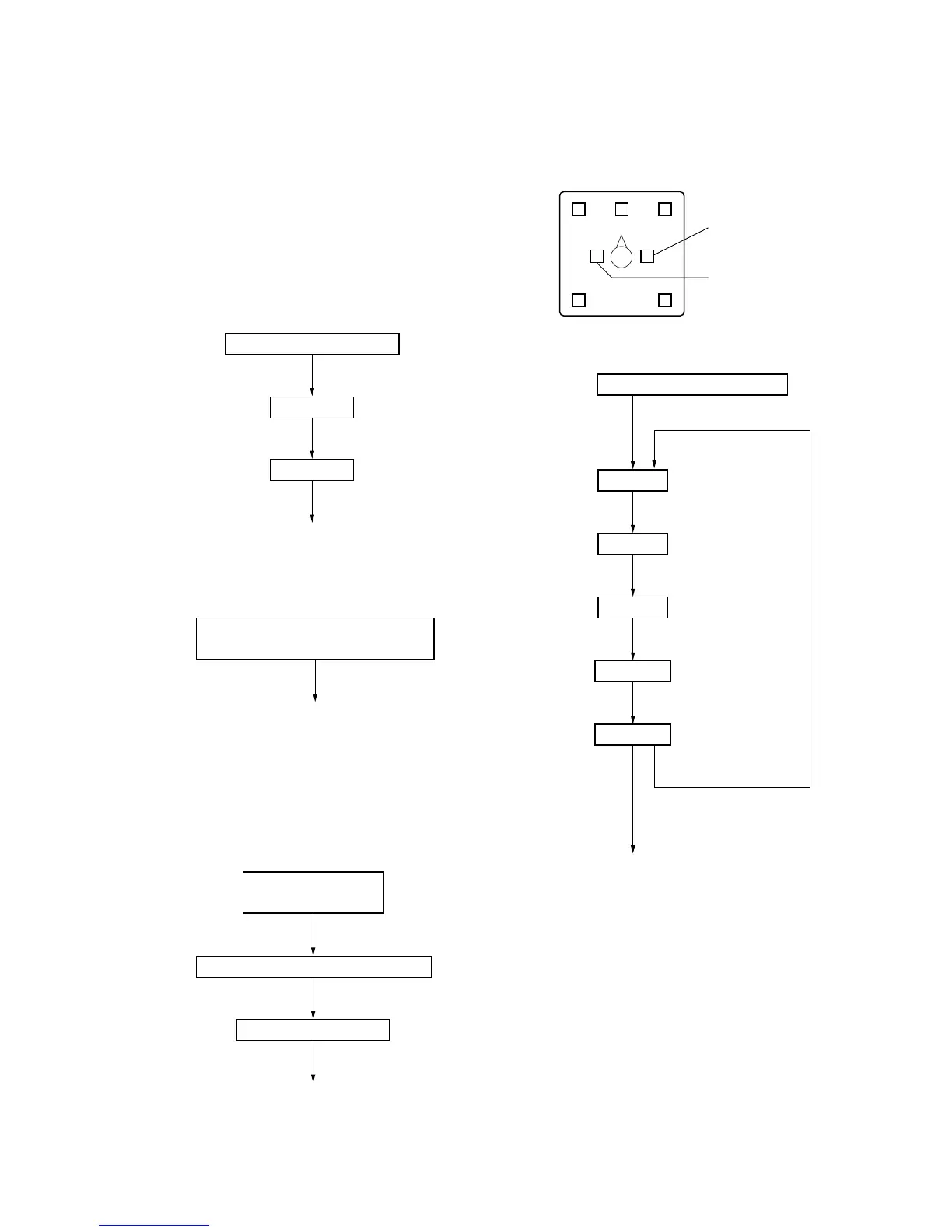
1. LED check
LEDs go on in sequence *1)
All LEDs on
All LEDs off
DEMO key
DEMO key
Go to Key check
*1) In test mode
2. Key check
DEMO key
Go to Audio check
Press each key and its corresponding
LED goes on *2)
*2) Corresponding LEDs
POWER key : POWER LED
INPUT key : ANALOG LED
EFFECT key : MUSIC LED
OUTPUT key : VIRTUAL LED
3. Audio check
DEMO key
DEMO key
DEMO key
Go to IF test tone
ANALOG, HR and HL LEDs on *4) *6)
POWER, DIGITAL,
L and R LEDs on *3)
HL and HR LEDs off *5)
*3) Digital input check : Do not use this in repair.
*4) Analog input check : Other than MUTE check, do not use this
in repair.
*5) Mute mode : Use this in electrical adjustment (see page 8).
*6)
L
C
R
LS
RS
HR LED
HL LED
4. IF test tone
POWER and MUSIC LEDs on
OUTPUT key
OUTPUT key
OUTPUT key
OUTPUT key
OUTPUT key
OUTPUT key
DEMO key
End of Test mode
1 kHz, –10 dBv
1 kHz, –30 dBv
100 Hz, –30 dBv
10 kHz, –30 dBv
1 kHz, FS
L LED on
C LED on
R LED on
RS LED on
LS LED on


 To Next Page