Error
messages
If
an
error
message
appears
If
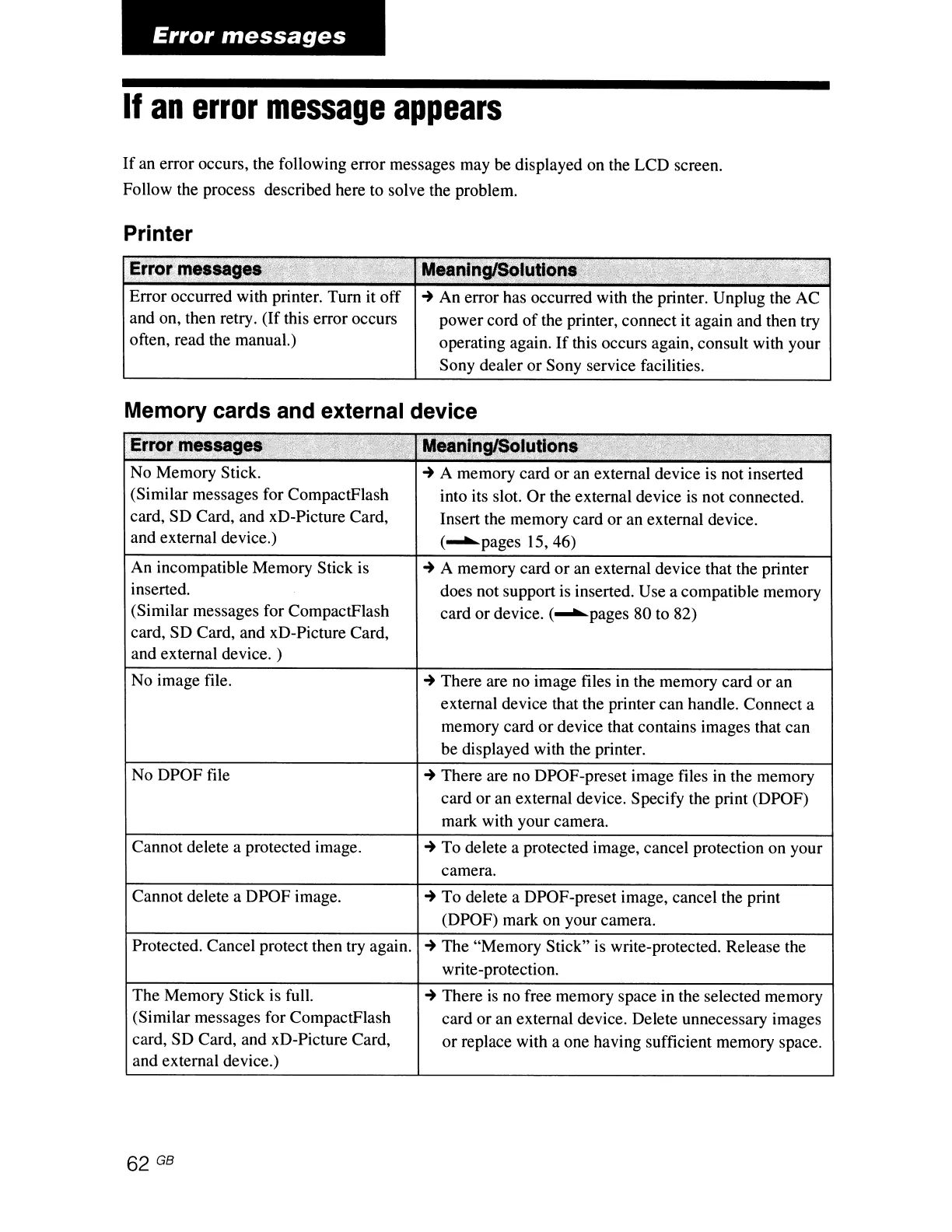
an error occurs, the following error messages may be displayed on the LCD screen.
Follow the process described here to solve the problem.
Printer
Error occurred with printer. Turn it off
and on, then retry.
(If
this error occurs
often, read the manual.)
:
MeanlngI$Qlutlo;~
.'
...
..
"
'~"
,'
...
-+
An error has occurred with the printer. Unplug the AC
power cord
of
the printer, connect it again and then try
operating again.
If
this occurs again, consult with your
Sony dealer or Sony service facilities.
Memory cards and external device
Err~'ttm.'
.•••.
"s.
sa""",
g
.••
:t.'A.;~:,,~,(i
,'M,tinln9lS4Iutt'
",
..
_.' ,
-.'
'.
"
..
",
,
".'
',,-,
:'-
;';:'
->
-;'1:;
No Memory Stick.
-+
A memory card or an external device is not inserted
(Similar messages for CompactFlash into its slot.
Or
the external device
is
not connected.
card, SD Card, and xD-Picture Card, Insert the memory card or an external device.
and external device.) (........pages
15,46)
An incompatible Memory Stick is
-+
A memory card
or
an external device that the printer
inserted. does not support is inserted. Use a compatible memory
(Similar messages for CompactFlash card or device. (........pages 80 to 82)
card, SD Card, and xD-Picture Card,
and external device. )
No image file.
No DPOF file
Cannot delete a protected image.
Cannot delete a DPOF image.
Protected. Cancel protect then try again.
The Memory Stick is full.
(Similar messages for CompactFlash
card, SD Card, and xD-Picture Card,
and external device.)
62 GB
-+
There are no image files in the memory card or an
external device that the printer can handle. Connect a
memory card or device that contains images that can
be displayed with the printer.
-+
There are no DPOF-preset image files in the memory
card or an external device. Specify the print (DPOF)
mark with your camera.
-+
To delete a protected image, cancel protection on your
camera.
-+
To delete a DPOF-preset image, cancel the print
(DPOF) mark on your camera.
-+
The "Memory Stick" is write-protected. Release the
write-protection.
-+
There
is
no free memory space in the selected memory
card or an external device. Delete unnecessary images
or
replace with a one having sufficient memory space.



 To Next Page