Error
messsg4tS
•
it.';"
'
'J',
"'eanlng/Solutlons~k,
Xi
"''c,'.
. .
,.
"
....
.<
..
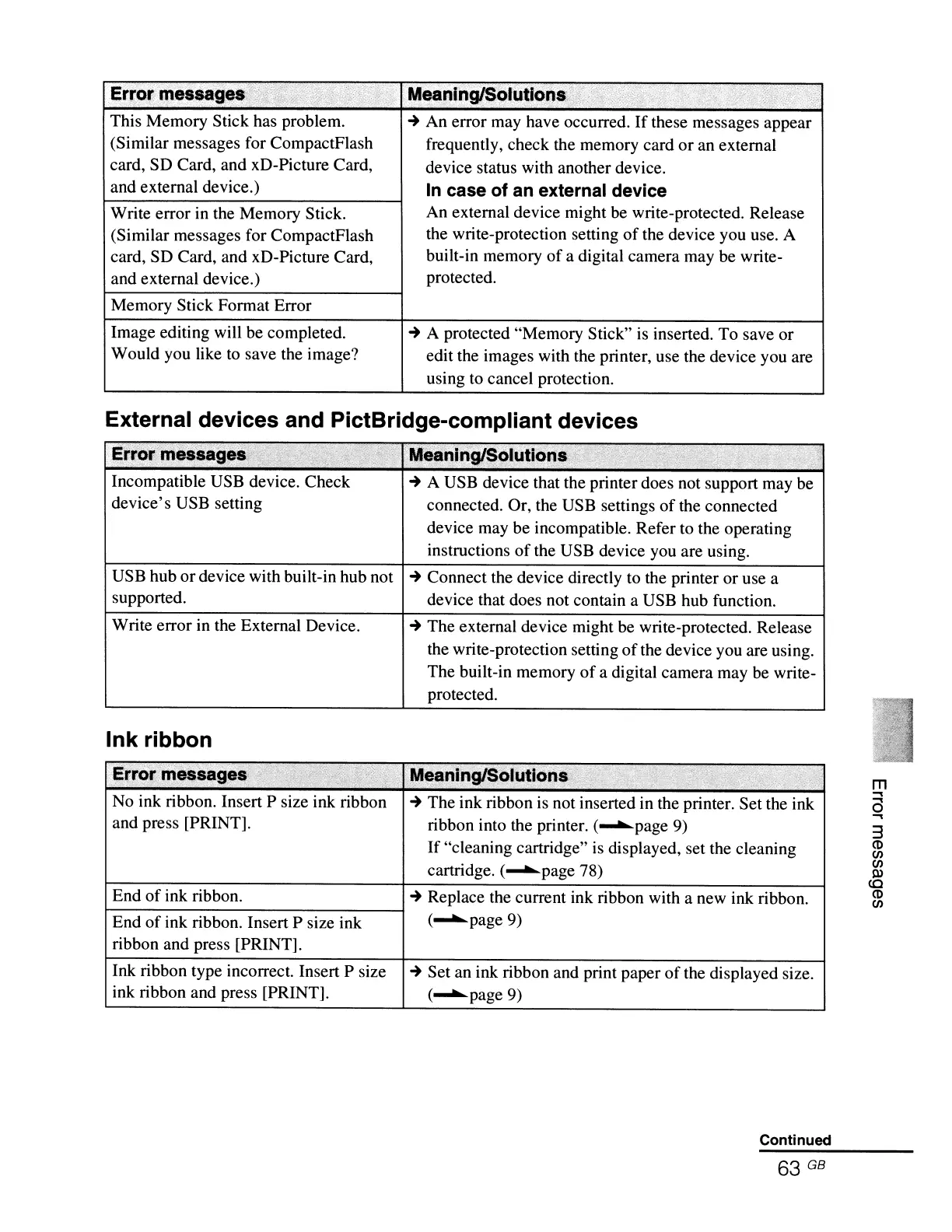
This Memory Stick has problem.
~
An error may have occurred.
If
these messages appear
(Similar messages for CompactFlash frequently, check the memory card or an external
card, SO Card, and xO-Picture Card,
device status with another device.
and external device.)
In
case of an external device
Write error in the Memory Stick.
An external device might be write-protected. Release
(Similar messages for CompactFlash
the write-protection setting
of
the device you use. A
card, SO Card, and xO-Picture Card,
built-in memory
of
a digital camera may be write-
and external device.)
protected.
Memory Stick Format Error
Image editing will be completed.
~
A protected "Memory Stick" is inserted. To save or
Would you like to save the image?
edit the images with the printer, use the device you are
using to cancel protection.
External devices and PictBridge-compliant devices
Errofm~sages<~,;)::;~:
"ti;,:
.
;.'
;51
1
1';;:
•
Meaniri9!S()luti()ns\~'
"
;:'~~~t$;
:;1
' :
"
Incompatible USB device. Check
~
A USB device that the printer does not support may be
device's USB setting
connected. Or, the USB settings
of
the connected
device may be incompatible. Refer to the operating
instructions
of
the USB device you are using.
USB hub ordevice with built-in hub not
~
Connect the device directly to the printer or use a
supported.
device that does not contain a USB hub function.
Write error in the External Device.
~
The external device might be write-protected. Release
the write-protection setting
of
the device you are using.
The built-in memory
of
a digital camera may be write-
protected.
Ink ribbon
~~~9~t
~
The ink ribbon is not inserted in the printer. Set the ink
ribbon into the printer. (........page 9)
If
"cleaning cartridge" is displayed, set the cleaning
cartridge. (........page 78)
End
of
ink ribbon.
End
of
ink ribbon. Insert P size ink
ribbon and press [PRINT].
m
..,
a
..,
3
(t)
CJ)
CJ)
~
co
(t)
CJ)
Ink ribbon type incorrect. Insert P size
ink ribbon and press [PRINT].
~
Set an ink ribbon and print paper
of
the displayed size.
(........
page9)
Continued



 To Next Page