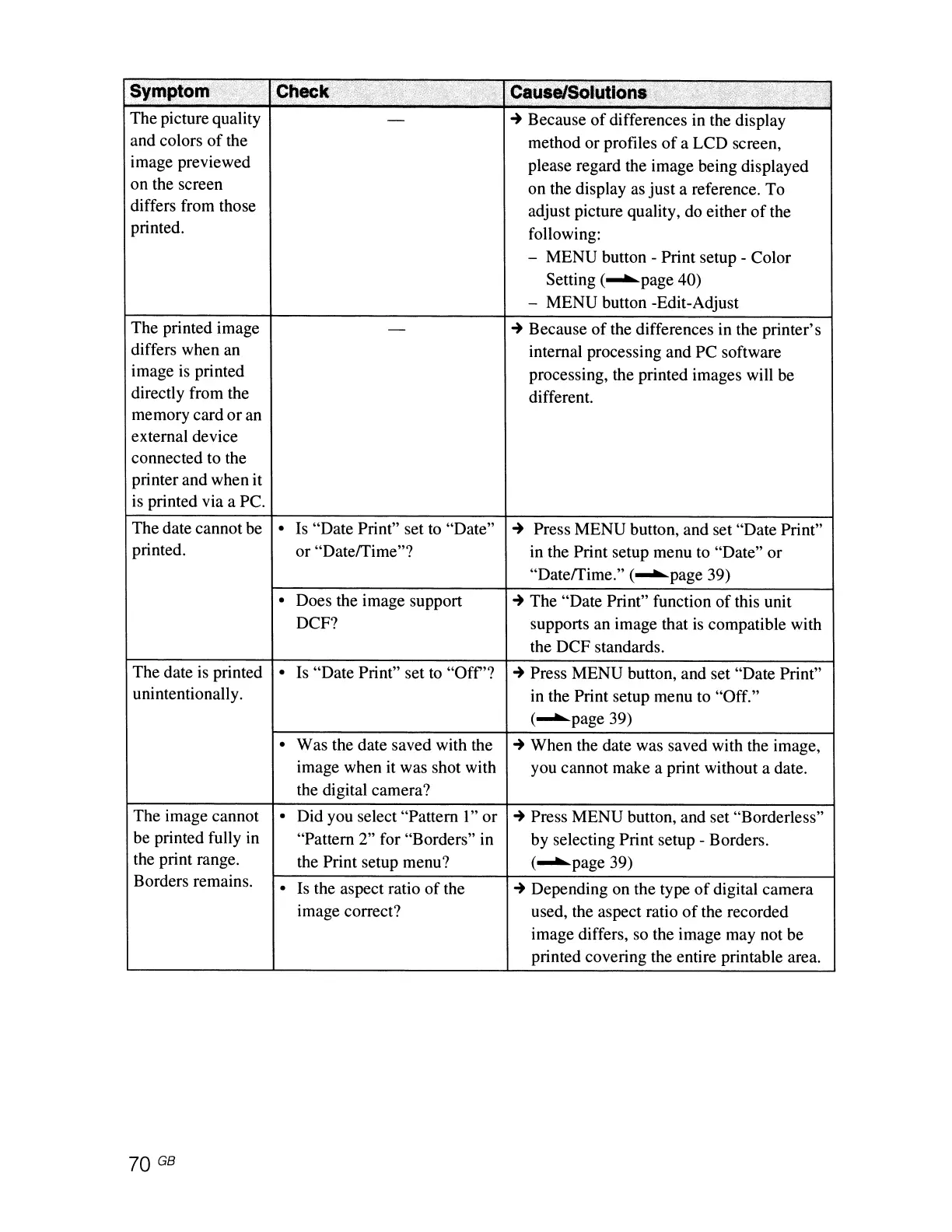
Symptom"'i
Check:>
.;::)i:f~f:
.
,';
....
"
;.~
~~U$eJ~I\J~lons.
,,:'*
'}:'i;i~",;;~,r",',
'
'"
The picture quality
-
..
Because
of
differences in the display
and colors
of
the
method or profiles
of
a LCD screen,
image previewed
please regard the image being displayed
on the screen
on the display as just a reference. To
differs from those
adjust picture quality, do either
of
the
printed.
following:
- MENU button - Print setup - Color
Setting (
...........
page 40)
- MENU button -Edit-Adjust
The printed image
-
..
Because
of
the differences in the printer's
differs when an
internal processing and PC software
image is printed
processing, the printed images will be
directly from the
different.
memory card
or
an
external device
connected to the
printer and when it
is
printed via a
Pc.
The date cannot be
•
Is
"Date Print" set to "Date"
..
Press MENU button, and set "Date Print"
printed.
or
"Daterrime"? in the Print setup menu to "Date" or
"Daterrime." (
...........
page 39)
•
Does the image support
..
The "Date Print" function
of
this unit
DCF? supports an image that
is
compatible with
the DCF standards.
The date is printed
•
Is "Date Print" set to
"Off'?
..
Press MENU button, and set "Date Print"
unintentionally.
in the Print setup menu to "Off."
(
...........
page 39)
•
Was the date saved with the
..
When the date was saved with the image,
image when it was shot with you cannot make a print without a date.
the digital camera?
The image cannot
•
Did you select "Pattern
l"
or
..
Press MENU button, and set "Borderless"
be printed fully in
"Pattern 2" for "Borders" in
by selecting Print setup - Borders.
the print range.
the Print setup menu?
(
...........
page 39)
Borders remains.
•
Is
the aspect ratio
of
the
..
Depending on the type
of
digital camera
image correct? used, the aspect ratio
of
the recorded
image differs,
so
the image may not be
printed covering the entire printable area.
70
GB



 To Next Page