SYrnpt°ril
.
'.
Checl("',
. .
c';:';
';
CeuselSCJlutlons,;
c"~
,n.;.
,
<.'>'
.
'f
" "
c'>'
"''.'"'''.';''
..
;;
",'
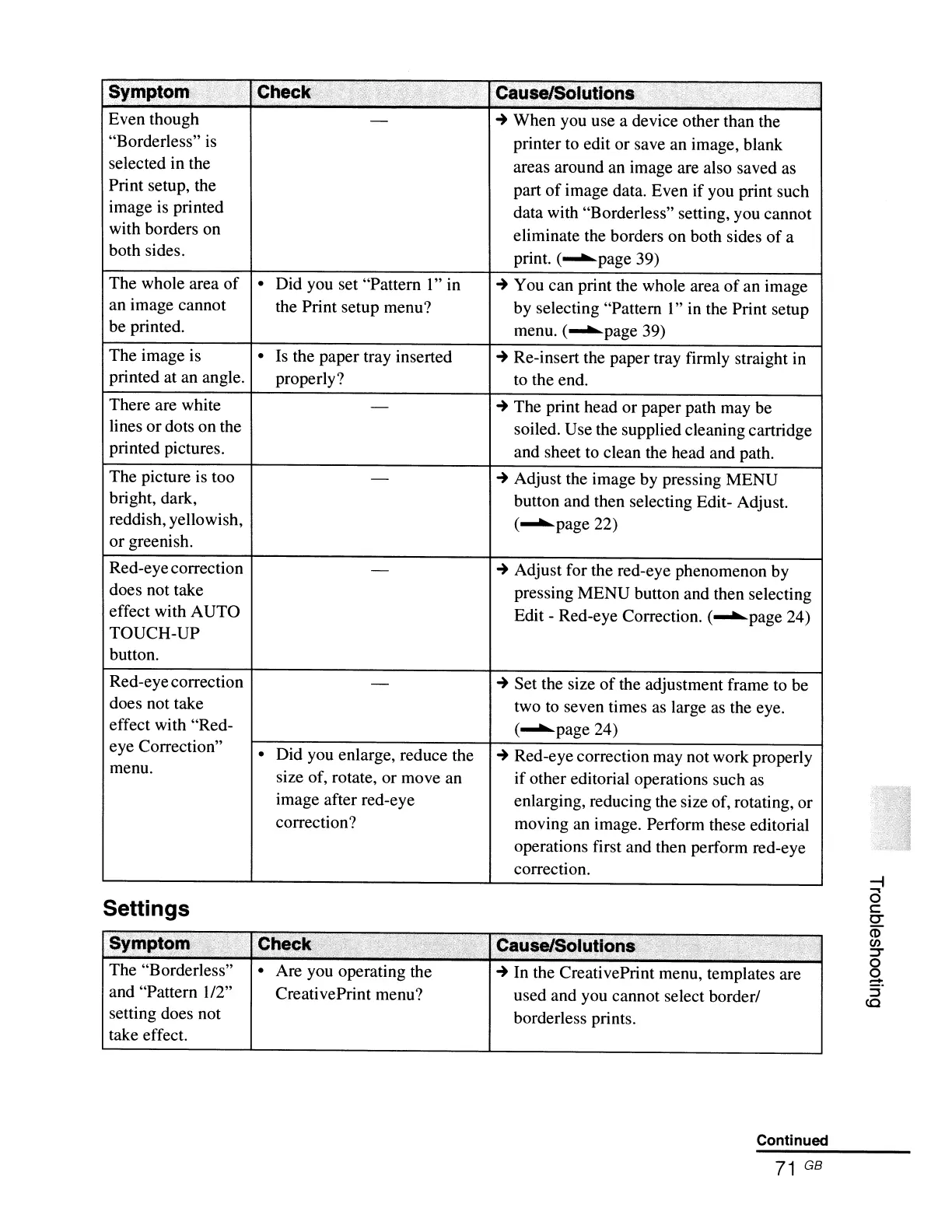
Even though
-
~
When you use a device other than the
"Borderless"
is
printer to edit or save an image, blank
selected in the
areas around an image are also saved as
Print setup, the
part
of
image data. Even if you print such
image is printed
data with "Borderless" setting, you cannot
with borders on
eliminate the borders on both sides
of
a
both sides.
print. (........page 39)
The whole area
of
•
Did you set "Pattern
1"
in
~
You can print the whole area
of
an image
an image cannot
the Print setup menu? by selecting "Pattern
l"
in the Print setup
be printed.
menu. (........page 39)
The image is
•
Is the paper tray inserted
~
Re-insert the paper tray firmly straight in
printed at an angle.
properly? to the end.
There are white
-
~
The print head or paper path may be
lines or dots on the
soiled. Use the supplied cleaning cartridge
printed pictures.
and sheet to clean the head and path.
The picture is too
-
~
Adjust the image by pressing MENU
bright, dark,
button and then selecting Edit- Adjust.
reddish, yellowish,
(........page 22)
or greenish.
Red-eyecorrection
-
~
Adjust for the red-eye phenomenon by
does not take
pressing MENU button and then selecting
effect with AUTO
Edit - Red-eye Correction. (........page 24)
TOUCH-UP
button.
Red-eye correction
-
~
Set the size
of
the adjustment frame to be
does not take
two to seven times as large
as
the eye.
effect with "Red-
(........page 24)
eye Correction"
•
Did you enlarge, reduce the
~
Red-eye correction may not work properly
menu.
size of, rotate, or move an
if other editorial operations such as
image after red-eye enlarging, reducing the size of, rotating, or
correction? moving an image. Perform these editorial
operations first and then perform red-eye
correction.
Settings
Symptt,)1I!
,
Check
.C
.,
("1,
'<~!;;;f~s
CaUse/SOlutions;
.
,
......
,tn.
",
.............
'
, .
."
."
..
The "Borderless"
•
Are you operating the
~
In
the CreativePrint menu, templates are
and "Pattern
1/2"
CreativePrint menu? used and you cannot select borderl
setting does not
borderless prints.
take effect.
Continued
71
GB
--i
a
c:
C'"
CD
en
=r
o
o
:=-.
::J
CO



 To Next Page