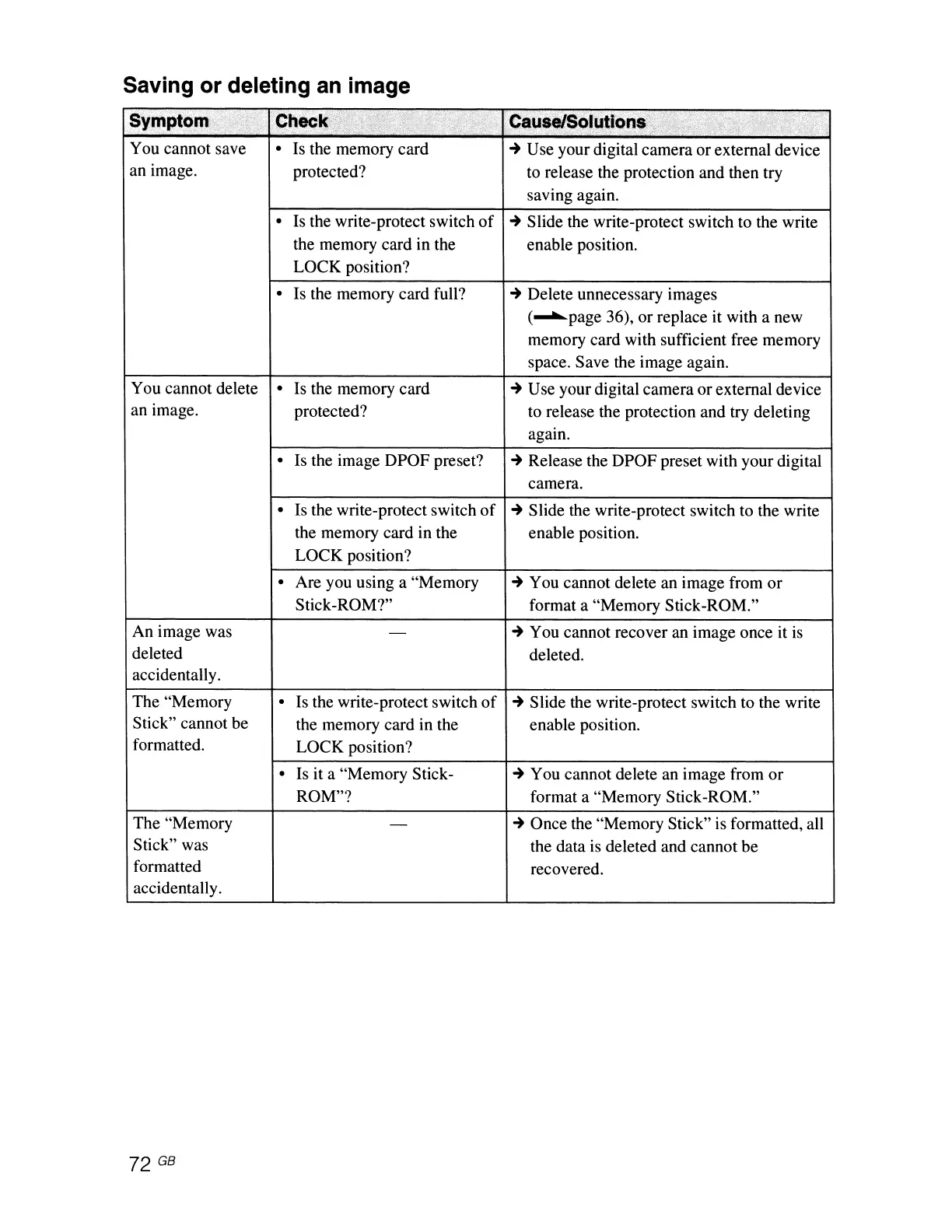
Saving or deleting
an
image
Symptom>':',,"
.Check:',
;'i:t,,~\~~,>,0.v::
",."
Cauj~SOI~tlon&
'!
..
:
'.,
\1;,1-;
,'1"
'i."
\\
,ric'
/'
' .
'{fif:
:",'
You cannot save
•
Is
the memory card
~
Use your digital camera or external device
an image.
protected?
to
release the protection and then try
saving again.
•
Is the write-protect switch
of
~
Slide the write-protect switch to the write
the memory card in the enable position.
LOCK position?
•
Is the memory card full?
~
Delete unnecessary images
(~page
36), or replace it with a new
memory card with sufficient free memory
space. Save the image again.
You cannot delete
•
Is the memory card
~
Use your digital camera or external device
an image.
protected? to release the protection and try deleting
again.
•
Is the image DPOF preset?
~
Release the DPOF preset with your digital
camera.
•
Is
the write-protect switch
of
~
Slide the write-protect switch to the write
the memory card in the enable position.
LOCK position?
•
Are you using a "Memory
~
You cannot delete an image from
or
Stick-ROM?" format a "Memory Stick-ROM."
An
image was
-
~
You cannot recover an image once it
is
deleted
deleted.
accidentall
y.
The "Memory
•
Is the write-protect switch
of
~
Slide the write-protect switch to the write
Stick" cannot be
the memory card in the
enable position.
formatted.
LOCK position?
•
Is it a "Memory Stick-
~
You cannot delete an image from
or
ROM"? format a "Memory Stick-ROM."
The "Memory
-
~
Once the "Memory Stick" is formatted, all
Stick" was
the data
is
deleted and cannot be
formatted
recovered.
accidentally.
72 GB



 To Next Page