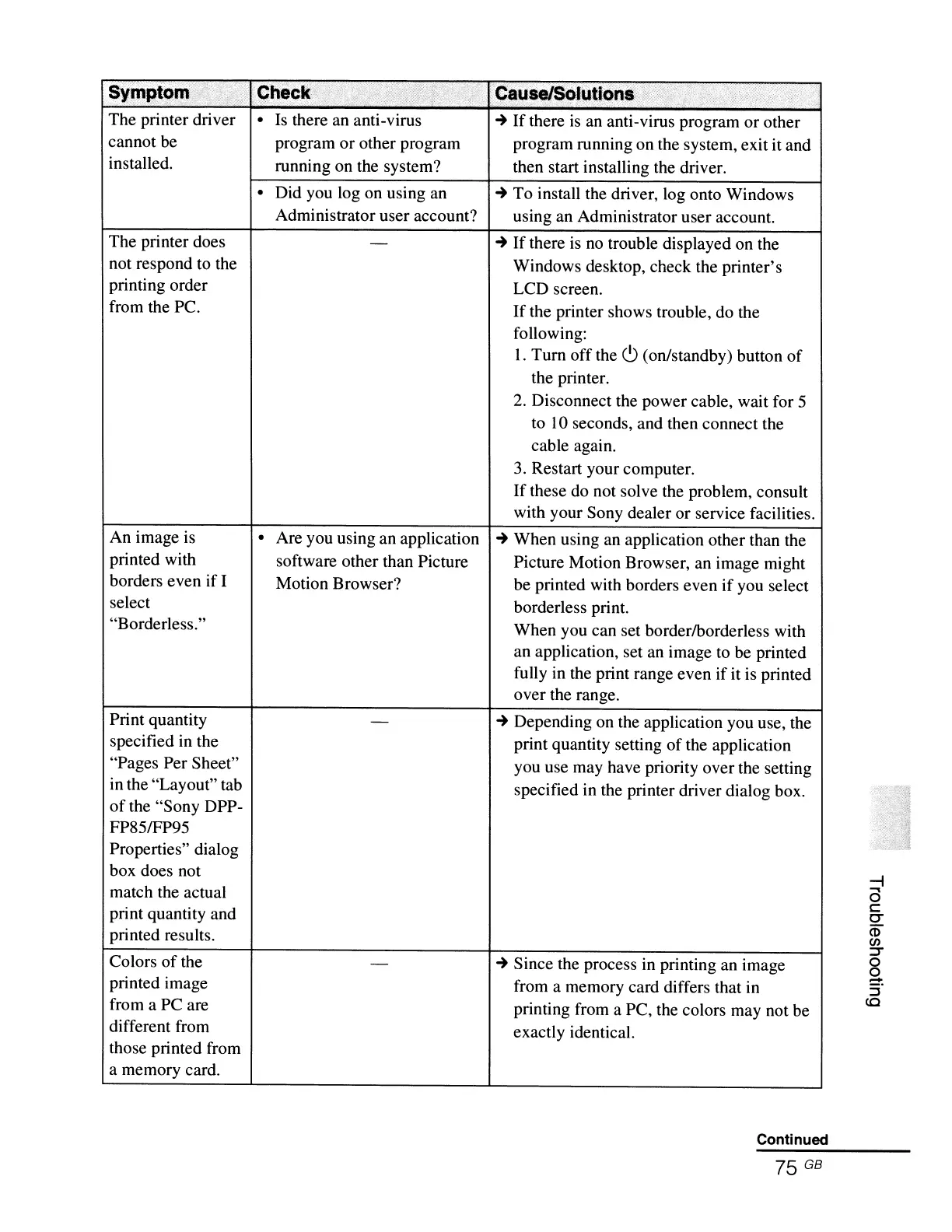
The printer driver • Is there an anti-virus
cannot be program
or
other program
installed. running on the system?
• Did you log on using an
Administrator user account?
The printer does
not respond to the
printing order
from the PC.
~
If
there
is
an anti-virus program or other
program running on the system, exit it and
then start installing the driver.
~
To install the driver, log onto Windows
using an Administrator user account.
~
If
there
is
no
trouble displayed on the
Windows desktop, check the printer's
LCD screen.
If
the printer shows trouble, do the
following:
1.
Tum
off the
c9
(on/standby) button of
the printer.
2. Disconnect the power cable, wait for 5
to
lO
seconds, and then connect the
cable again.
3.
Restart your computer.
If
these do not solve the problem, consult
with your Sony dealer or service facilities.
An image is
printed with
borders even if I
select
"Borderless."
Print quantity
specified in the
"Pages Per Sheet"
in the "Layout" tab
of
the "Sony DPP-
FP851FP95
Properties" dialog
box does not
match the actual
print quantity and
printed results.
Colors
of
the
printed image
from a PC are
different from
those printed from
a memory card.
• Are you using an application
software other than Picture
Motion Browser?
~
When using an application other than the
Picture Motion Browser, an image might
be printed with borders even if you select
borderless print.
When you can set borderlborderless with
an application, set an image to be printed
fully in the print range even if it is printed
over the range.
~
Depending on the application you use, the
print quantity setting
of
the application
you use may have priority over the setting
specified in the printer driver dialog box.
~
Since the process in printing an image
from a memory card differs that in
printing from a PC, the colors may not be
exactly identical.
Continued
75
GB
-I
a
c:
CT
<t>
en
::r
o
o
:::!".
::J
CO



 To Next Page