Sy",ptqm;'
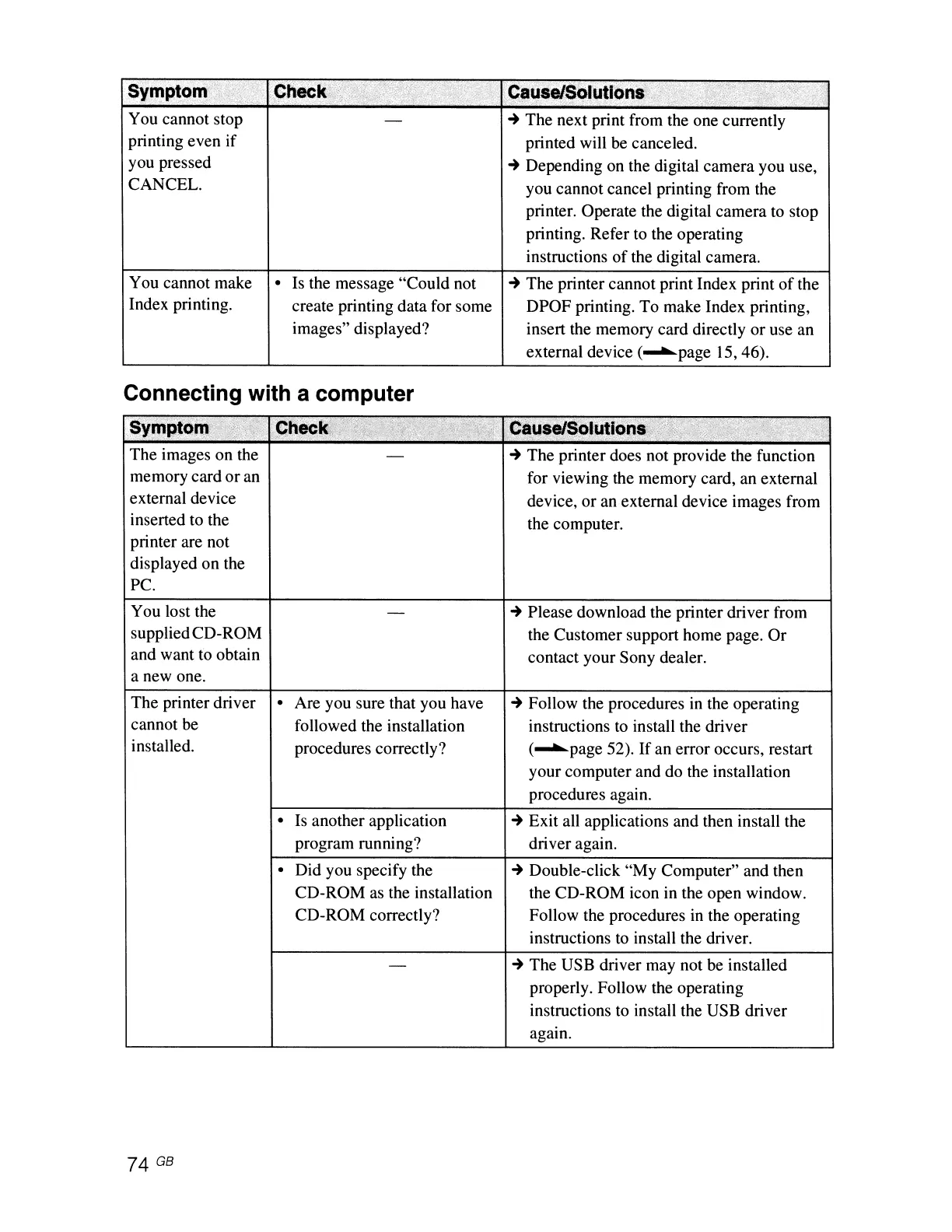
You cannot stop
printing even if
you pressed
CANCEL.
,,'
,Causi{$orutloI'lS:
~
The next print from the one currently
printed will be canceled.
~
Depending on the digital camera you use,
you cannot cancel printing from the
printer. Operate the digital camera to stop
printing. Refer to the operating
instructions
of
the digital camera.
You cannot make
Index printing.
• Is the message "Could not
create printing data for some
images" displayed?
~
The printer cannot print Index print
of
the
DPOF printing. To make Index printing,
insert the memory card directly or use an
external device (
......
page 15,46).
Connecting with a computer
Sympj~':
' .
~t1ec
................
-
.....
_
..........
-
The images on the
memory card
or
an
external device
inserted to the
printer are not
displayed on the
Pc.
You lost the
suppliedCD-ROM
and want to obtain
a new one.
Cause/Solutions'
,
~
The printer does not provide the function
for viewing the memory card, an external
device, or an external device images from
the computer.
~
Please download the printer driver from
the Customer support home page.
Or
contact your Sony dealer.
The printer driver
cannot be
installed.
• Are you sure that you have
followed the installation
procedures correctly?
• Is another application
program running?
• Did you specify the
CD-ROM
as
the installation
CD-ROM correctly?
~
Follow the procedures
in
the operating
instructions to install the driver
(
......
page 52).
If
an error occurs, restart
your computer and do the installation
procedures again.
~
Exit all applications and then install the
driver again.
~
Double-click "My Computer" and then
the CD-ROM icon in the open window.
Follow the procedures
in
the operating
instructions to install the driver.
~
The USB driver may not be installed
properly. Follow the operating
instructions to install the USB driver
again.



 To Next Page