EasyManua.ls Logo

Sony DPS-V55 - Page 12

Sony DPS-V55
44 pages
Print Icon
To Next Page IconTo Next Page
To Previous Page IconTo Previous Page
Loading...
Pe
Mie
ees
12®
Basic
Operations
Selecting
Programs
by
Effect
Block
This
function
lets
you
search
for
programs
based
on
the
type
of
effects
they
contain.
In
addition
to
being
a
good
way
to
explore
different
implementations
of
the
same
effect,
it is
also
a
quick
way
locate
a
specific
program.
ee:
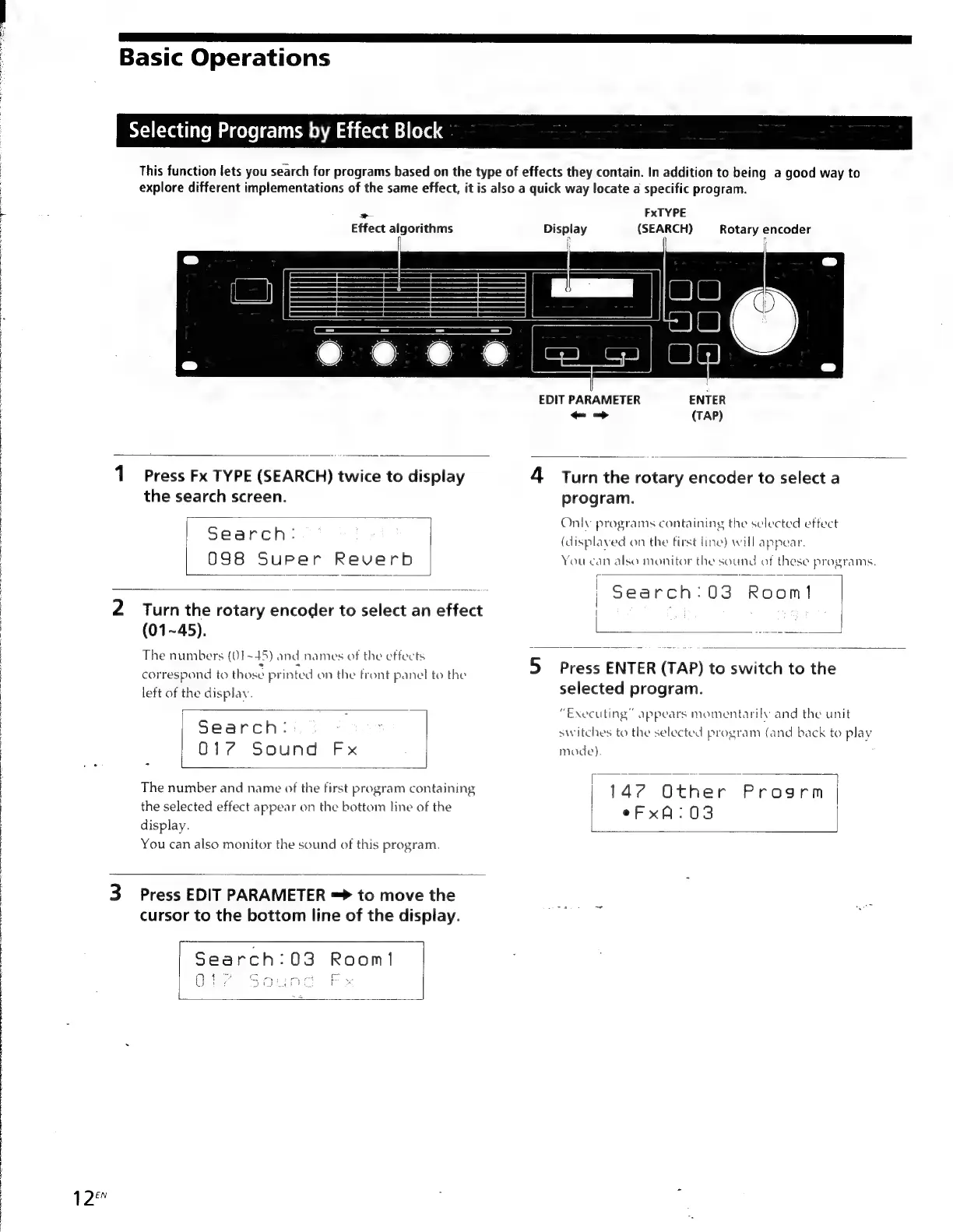
Effect
algorithms
FxTYPE
Display
(SEARCH)
Rotary
encoder
1
Press
Fx
TYPE
(SEARCH)
twice
to
display
the
search
screen.
Search:
098
Super
Reverb
2
Turn
the
rotary
encoder
to
select
an
effect
(01~45).
The
numbers
(Q1~45)
and
names
of
the
effects
correspond
to
those
printed
on
the
front
panel
to
the
left
of
the
display.
Search:
.
-
017
Sound
Fx
The
number
and
name
of
the
first
program
containing
the
selected
effect
appear
on
the
bottom
line
of
the
display.
You
can
also
monitor
the
sound
of
this
program.
3
Press
EDIT
PARAMETER
=
to
move
the
cursor
to
the
bottom
line
of
the
display.
Search:03
Room!
Gg
{4
CA.
ea
ct
toe
Bo
SA
ee
ee
2
Oe
pos
EDIT
PARAMETER
ENTER
-—>
(TAP)
4
Turnthe
rotary
encoder
to
select
a
program.
Only
programs
containing
the
selected
effect
(displaved
on
the
first
line)
will
appear.
You
can
also
monitor
the
sound
of
these
programs.
Search:
03
Soon
|
|
5
Press
ENTER
(TAP)
to
switch
to
the
selected
program.
“Executing”
appears
momentarily
and
the
unit
switches
to
the
selected
program
(and
back
to
play
mode).
147
Other
Pipes
rm
|
eFxA:03

Other manuals for Sony DPS-V55

Related product manuals