EasyManua.ls Logo

Sony DPS-V55 - Outputting Without Effects (BYPASS); Bypass Functionality Explained

Sony DPS-V55
44 pages
Print Icon
To Next Page IconTo Next Page
To Previous Page IconTo Previous Page
Loading...
Reading
the
Display
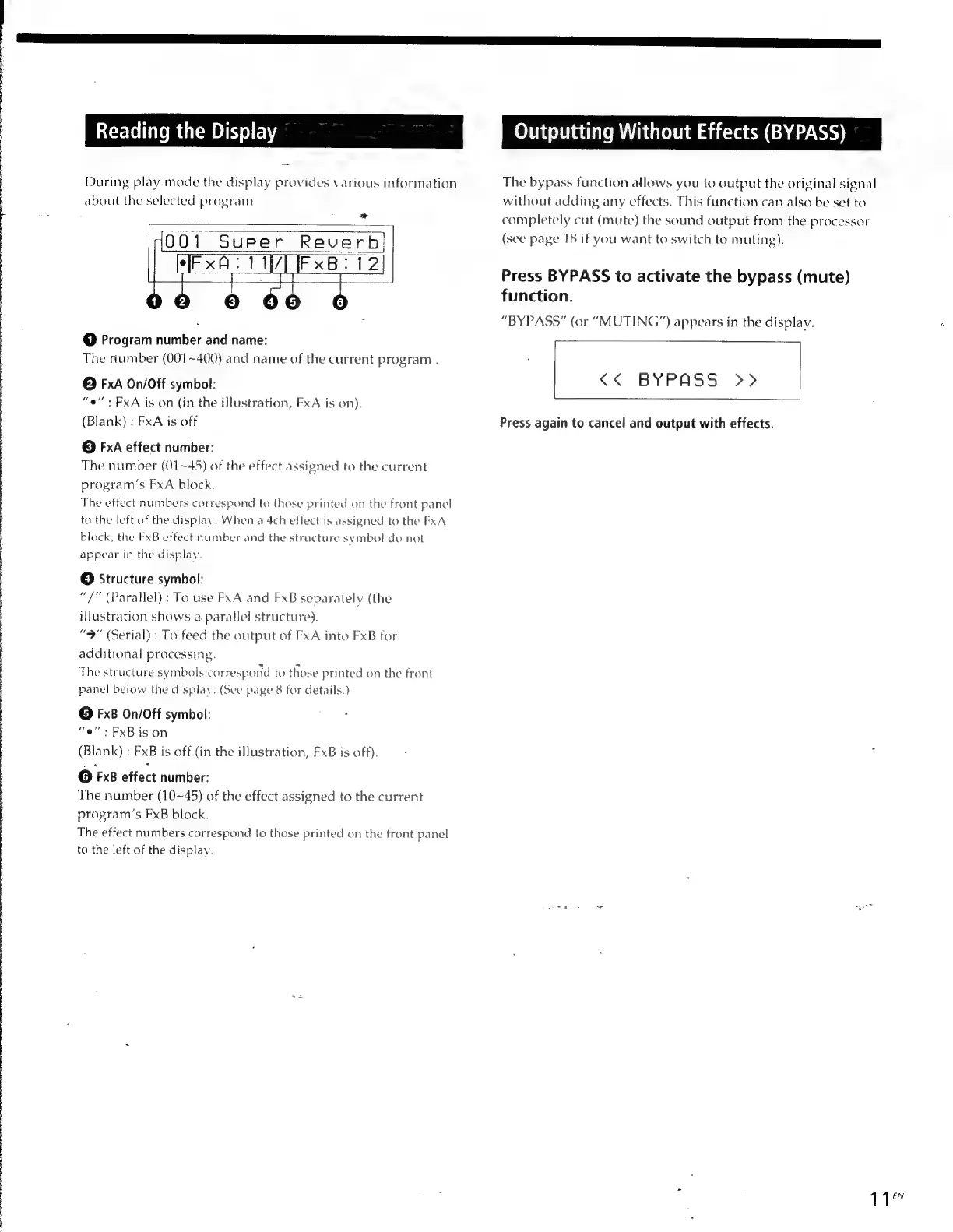
During
play
mode
the
display
provides
various
information
about
the
selected
program
~
001
Super
Reverb:
ee
Hi
zeus
12|
,)
o-
@
Program
number
and
name:
The
number
(001~400)
and
name
of
the
current
program
.
©
FxA
On/Off
symbol:
“e”
>
FxA
is
on
(in
the
illustration,
FxA
is
on).
(Blank)
:
FxA
is
off
©
FxA
effect
number:
The
number
(01~45)
of
the
effect
assigned
to
the
current
program’s
FxA
block.
The
effect
numbers
correspond
to
those
printed
on
the
front
panel
to
the
left
of
the
display.
When
a
4ch
effect
is
assigned
to
the
FxA
block,
the
FxB
effect
number
and
the
structure
symbol
do
not
appear
in
the
display,
©
Structure
symbol:
“7”
(Parallel)
:
To
use
FxA
and
FxB
separately
(the
illustration
shows
a
parallel
structure).
“9"
(Serial)
:
To
feed
the
output
of
FxA
into
FxB
for
additional
processing.
The
structure
symbols
correspond
to
those
printed
on
the
front
panel
below
the
display.
(See
page
8
for
details.)
©
FxB
On/Off
symbol:
“oe”:
FxBis
on
(Blank)
:
FxB
is
off
(in
the
illustration,
FxB
is
off).
©
FxB
effect
number:
The
number
(10~45)
of
the
effect
assigned
to
the
current
program’s
FxB
block.
The
effect
numbers
correspond
to
those
printed
on
the
front
panel
to
the
left
of
the
display.
Outputting
Without
Effects
(BYPASS)
The
bypass
function
allows
you
to
output
the
original
signal
without
adding
any
effects.
This
function
can
also
be
set
to
completely
cut
(mute)
the
sound
output
from
the
processor
(sec
page
18
if
you
want
to
switch
to
muting).
Press
BYPASS
to
activate
the
bypass
(mute)
function.
“BYPASS”
(or
“MUTING”)
appears
in
the
display.
<<.
BYPASS:
>>
Press
again
to
cancel
and
output
with
effects.
11”

Other manuals for Sony DPS-V55

Related product manuals