EasyManua.ls Logo

Sony DPS-V55 - Using the TAP Function; TAP Function for Tempo and Triggers

Sony DPS-V55
44 pages
Print Icon
To Next Page IconTo Next Page
To Previous Page IconTo Previous Page
Loading...
Using
the
TAP
function
This
function
lets
you
change
the
value
of
certain
time
related
parameters
or
trigger
an
effect
by
tapping
on
the
“ENTER
(TAP)
button.
*
The
parameter
which
responds
to
the
TAP
function
is
different
for
each
effect,
and
not
all
effect
have
compatible
parameters.
However,
many
time
related
parameters
(such
as
Delay
Time)
or
parameters
activated
by
a
trigger
(such
as
Key
Trigger)
are
designed
to
work
with
the
TAP
function.
(Refer
to
the
separate
Effect
Parameter
Guide
for
specific
information.)
The
TAP
function
works
the
same
in
either
play
mode
or
edit
mode,
but
not
can
not
be
used
when
any
other
modes
(such
as
SYSTEM
or
SAVE)
are
active.
To
use
TAP
with
time
related
parameters
(“Time”
below)
Select
a
program
containing
a
compatible
effect,
then
tap
ENTER
(TAP)
repeatedly
to
enter
the
desired
tempo.
The
effector’s
tap
editor
measures
the
timing
of
the
last
two
taps
an
sets
the
corresponding
parameter
accordingly.
You
can
also
change
the
ratio
between
your
taps
and
the
actual
parameter
value
(see
page
18
for
details).
To
use
TAP
as
a
trigger
("Trigger”
below)
Press
ENTER
(TAP)
at
the
point
where
you
want
to
activate
the
effect.
7
S
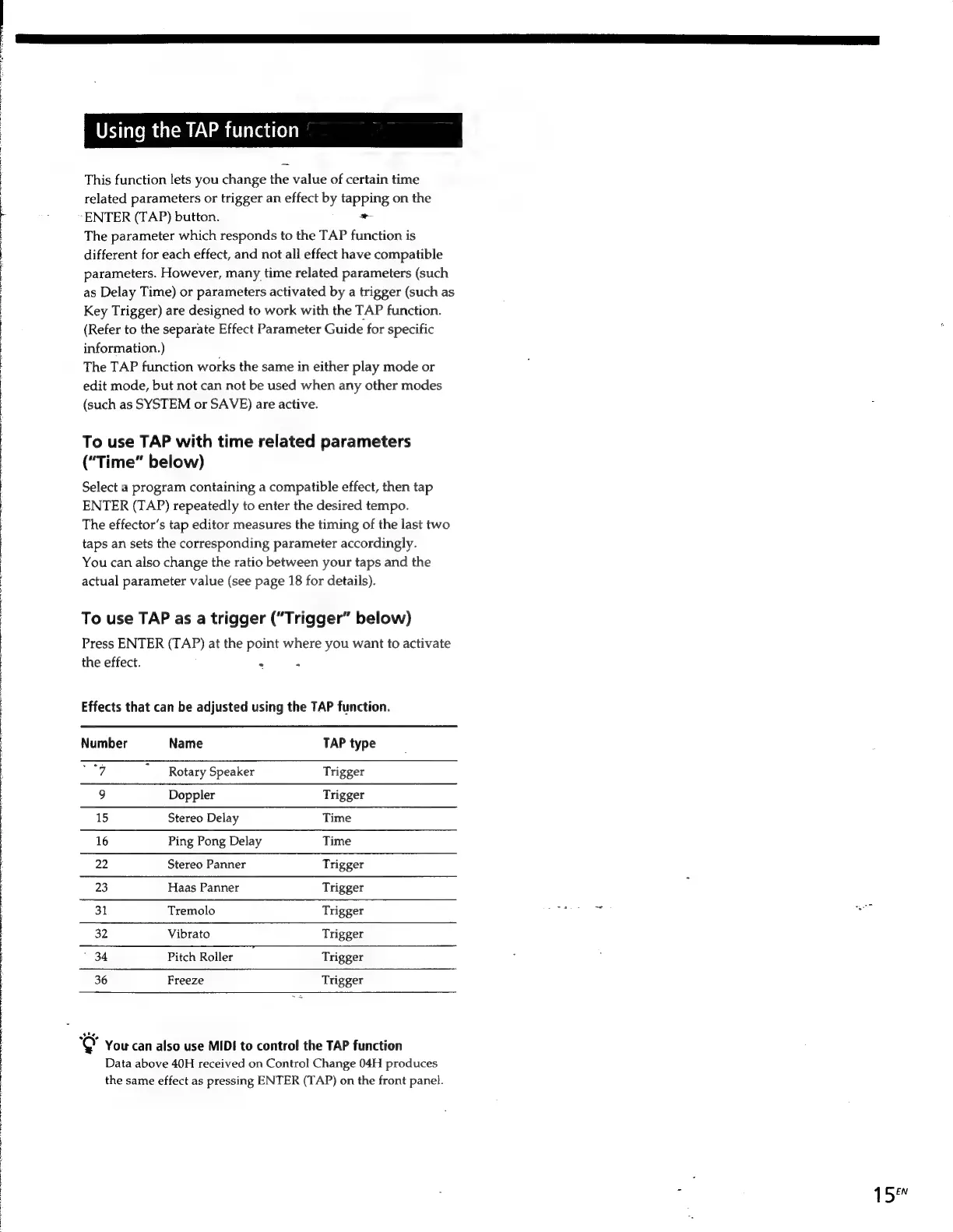
Effects
that
can
be
adjusted
using
the
TAP
function.
Number
Name
TAP
type
/
“Rotary
Speaker
Trigger
9
Doppler
Trigger
15
Stereo
Delay
Time
16
Ping
Pong
Delay
Time
22
Stereo
Panner
Trigger
23
Haas
Panner
Trigger
31
Tremolo
Trigger
32
Vibrato
Trigger
"34
Pitch
Roller
Trigger
36
Freeze
Trigger
You
can
also
use
MIDI
to
control
the
TAP
function
Data
above
40H
received
on
Control
Change
04H
produces
the
same
effect
as
pressing
ENTER
(TAP)
on
the
front
panel.
15%

Other manuals for Sony DPS-V55

Related product manuals