EasyManua.ls Logo

Sony DPS-V55 - Front Panel Controls; Control Panel Layout and Functions

Sony DPS-V55
44 pages
Print Icon
To Next Page IconTo Next Page
To Previous Page IconTo Previous Page
Loading...
6
Getting
Started
Names
and
Functions
of
Parts
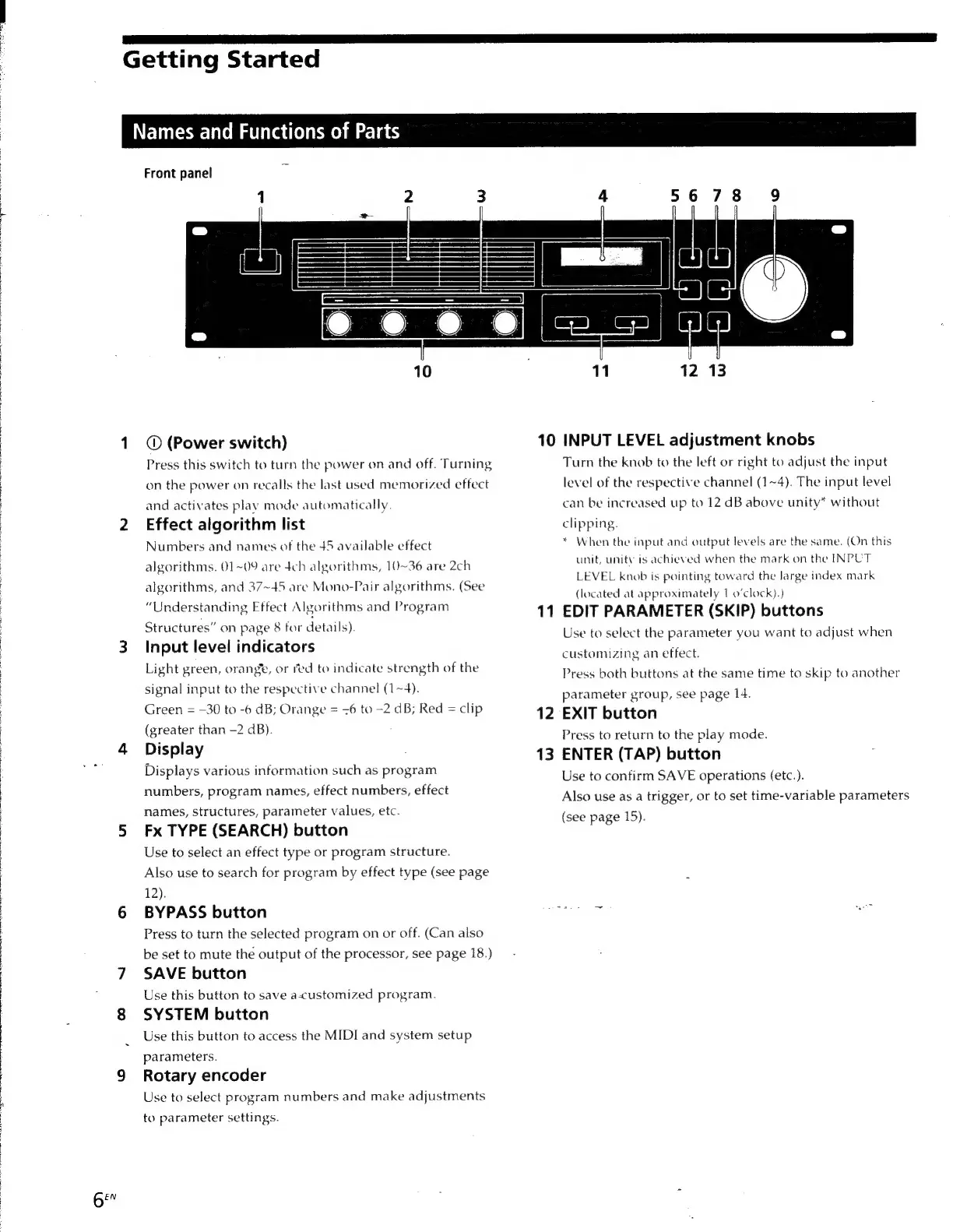
Front
panel
(Power
switch)
Press
this
switch
to
turn
the
power
on
and
off.
Turning
on
the
power
on
recalls
the
last
used
memorized
effect
and
activates
play
mode
automatically.
Effect
algorithm
list
Numbers
and
names
of
the
45
available
effect
algorithms.
01~09
are
4ch
algorithms,
10~36
are
2ch
algorithms,
and
37~45
are
Mono-Pair
algorithms.
(See
“Understanding
Effect
Algorithms
and
Program
Structures”
on
page
8
for
details).
Input
level
indicators
Light
green,
orange,
or
red
to
indicate
strength
of
the
signal
input
to
the
respective
channel
(1~4).
Green
=
-30
to
-6
dB;
Orange
=
<6
to
-2
dB;
Red
=
clip
(greater
than
-2
dB).
Display
Displays
various
information
such
as
program
numbers,
program
names,
effect
numbers,
effect
names,
structures,
parameter
values,
etc.
Fx
TYPE
(SEARCH)
button
Use
to
select
an
effect
type
or
program
structure.
Also
use
to
search
for
program
by
effect
type
(see
page
12).
BYPASS
button
Press
to
turn
the
selected
program
on
or
off.
(Can
also
be
set
to
mute
the
output
of
the
processor,
see
page
18.)
SAVE
button
Use
this
button
to
save
a-customized
program.
SYSTEM
button
Use
this
button
to
access
the
MIDI
and
system
setup
parameters.
Rotary
encoder
Use
to
select
program
numbers
and
make
adjustments
to
parameter
settings.
10
INPUT
LEVEL
adjustment
knobs
Turn
the
knob
to
the
left
or
right
to
adjust
the
input
11
12
13
level
of
the
respective
channel
(1~4).
The
input
level
can
be
increased
up
to
12
dB
above
unity*
without
clipping.
*
When
the
input
and
output
levels
are
the
same.
(On
this
unit,
unity
is
achieved
when
the
mark
on
the
INPUT
LEVEL
knob
is
pointing
toward
the
large
index
mark
(located
at
approximately
1
0’clock).)
EDIT
PARAMETER
(SKIP)
buttons
Use
to
select
the
parameter
you
want
to
adjust
when
customizing
an
effect.
Press
both
buttons
at
the
same
time
to
skip
to
another
parameter
group,
see
page
14.
EXIT
button
Press
to
return
to
the
play
mode.
ENTER
(TAP)
button
Use
to
confirm
SAVE
operations
(etc.).
Also
use
as
a
trigger,
or
to
set
time-variable
parameters
(see
page
15).

Other manuals for Sony DPS-V55

Related product manuals