EasyManua.ls Logo

Sony DPS-V55 - Rear Panel Connections; I;O Ports and Terminal Descriptions

Sony DPS-V55
44 pages
Print Icon
To Next Page IconTo Next Page
To Previous Page IconTo Previous Page
Loading...
Names
and
Functions
of
Parts
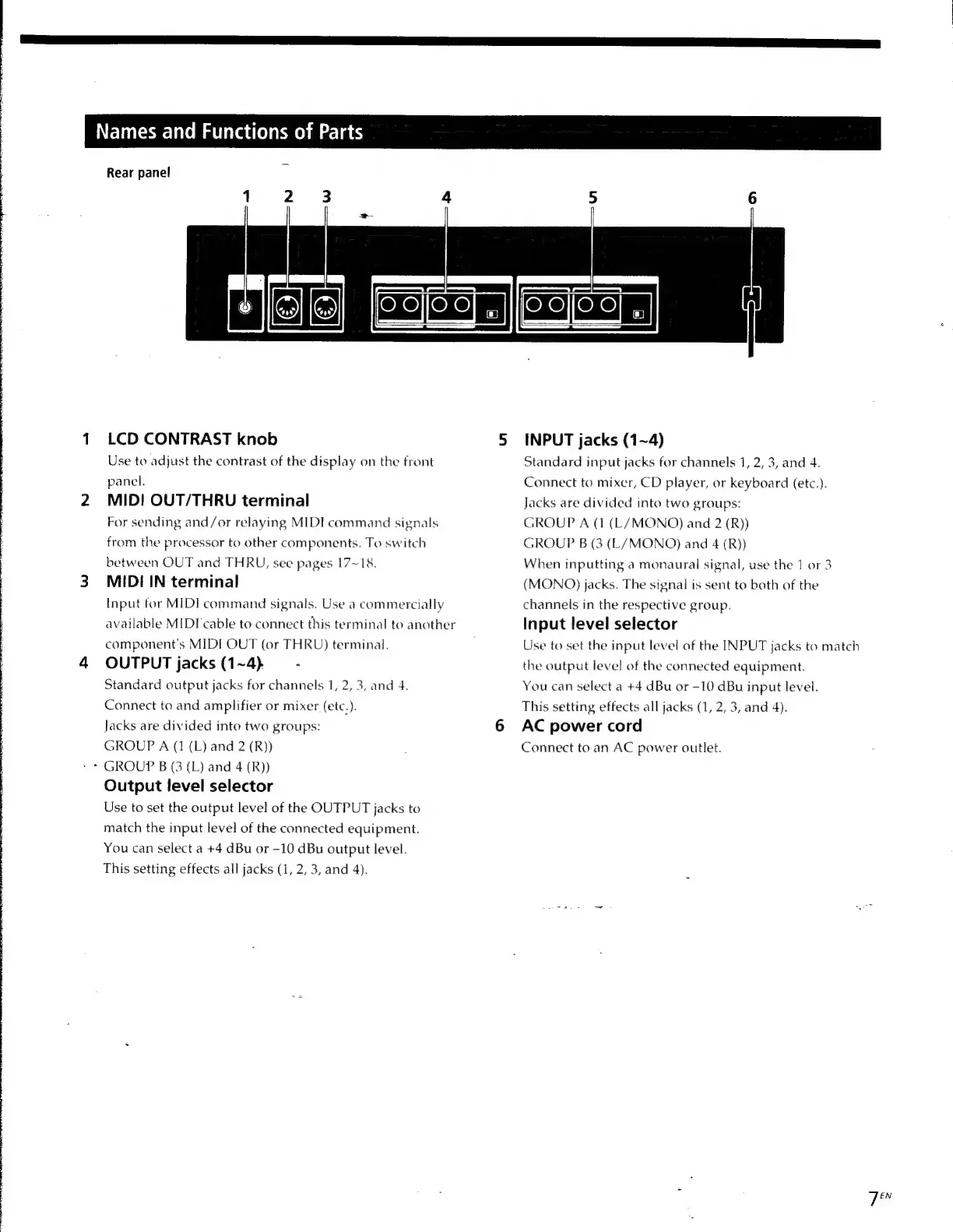
Rear
panel
1
2
3
4
LCD
CONTRAST
knob
Use
to
adjust
the
contrast
of
the
display
on
the
front
panel.
MID!
OUT/THRU
terminal
For
sending
and/or
relaying
MIDE
command
signals
from
the
processor
to
other
components.
To
switch
between
OUT
and
THRU,
see
pages
17~18.
MIDI
IN
terminal
Input
for
MIDI
command
signals.
Use
a
commercially
available
MIDI
cable
to
connect
this
terminal
to
another
component's
MIDI
OUT
(or
THRU)
terminal.
OUTPUT
jacks
(1~4)
-
Standard
output
jacks
for
channels
1,
2,
3,
and
4.
Connect
to
and
amplifier
or
mixer
(etc.).
Jacks
are
divided
into
two
groups:
GROUP
A
(1
(L)
and
2
(R))
GROUP
B
(3
(L)
and
4
(R))
Output
level
selector
Use
to
set
the
output
level
of
the
OUTPUT
jacks
to
match
the
input
level
of
the
connected
equipment.
You
can
select
a
+4
dBu
or
-10
dBu
output
level.
This
setting
effects
all
jacks
(1,
2,
3,
and
4).
INPUT
jacks
(1~4)
Standard
input
jacks
for
channels
1,
2,
3,
and
4.
Connect
to
mixer,
CD
player,
or
keyboard
(etc.).
Jacks
are
divided
into
two
groups:
GROUP
A
(1
(L/
MONO)
and
2
(R))
GROUP
B
(3
(L/
MONO)
and
4
(R))
When
inputting
a
monaural
signal,
use
the
1
or
3
(MONO)
jacks.
The
signal
is
sent
to
both
of
the
channels
in
the
respective
group.
Input
level
selector
Use
to
set
the
input
level
of
the
INPUT
jacks
to
match
the
output
level
of
the
connected
equipment.
You
can
select
a
+4
dBu
or
-10
dBu
input
level.
This
setting
effects
all
jacks
(1,
2,
3,
and
4).
AC
power
cord
Connect
to
an
AC
power
outlet.
7
7

Other manuals for Sony DPS-V55

Related product manuals