EasyManua.ls Logo

Sony DPS-V55 - Hooking Up and Connections; Connection Examples and Setup Guide

Sony DPS-V55
44 pages
Print Icon
To Next Page IconTo Next Page
To Previous Page IconTo Previous Page
Loading...
Et
Pet
a
Th
ay
ae
|
Hooking
Up
¢
Before
connecting
this
unit
to
another
device,
be
sure
to
unplug
the
AC
power
cord
from
the
power
outlet.
*
Turn
off
the
power
switch
on
this
unit
and
all
components
to
be
connected,
such
as
keyboards
and
active
speakers
(speakers
with
built
in
amplifiers).
ory
*
After
all
the
connections,
double
check
that
the
connections
are
correct
before
plugging
the
AC
power
cord
back
into
the
power
outlet.
¢
If
the
connected
components
output
large
signals
that
cause
distortion,
adjust
the
INPUT
LEVEL
knobs
on
this
unit
to
lower
the
input
level,
or
lower
the
output
level
of
the
connected
component.
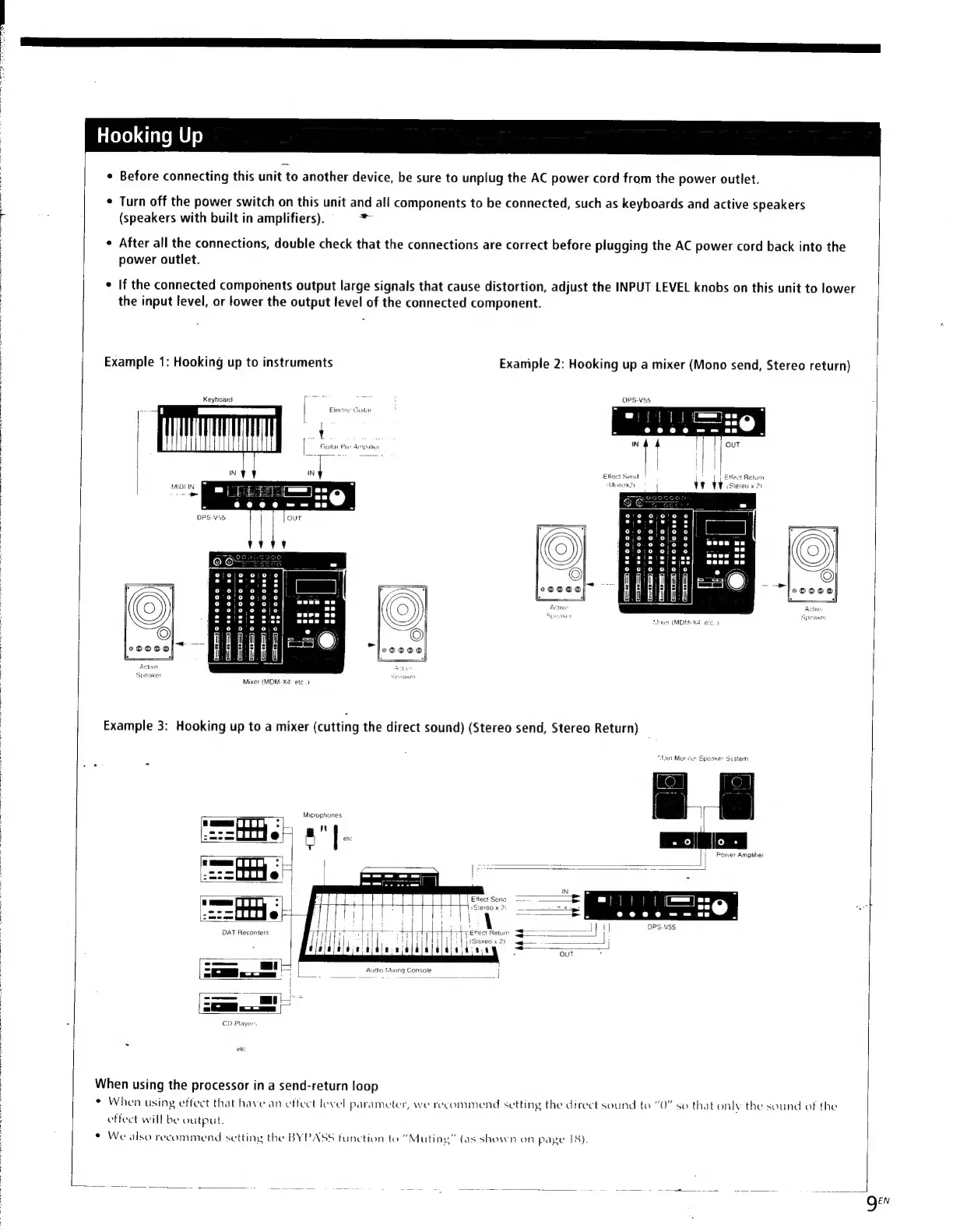
Example
1:
Hooking
up
to
instruments
Exaniple
2:
Hooking
up
a
mixer
(Mono
send,
Stereo
return)
Keyboard
|
Electae
Guitar
t
|
Guilae
Pie
Ampater
(N
|
Effect
Send
|
Monox2t
{
1
Etfect
Return
§
>
HADI
IN
TVG
stereo
«>
i—as—
ite
ee
eT)
iss
1-2
ee
t—1—
FT
er)
s
U.
fecer
(MDM
Xd
etc.
1
Active
Speaker
SpeaKe
Mixer
(MOM-X4
etc.)
Example
3:
Hooking
up
to
a
mixer
(cutting
the
direct
sound)
(Stereo
send,
Stereo
Return)
“Alain
Moriior
Speane
System
——-
Microphones
7)
n"
r235
en
4
|
a
(em
PITT
.
:
|
<
Effect
Sena
=
{
.
ng
1Stereo
x
2i
5
oom
1
i
_—e
me
e
rr
ote
DAT
Recorders
+
-
T
Ettect
Returr:
|
|
(Stereo
x
2)
laideace
—=
-
Audio
bling
Console
'
S-
P=-—
om
ee
el
ees
_
J
SS
Se]
dS
——
|
=
4
.
CO
Player,
etc
When
using
the
processor
in
a
send-return
loop
*
When
using
effect
that
have
an
effect
level
parameter,
we
recommend
setting
the
direct
sound
to
“0”
so
that
only
the
sound
of
the
effect
will
be
output.
¢
We
also
recommend
setting
the
BYPASS
function
to
“Muting”
(as
shown
on
page
18).
Qe

Other manuals for Sony DPS-V55

Related product manuals