EasyManua.ls Logo

Sony DPS-V55 - Editing a Program: Structure and Parameters; Adjusting Effect Parameters

Sony DPS-V55
44 pages
Print Icon
To Next Page IconTo Next Page
To Previous Page IconTo Previous Page
Loading...
Ee
gn
Re
ee
Le,
AAS
ee
ee
14"
Editing
a
Program
Choosing
the
Structure
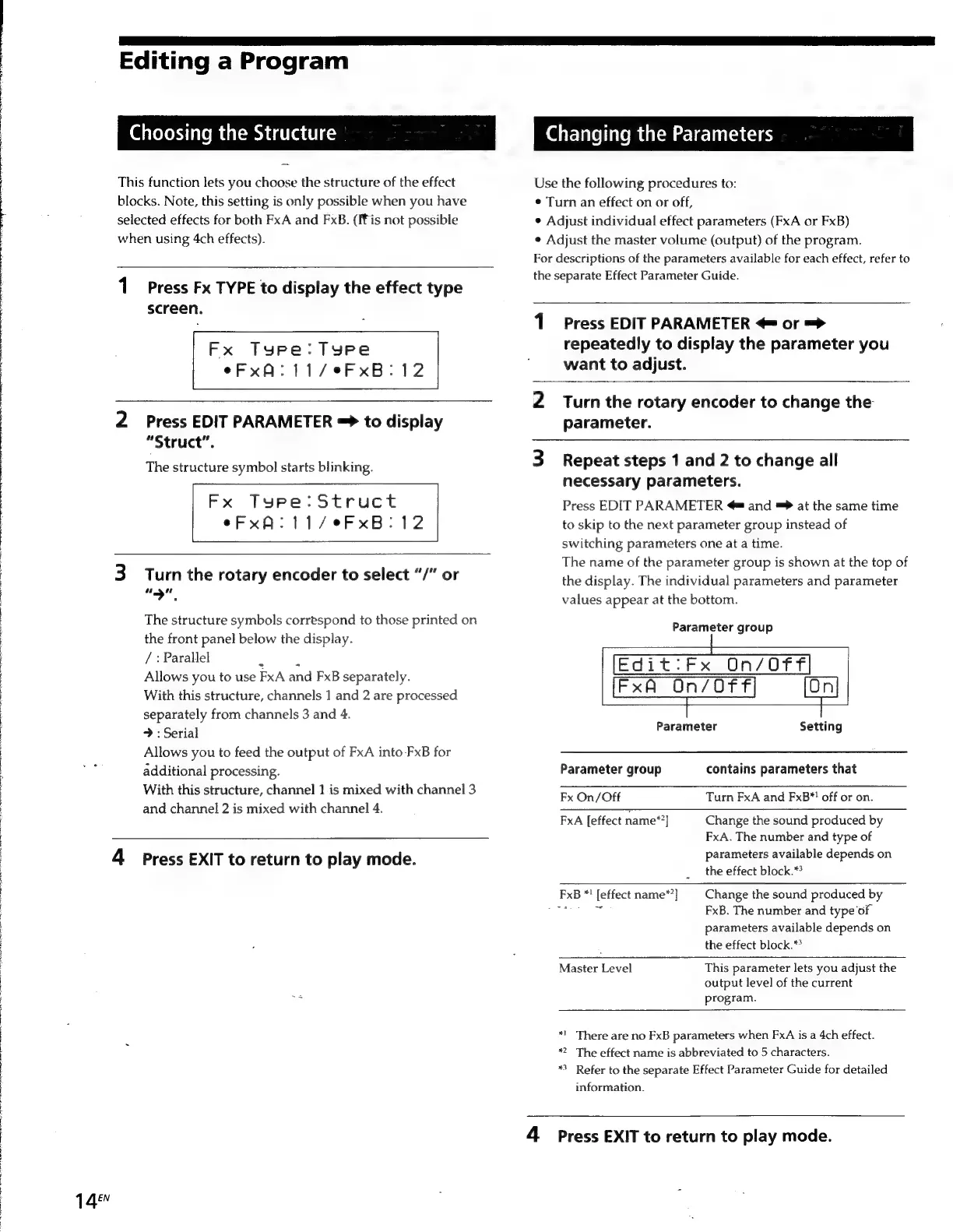
This
function
lets
you
choose
the
structure
of
the
effect
blocks.
Note,
this
setting
is
only
possible
when
you
have
selected
effects
for
both
FxA
and
FxB.
(Fis
not
possible
when
using
4ch
effects).
1
Press
Fx
TYPE
to
display
the
effect
type
screen.
Fx
Type:
Tyre
eFxA:11/°eFxB:12
2
Press
EDIT
PARAMETER
=>
to
display
“Struct”.
The
structure
symbol
starts
blinking.
Fx
Type:
Struct
eFxA:11/eFxB:12
3
Turn
the
rotary
encoder
to
select
“/"
or
“yp
The
structure
symbols
correspond
to
those
printed
on
the
front
panel
below
the
display.
/
:
Parallel
;
Allows
you
to
use
FxA
and FxB
separately.
With
this
structure,
channels
1
and
2
are
processed
separately
from
channels
3
and
4.
>
:
Serial
Allows
you
to
feed
the
output
of
FxA
into
FxB
for
additional
processing.
With
this
structure,
channel
1
is
mixed
with
channel
3
and
channel
2
is
mixed
with
channel
4.
4
Press
EXIT
to
return
to
play
mode.
Changing
the
Parameters
Use
the
following
procedures
to:
¢
Turn
an
effect
on
or
off,
*
Adjust
individual
effect
parameters
(FxA
or
FxB)
¢
Adjust
the
master
volume
(output)
of
the
program.
For
descriptions
of
the
parameters
available
for
each
effect,
refer
to
the
separate
Effect
Parameter
Guide.
1
Press
EDIT
PARAMETER
<
or
=>
repeatedly
to
display
the
parameter
you
want
to
adjust.
2
Turn
the
rotary
encoder
to
change
the
parameter.
3
Repeat
steps
1
and
2
to
change
all
necessary
parameters.
Press
EDIT
PARAMETER
@
and
=
at
the
same
time
to
skip
to
the
next
parameter
group
instead
of
switching
parameters
one
at
a
time.
The
name
of
the
parameter
group
is
shown
at
the
top
of
the
display.
The
individual
parameters
and
parameter
values
appear
at
the
bottom.
Parameter
group
Edit:Fx
On/Off
Fx
On/Off
Parameter
Setting
Parameter
group
contains
parameters
that
Fx
On/Off
Turn
FxA
and
FxB*!
off
or
on.
FxA
[effect
name*’]
Change
the
sound
produced
by
FxA.
The
number
and
type
of
parameters
available
depends
on
the
effect
block.*?
FxB
*!
[effect
name*?]
Change
the
sound
produced
by
ae
FxB.
The
number
and
type
of
parameters
available
depends
on
the
effect
block.**
Master
Level
This
parameter
lets
you
adjust
the
output
level
of
the
current
program.
*!_
There
are
no
FxB
parameters
when
FxA
is
a
4ch
effect.
*”
The
effect
name
is
abbreviated
to
5
characters.
*
Refer
to
the
separate
Effect
Parameter
Guide
for
detailed
information.
4
Press
EXIT
to
return
to
play
mode.

Other manuals for Sony DPS-V55

Related product manuals