EasyManua.ls Logo

Sony DPS-V55 - System Operations: Function Customization; Customizing Bypass and Tap Modes

Sony DPS-V55
44 pages
Print Icon
To Next Page IconTo Next Page
To Previous Page IconTo Previous Page
Loading...
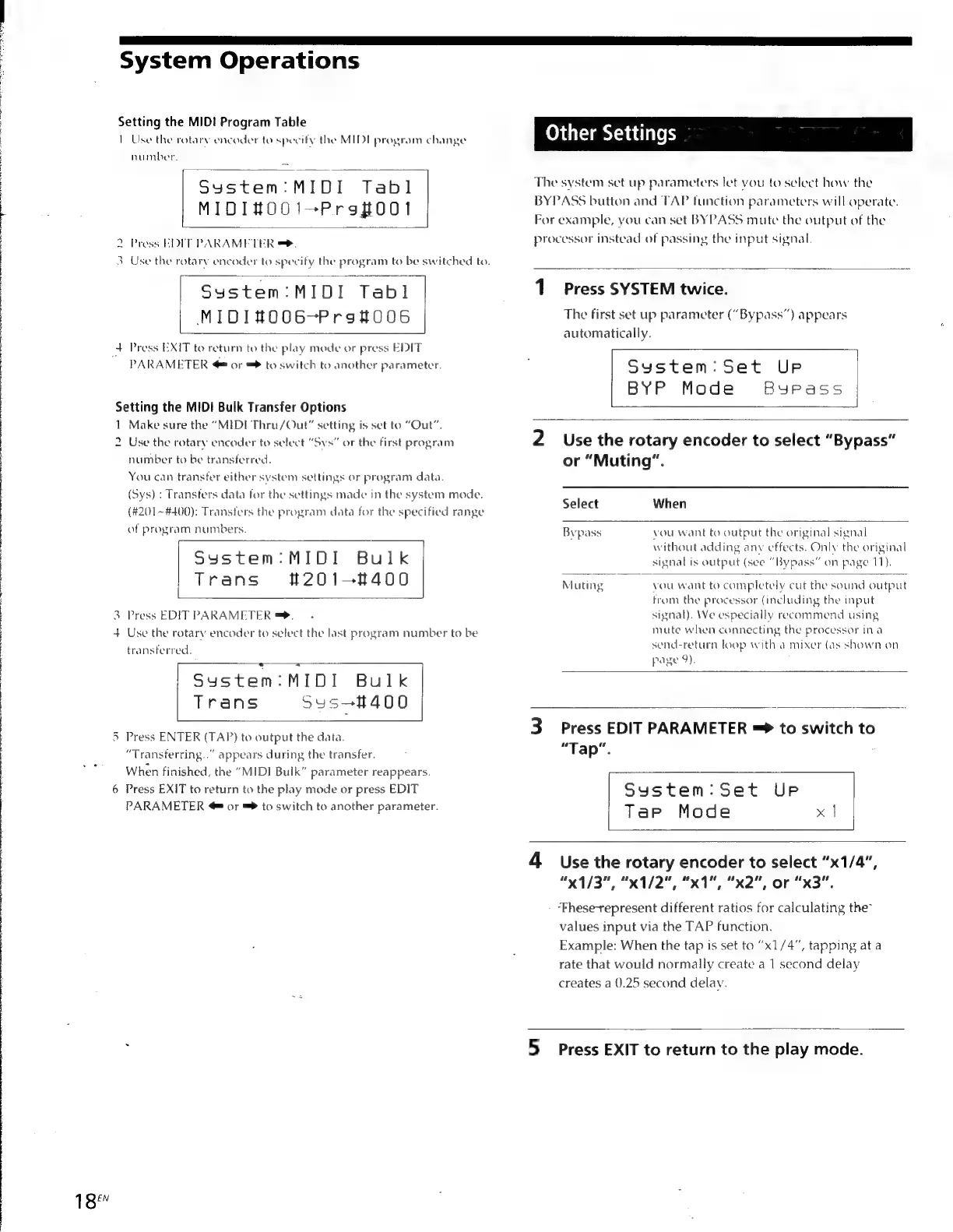
18"
System
Operations
Setting
the
MIDI
Program
Table
1
Use
the
rotary
encoder
to
specify
the
MIDE
program
change
number,
Sucton
MbDi
Tabi
MIDI#O001—Proftoot
2
Press
EDIT
PARAMETER
=.
eS
3
Use
the
rotary
encoder
to
specify
the
program
to
be
switched
to.
Syustem:MIDI
Tab]
MIDIHOOGOG-Prot006
4
Press
EXIT
to
return
to
the
play
mode
or
press
EDIT
PARAMETER
©
or
=
to
switch
to
another
parameter.
Setting
the
MIDI
Bulk
Transfer
Options
1
Make
sure
the
“MIDI
Thru/Out”
setting
is
set
to
“Out”.
2
Use
the
rotary
encoder
to
select
“Sys”
or
the
first
program
number
to
be
transferred.
You
can
transfer
either
system
settings
or
program
data.
(Sys)
:
Transfers
data
for
the
settings
made
in
the
system
mode.
(#201~#400):
Transfers
the
program
data
for
the
specified
range
of
program
numbers
System:MIDI
Bulk
t#201—-8400
Trans
Ww
Press
EDIT
PARAMETER
=.
+
Use
the
rotary
encoder
to
select
the
last
program
number
to
be
transferred.
Sustem:MIOL
Bulk
Trans
Sys—400
5
Press
ENTER
(TAP)
to
output
the
data.
“Transterring..”
appears
during
the
transfer.
When
finished,
the
“MIDI
Bulk”
parameter
reappears.
6
Press
EXIT
to
return
to
the
play
mode
or
press
EDIT
PARAMETER
@
or
=
to
switch
to
another
parameter.
Other
Settings
The
system
set
up
parameters
let
vou
to
select
how
the
BYPASS
button
and
TAP
function
parameters
will
operate.
For
example,
you
can
set
BYPASS
mute
the
output
of
the
processor
instead
of
passing
the
input
signal.
1
Press
SYSTEM
twice.
The
first
set
up
parameter
(“Bypass”)
appears
automatically.
System:
Set
UP
BYP
Mode
Bypass
2.
Use
the
rotary
encoder
to
select
“Bypass”
or
“Muting”.
Select
When
Bypass
vou
want
to
output
the
original
signal
without
adding
anv
effects.
Only
the
original
signal
is
output
(see
“Bypass”
on
page
11).
Muting
g
vou
want
to
completely
cut
the
sound
output
from
the
processor
(including
the
input
signal).
We
especially
recommend
using
mute
when
connecting
the
processor
ina
send-return
loop
with
a
mixer
(as
shown
on
page
9).
3
Press
EDIT
PARAMETER
=
to
switch
to
“Tap”.
System:Set
UP
TaP
Mode
x
|
4
Use
the
rotary
encoder
to
select
“x1/4”,
“x1/3",
"x1/2",
“A,
"x2",
or
“x3”.
“Fhesetepresent
different
ratios
for
calculating
the”
values
input
via
the
TAP
function.
Example:
When
the
tap
is
set
to
“x1/4”,
tapping
at
a
rate
that
would
normally
create
a
1
second
delay
creates
a
().25
second
delay.
5
Press
EXIT
to
return
to
the
play
mode.

Other manuals for Sony DPS-V55

Related product manuals