EasyManua.ls Logo

Sony DPS-V55 - Editing a Program: Effect Selection; Assigning Effects to FxA and FxB

Sony DPS-V55
44 pages
Print Icon
To Next Page IconTo Next Page
To Previous Page IconTo Previous Page
Loading...
Editing
a
Program
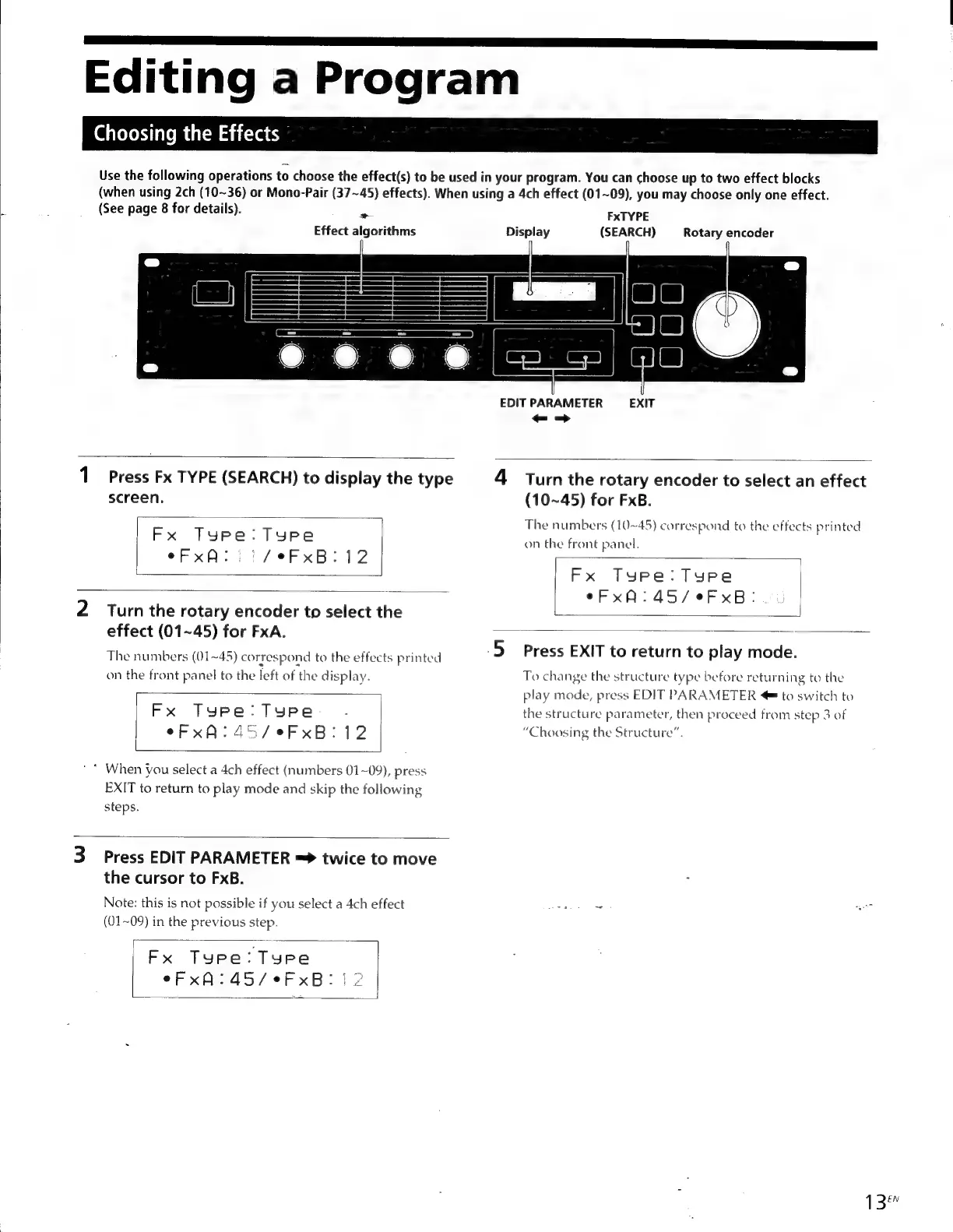
Choosing
the
Effects
Use
the
following
operations
to
choose
the
effect(s)
to
be
used
in
your
program.
You
can
choose
up
to
two
effect
blocks
(when
using
2ch
(10~36)
or
Mono-Pair
(37~45)
effects).
When
using
a
4ch
effect
(01~09),
you
may
choose
only
one
effect.
(See
page
8
for
details).
EA
FxTYPE
Effect
algorithms
Display
(SEARCH)
Rotary
encoder
EDIT
PARAMETER
EXIT
-=>
1
Press
Fx
TYPE
(SEARCH)
to
display
the
type
4
Turn
the
rotary
encoder
to
select
an
effect
screen.
(10~45)
for
FxB.
The
numbers
(10~45)
correspond
to
the
effects
printed
FX
Tare.
Tore
on
the
front
panel.
eFxA:.
|
/eFxB:
12
Fx
Type:
Type
eFxA:45/eFxB:
2
Turn
the
rotary
encoder
to
select
the
effect
(01~45)
for
FxA.
The
numbers
(01~45)
correspond
to
the
effects
printed
5
Press
EXIT
to
return
to
play
mode.
on
the
front
panel
to
the
left
of
the
display.
To
change
the
structure
type
before
returning
to
the
play
mode,
press
EDIT
PARAMETER
=
to
switch
to
Fx
Type:
Type
.
the
structure
parameter,
then
proceed
from
step
3
of
eFx
A:
45/eFxB:
12
“Choosing
the
Structure”.
*
When
you
select
a
4ch
effect
(numbers
01~09),
press
EXIT
to
return
to
play
mode
and
skip
the
following
steps.
3
Press
EDIT
PARAMETER
=>
twice
to
move
the
cursor
to
FxB.
Note:
this
is
not
possible
if
you
select
a
4ch
effect
reo
(01~09)
in
the
previous
step.
Fx
Type:Type
eFxA:
45/e¢eFxB:
|
2
13

Other manuals for Sony DPS-V55

Related product manuals