EasyManua.ls Logo

Sony DPS-V55 - System Operations: MIDI Configuration; Configuring MIDI Channel and Mode Settings

Sony DPS-V55
44 pages
Print Icon
To Next Page IconTo Next Page
To Previous Page IconTo Previous Page
Loading...
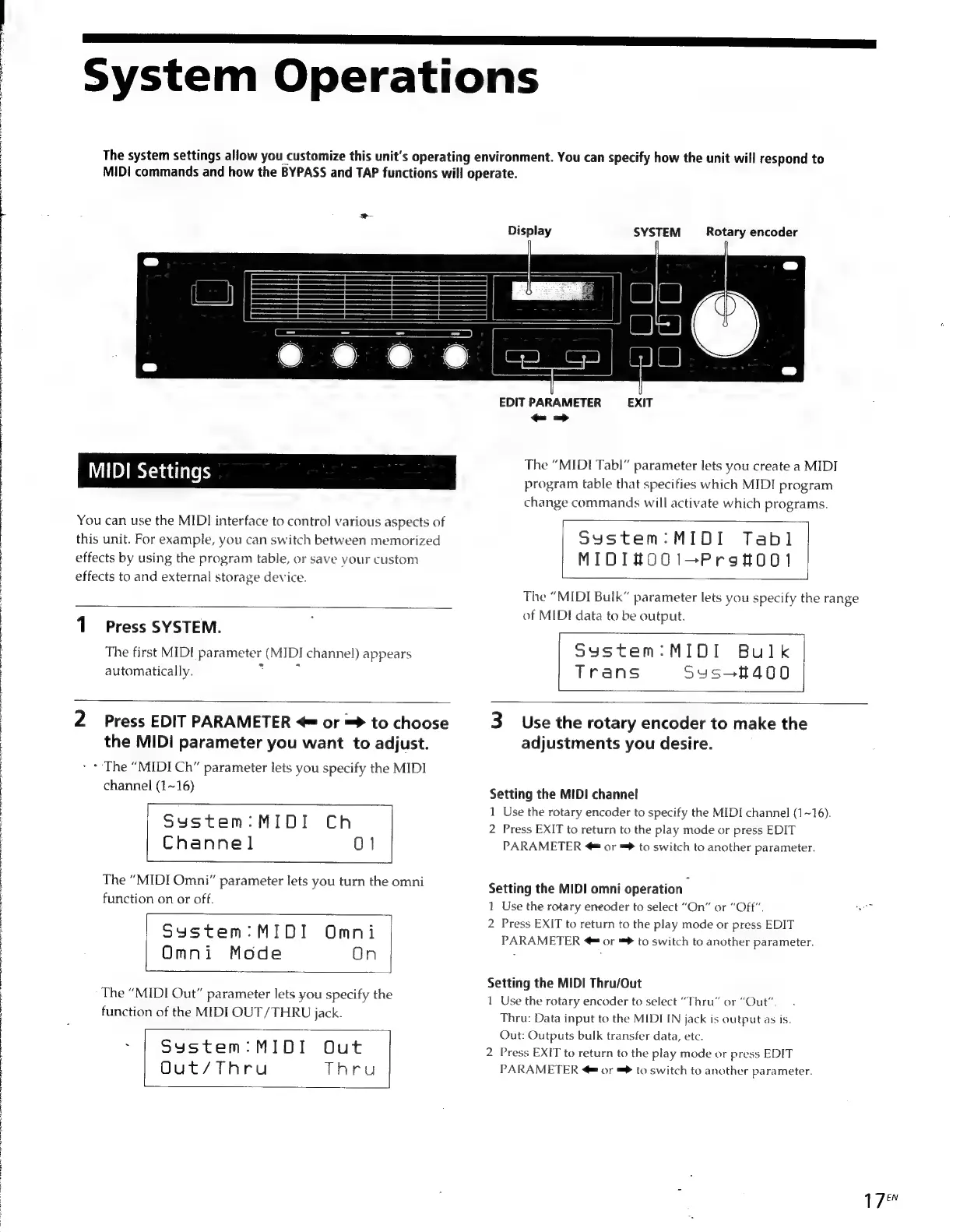
System
Operations
The
system
settings
allow
you
customize
this
unit's
operating
environment.
You
can
specify
how
the
unit
will
respond
to
MIDI
commands
and
how
the
BYPASS
and
TAP
functions
will
operate.
Display
SYSTEM
Rotary
encoder
MIDI
Settings
You
can
use
the
MIDI
interface
to
control
various
aspects
of
this
unit.
For
example,
you
can
switch
between
memorized
effects
by
using
the
program
table,
or
save
your
custom
effects
to
and
external
storage
device.
1
Press
SYSTEM.
The
first
MIDI
parameter
EAN!
channel)
appears
automatically.
7
EDIT
PARAMETER
EXIT
<-->
The
“MIDI
Tab!”
parameter
lets
you
create
a
MIDI
program
table
that
specifies
which
MIDI
program
change
commands
will
activate
which
programs.
System:MIDI
Tabl
MIDI#OO1i1—-PrgstOO0!l
The
“MIDI
Bulk”
parameter
lets
you
specify
the
range
of
MIDI
data
to
be
output.
System:MIDI
Bulk
Trans
Syus-f400
2
Press
EDIT
PARAMETER
or
=>
to
choose
the
MIDI
parameter
you
want
to
adjust.
>
+
The
“MIDI
Ch”
parameter
lets
you
specify
the
MIDI
channel
(1~16)
System:MIDI
Ch
Channel
0]
The
“MIDI
Omni”
parameter
lets
you
turn
the
omni
function
on
or
off.
System:
MIDI
Omni
Omni
Mode
On
The
“MIDI
Out”
parameter
lets
you
specify
the
function
of
the
MIDI
OUT/THRU
jack.
:
System:MIDI
Out
Out/Thru
Thru
3
Use
the
rotary
encoder
to
make
the
adjustments
you
desire.
Setting
the
MIDI
channel
1
Use
the
rotary
encoder
to
specify
the
MIDI
channel
(1~16).
2
Press
EXIT
to
return
to
the
play
mode
or
press
EDIT
PARAMETER
@
or
™®
to
switch
to
another
parameter.
Setting
the
MIDI
omni
operation
1
Use
the
rotary
eneoder
to
select
“On”
or
“Off”.
a
2
Press
EXIT
to
return
to
the
play
mode
or
press
EDIT
PARAMETER
@
or
™®
to
switch
to
another
parameter.
Setting
the
MIDI
Thru/Out
1
Use
the
rotary
encoder
to
select
“Thru”
or
“Out”.
Thru:
Data
input
to
the
MIDI
IN
jack
is
output
as
is.
Out:
Outputs
bulk
transfer
data,
etc.
2
Press
EXIT
to
return
to
the
play
mode
or
press
EDIT
PARAMETER
or
=
to
switch
to
another
parameter.
1
7

Other manuals for Sony DPS-V55

Related product manuals