42
The operation guide list
The operation guide also indicates operations other than the controller
operation. The indications of icons are as follows.
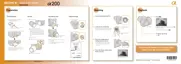
2 Following the operation guide,
select [White balance] with v/V/
b/B on the controller, then press
the center z to execute.
Operation guide
3 Following the operation guide,
select and execute the desired
function.
For example, to change [5500K] (the
current setting), select [5500K] with v/
V, adjust the value of
[ColorTemperature] with b/B, then press
the center z to execute.
MENU button
Returns with MENU button
button
button
button
button



 To Next Page
 Loading...