60
• The shutter speed may become slower depending on the aperture value.
When the shutter speed is slower, use a tripod.
• The flash range differs according to the aperture value. When you shoot
with the flash, check the flash range (page 73).
• To blur the background more, use a telephoto lens or a lens that is
equipped with a smaller diaphragm (bright lens).
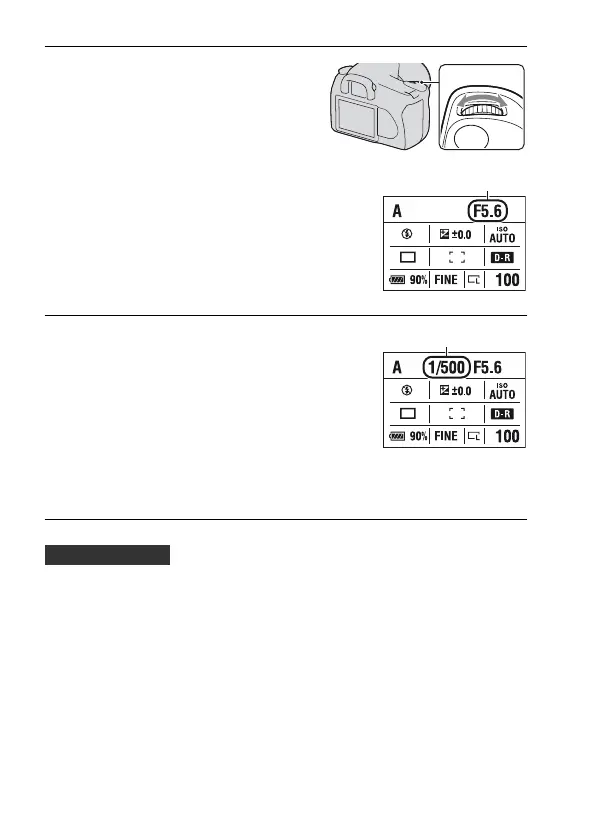
2 Select the aperture value (F-
number) with the control dial.
• Smaller F-number: The foreground and
background of the subject are blurred.
Larger F-number: The subject and its
foreground and background are also
focused on.
• You cannot check the blurring of an
image in the viewfinder. Check the
recorded image and adjust the aperture.
Aperture (F-number)
3 Adjust the focus and shoot the
subject.
The shutter speed is automatically
adjusted to obtain correct exposure.
• When the camera judges that the proper
exposure is not obtained with the
selected aperture value, the shutter
speed flashes. In such cases, adjust the
aperture again.
Shutter speed
Shooting techniques



 To Next Page
 Loading...