20
Parts identification
a Wireless receiver slot
Insert the optional DWR-S01D or WRR-
855 here.
For details on how to attach the receiver or tuner
unit to the DWA-01D, see “Attaching the receiver/
tuner unit” on page 22.
b Wireless receiver screw holes
Run in the mounting screws to secure the
receiver/tuner unit.
c Monitor output selector
Selects the audio output from the PHONES
connector.
1: Outputs the audio from the OUTPUT1
connector to the L/R channels.
1+2: The audio from the OUTPUT1
connector is mixed with the audio from the
OUTPUT2 connector (only when the
OUTPUT2 connector is set to output analog
signal) and output to the L/R channels.
2: Outputs the audio from the OUTPUT2
connector (only when the OUTPUT2
connector is set to output analog signal) to
the L/R channels. When the WRR-855 is
attached, no audio is output from the
PHONES connector.
Monitor output is split from the analog
signal output to the OUTPUT1/2
connectors. When audio that is output to the
OUTPUT1 connector is changed on the
DWR-S01D using the ANALOG
OUTPUT1 function, monitor output
changes accordingly.
d PHONES (monitor output)
connector (3.5 mm, TRS jack, tip: L,
ring: R, sleeve: ground)
Connect the headphones here. Select the
output signal using the monitor output
selector.
e Monitor level control
Adjusts the monitor output level.
f Audio monitor section cover
This is a cover for the jack and controls of
the audio monitor section. When you do not
use the headphones, close this cover.
g Joint bracket
Combines two DWA-01D adapters.
For details on how to combine two DWA-01D
adapters, see “Combining two DWA-01D adapters”
on page 23.
h V-shaped mount bracket
This is a bracket used for attaching to the
camcorder.
Bottom
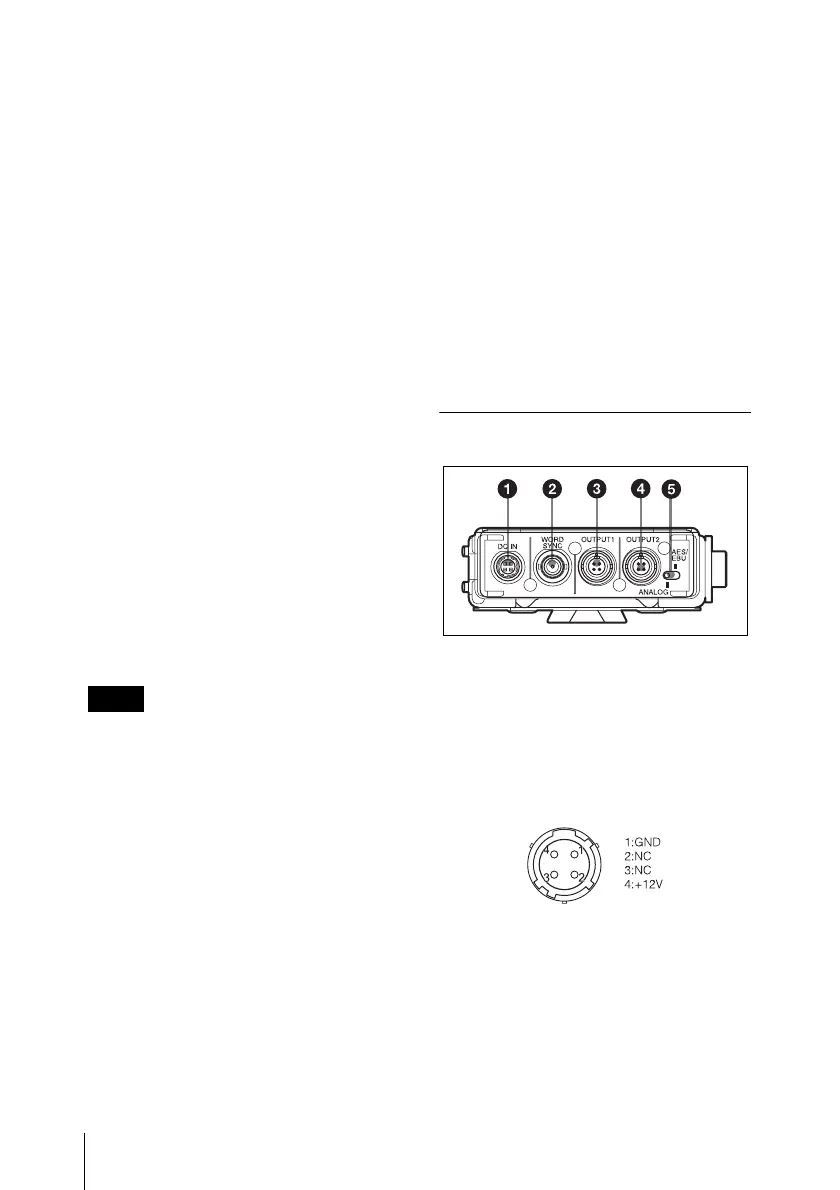
a DC IN (external power input)
connector (4-pin)
Connect to the external power output
connector of the camcorder using the
supplied DC power cable. This connector
accepts the power voltage between 10 V
DC and 17 V DC.
b WORD SYNC (word sync input)
connector (BNC type)
Accepts external sync signal.
When the DWR-S01D is attached and the
sync signal is input, the DWR-S01D can be
operated in synchronization with the whole
audio system. In order for the DWR-S01D
Note



 To Next Page