EasyManua.ls Logo

Sony EV-S900 - Remote Control Operation; Controlling Multiple VCRs

Sony EV-S900
60 pages
Print Icon
To Next Page IconTo Next Page
To Previous Page IconTo Previous Page
Loading...
ww,
:
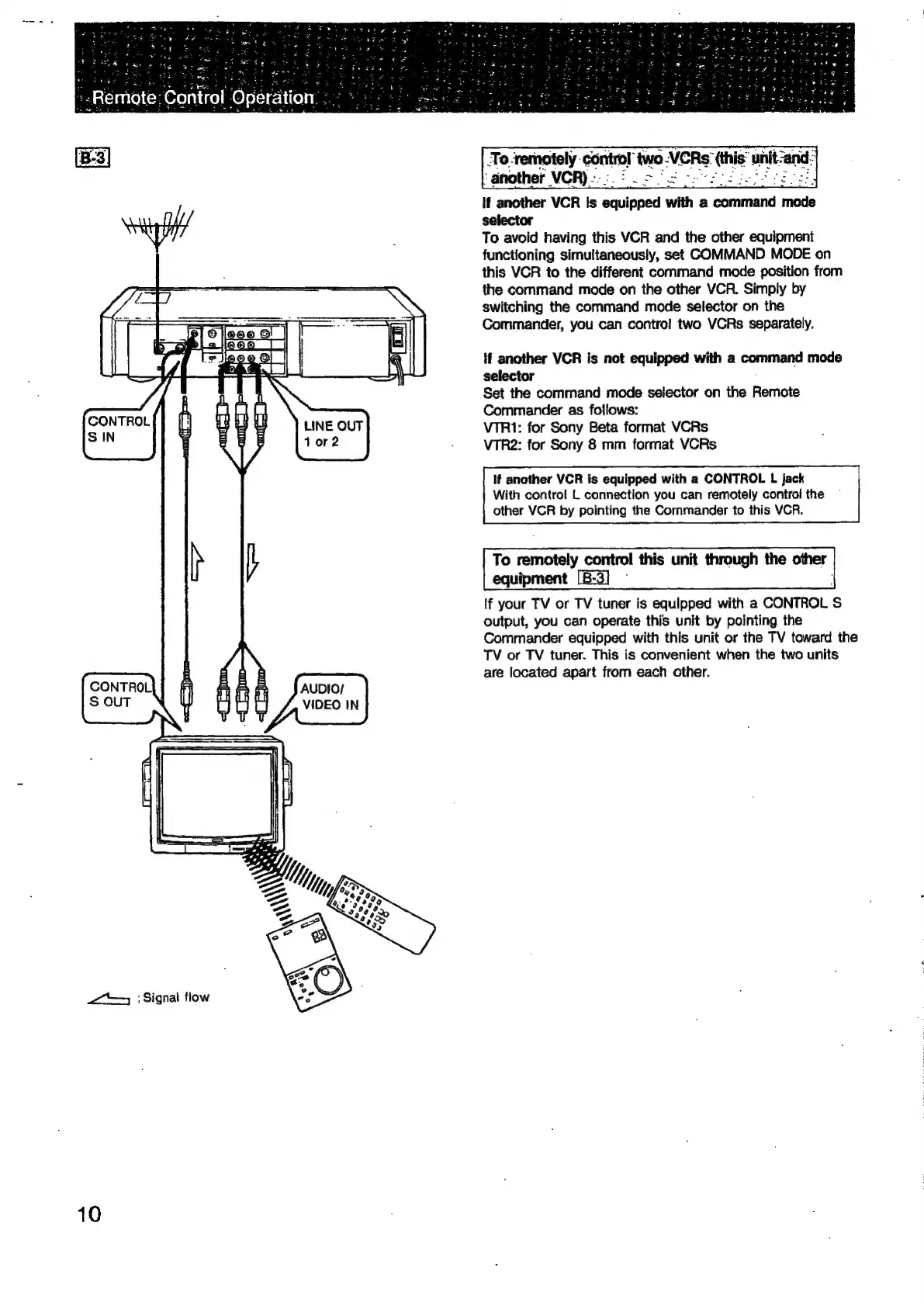
Signal
flow
10
7
AUDIO/
VIDEO
IN
7
‘o.remotely
‘control
two
-
VCRs’
(this”
uhit-and.
If
another
VCR
Is
equipped
with
a
command
mode
selector
To
avoid
having
this
VCR
and
the
other
equipment
functioning
simultaneously,
set
COMMAND
MODE
on
this
VOR
to
the
different
command
mode
position
from
the
command
mode
on
the
other
VCR.
Simply
by
switching
the
command
mode
selector
on
the
Commander,
you
can
contro!
two
VCRs
separately.
tf
another
VCR
is
not
equipped
with
a
command
mode
selector
;
Set
the
command
mode
selector
on
the
Remote
Commander
as
follows:
VTR1:
for
Sony
Beta
format
VCRs
VTR2:
for
Sony
8
mm
format
VCRs
If
another
VCR
is
equipped
with
a
CONTROL
L
jack
With
control
L
connection
you
can
remotely
control
the
other
VCR
by
pointing
the
Commander
to
this
VCR.
To
remotely
control
this
unit
through
the
other
equipment
[B-3]
-
If
your
TV
or
TV
tuner
is
equipped
with
a
CONTROL
S
output,
you
can
operate
this
unit
by
pointing
the
Commander
equipped
with
this
unit
or
the
TV
toward
the
TV
or
TV
tuner.
This
is
convenient
when
the
two
units
are
located
apart
from
each
other.

Related product manuals