EasyManua.ls Logo

Sony EV-S900 - Operating the VCR

Sony EV-S900
60 pages
Print Icon
To Next Page IconTo Next Page
To Previous Page IconTo Previous Page
Loading...
avin
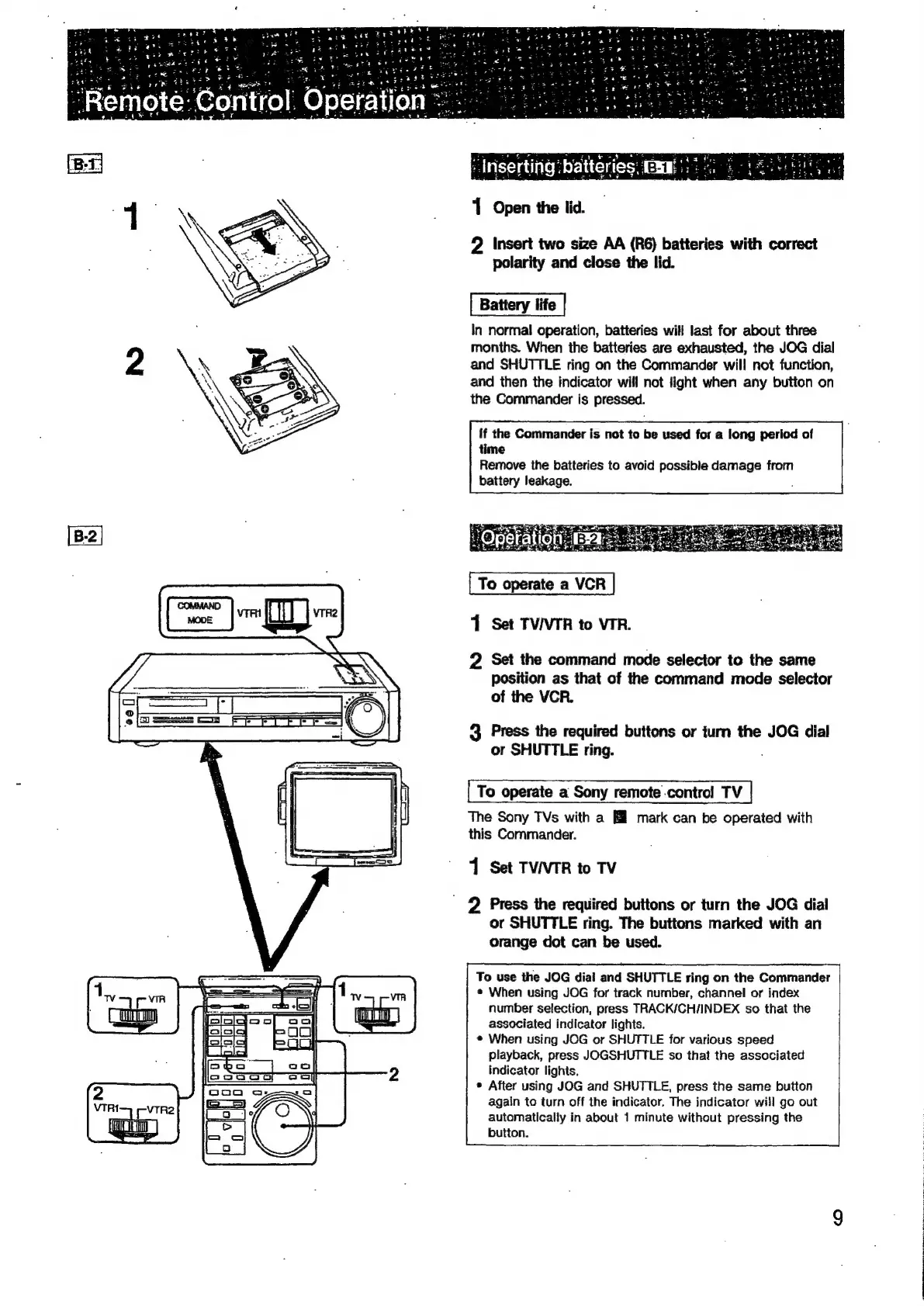
1
Open
the
lid.
2
Insert
two
size
AA
(R6)
batteries
with
correct
polarity
and
close
the
lid.
Battery
life
In
normal
operation,
batteries
will
last
for
about
three
months.
When
the
batteries
are
exhausted,
the
JOG
dial
and
SHUTTLE
ring
on
the
Commander
will
not
function,
and
then
the
indicator
will
not
light
when
any
button
on
the
Commander
is
pressed.
{f
the
Commander
is
not
to
be
used
for
a
long
period
of
time
Remove
the
batteries
to
avoid
possible
damage
from
battery
leakage.
;
To
operate
a
VCR
1
Set
TV/VTR
to
VIR.
2
Set
the
command
mode
selector
to
the
same
position
as
that
of
the
command
mode
selector
of
the
VCR.
3
Press
the
required
buttons
or
turn
the
JOG
dial
or
SHUTTLE
ring.
To
operate
a
Sony
remote
.control
TV
The
Sony
TVs
with
a
mark
can
be
operated
with
this
Commander.
1
Set
TV/VTR
to
TV
2
Press
the
required
buttons
or
turn
the
JOG
dial
or
SHUTTLE
ring.
The
buttons
marked
with
an
orange
dot
can
be
used.
To
use
the
JOG
dial
and
SHUTTLE
ring
on
the
Commander
e
When
using
JOG
for
track
number,
channel
or
index
number
selection,
press
TRACK/CH/INDEX
so
that
the
associated
indicator
lights.
*
When
using
JOG
or
SHUTTLE
for
various
speed
playback,
press
JOGSHUTTLE
so
that
the
associated
indicator
lights,
®
After
using
JOG
and
SHUTTLE,
press
the
same
button
again
to
turn
off
the
indicator.
The
indicator
will
go
out
automatically
in
about
1
minute
without
pressing
the
button.

Related product manuals