EasyManua.ls Logo

Sony EV-S900 - Page 8

Sony EV-S900
60 pages
Print Icon
To Next Page IconTo Next Page
To Previous Page IconTo Previous Page
Loading...
Location
and
Function
of
Parts
and
Controls
=>.
°
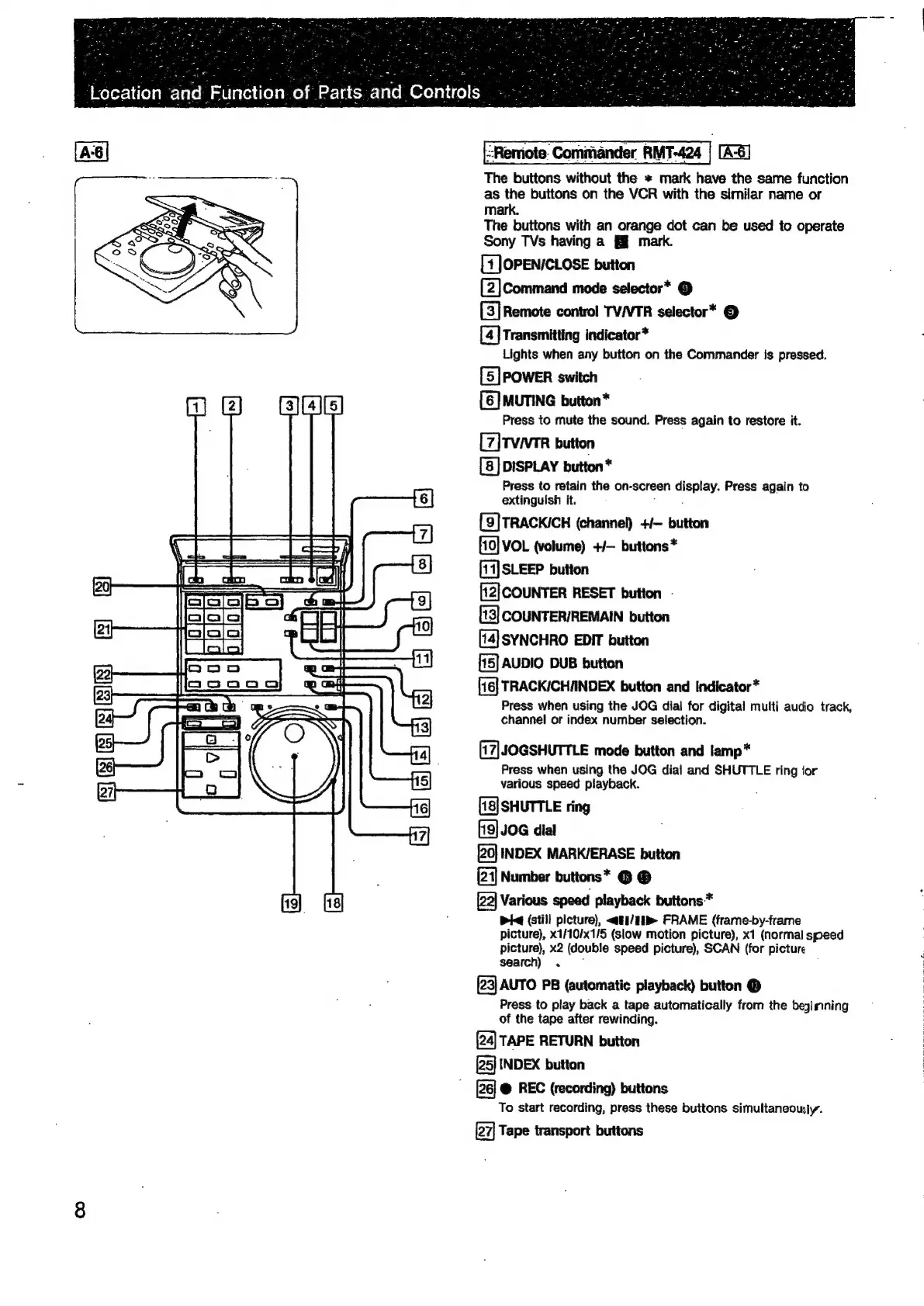
Remote.
Commander
RMT-424
|
[A-6]
The
buttons
without
the
*
mark
have
the
same
function
as
the
buttons
on
the
VCR
with
the
similar
name
or
mark.
The
buttons
with
an
orange
dot
can
be
used
to
operate
Sony
TVs
having
a
mark.
[1
OPEN/CLOSE
button
(2]Command
mode
selector*
©
[3]
Remote
control
TV/VTR
selector*
©
[4]
Transmitting
indicator*
Lights
when
any
button
on
the
Commander
is
pressed.
[5]
POWER
switch
3]
HG
[6]
MUTING
button*
Press
to
mute
the
sound.
Press
again
to
restore
it.
[7]TViVTR
button
DISPLAY
button*
Press
to
retain
the
on-screen
display.
Press
again
to
extingulsh
it.
é
:
[9}TRACKICH
(channel)
+/-
button
f10]
VOL
(volume)
+/—
buttons
*
[14]
SLEEP
button
['2]COUNTER
RESET
button
-
[13]
COUNTER/REMAIN
button
[14]
SYNCHRO
EDIT
button
[15]
AUDIO
DUB
button
[16]
TRACKICHIINDEX
button
and
indicator*
Press
when
using
the
JOG
dial
for
digital
multi
audio
track,
channel
or
index
number
selection.
S|
IN
=]
Ais]
el)
[17|JOGSHUTTLE
mode
button
and
lamp*
Press
when
using
the
JOG
dial
and
SHUTTLE
ring
ior
various
speed
playback.
[18]SHUTTLE
ring
fig]
JOG
dial
INDEX
MARK/ERASE
button
(21]
Number
buttons*
@ @
Fro]
[22]
Various
speed
playback
buttons*
; ;
Pi
(still
picture),
<ati/1b
FRAME
(frame-by-frame
picture),
x1/10/x1/5
(slow
motion
picture),
x1
(normal
speed
picture),
x2
(double
speed
picture),
SCAN
(for
picture
search)
.
~
:
[23]
AUTO
PB
(automatic
playback)
button
®
Press
to
play
back
a
tape
automatically
from
the
begimning
of
the
tape
after
rewinding.
(24)
TAPE
RETURN
button
[25]
INDEX
button
@
REC
(recording)
buttons
To
start
recording,
press
these
buttons
simultaneously.
Tape
transport
buttons
Ss]
(8)
&)
SSIs
SJ
elall
@
&

Related product manuals