EasyManua.ls Logo

Sony EV-S900 - Timer Recording Preparation; Timer Setting Controls

Sony EV-S900
60 pages
Print Icon
To Next Page IconTo Next Page
To Previous Page IconTo Previous Page
Loading...
ret
22
Timer-Activated
Recording
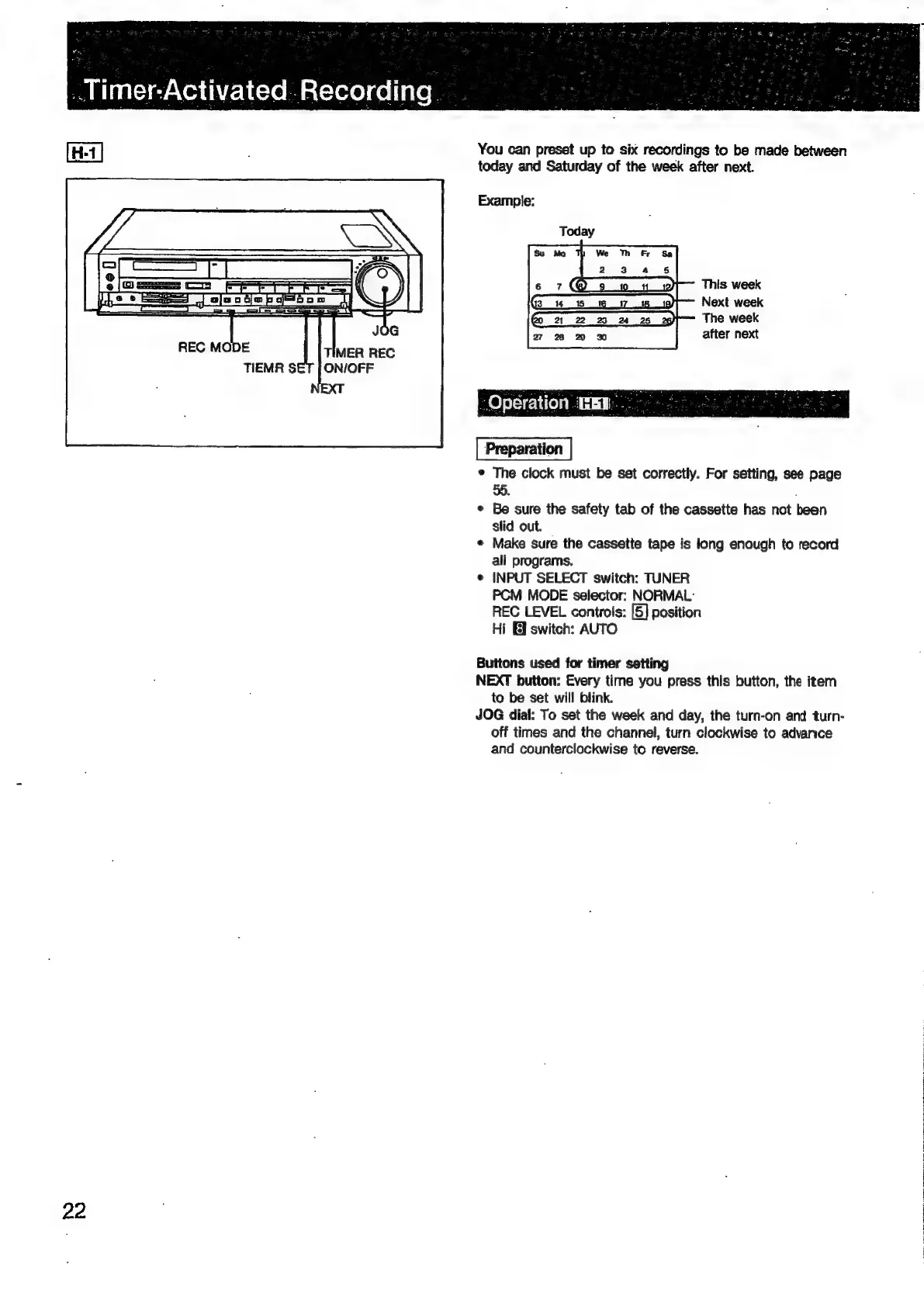
You
can
preset
up
to
six
recordings
to
be
made
between
today
and
Saturday
of
the
week
after
next.
Example:
This
week
Next
week
The
week
after
next
¢
The
clock
must
be
set
correctly.
For
setting,
see
page
55.
e
Be
sure
the
safety
tab
of
the
cassette
has
not
been
slid
out.
«
Make
sure
the
cassette
tape
is
long
enough
to
record
all
programs.
INPUT
SELECT
switch:
TUNER
PCM
MODE
selector:
NORMAL:
REC
LEVEL
controls:
[5]
position
Hi
El
switch:
AUTO
e
Buttons
used
for
timer
setting
NEXT
button:
Every
time
you
press
this
button,
the
item
to
be
set
will
blink.
JOG
dial:
To
set
the
week
and
day,
the
turn-on
and
turn-
off
times
and
the
channel,
turn
clockwise
to
advance
and
counterclockwise
to
reverse.

Related product manuals