EasyManua.ls Logo

Sony EV-S900 - Timer-Activated Recording; Managing Timer Settings

Sony EV-S900
60 pages
Print Icon
To Next Page IconTo Next Page
To Previous Page IconTo Previous Page
Loading...
Timer-Activated
Recording.
Checking’
the
Timer:
Settings
“i
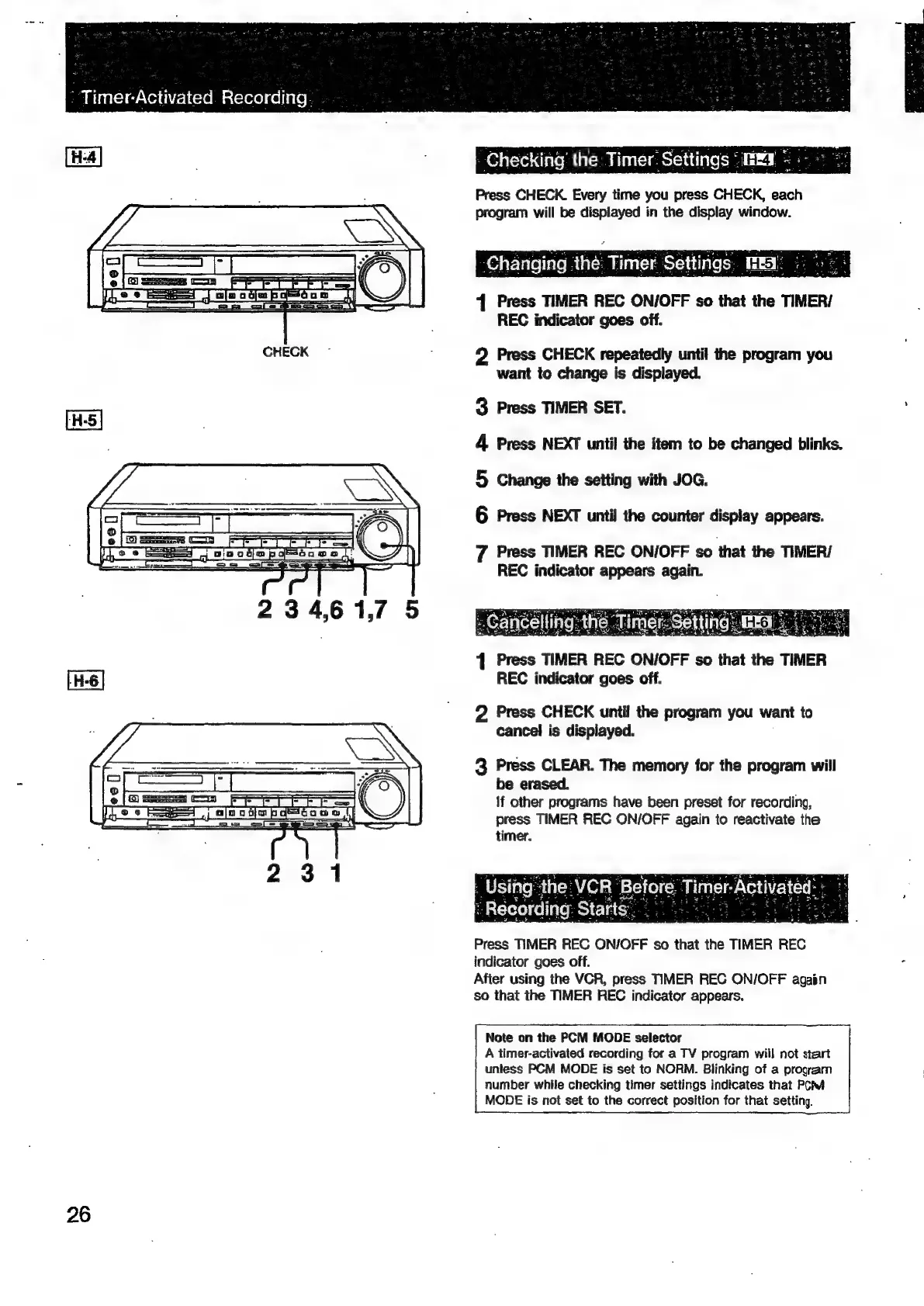
Press
CHECK.
Every
time
you
press
CHECK,
each
program
will
be
displayed
in
the
display
window.
Changing
the
Timer
Settings,
REA
|v.
4
Press
TIMER
REC
ON/OFF
so
that
the
TIMER/
REC
indicator
goes
off.
2
Press
CHECK
repeatedly
until
the
program
you
want
to
change
is
displayed.
3
Press
TIMER
SET.
4
Press
NEXT
until
the
item
to
be
changed
blinks.
5
Change
the
setting
with
JOG.
6
Press
NEXT
until
the
counter
display
appears.
7
Press
TIMER
REC
ON/OFF
so
that
the
TIMER/
REC
indicator
appears
again.
1
Press
TIMER
REC
ON/OFF
so
that
the
TIMER
REC
indicator
goes
off.
2
Press
CHECK
until
the
program
you
want
to
cancel
is
displayed.
3
Press
CLEAR.
The
memory
for
the
program
will
be
erased.
If
other
programs
have
been
preset
for
recording,
press
TIMER
REC
ON/OFF
again
to
reactivate
the
timer.
Press
TIMER
REC
ON/OFF
so
that
the
TIMER
REC
indicator
goes
off.
After
using
the
VCR,
press
TIMER
REC
ON/OFF
agaén
so
that
the
TIMER
REC
indicator
appears.
Note
on
the
PCM
MODE
selector
A
timer-activated
recording
for
a
TV
program
wiil
not
start
untess
PCM
MODE
is
set
to
NORM.
Blinking
of
a
program
number
while
checking
timer
settings
indicates
that
Poh
MODE
is
not
set
to
the
correct
position
for
that
setting.
26

Related product manuals