EasyManua.ls Logo

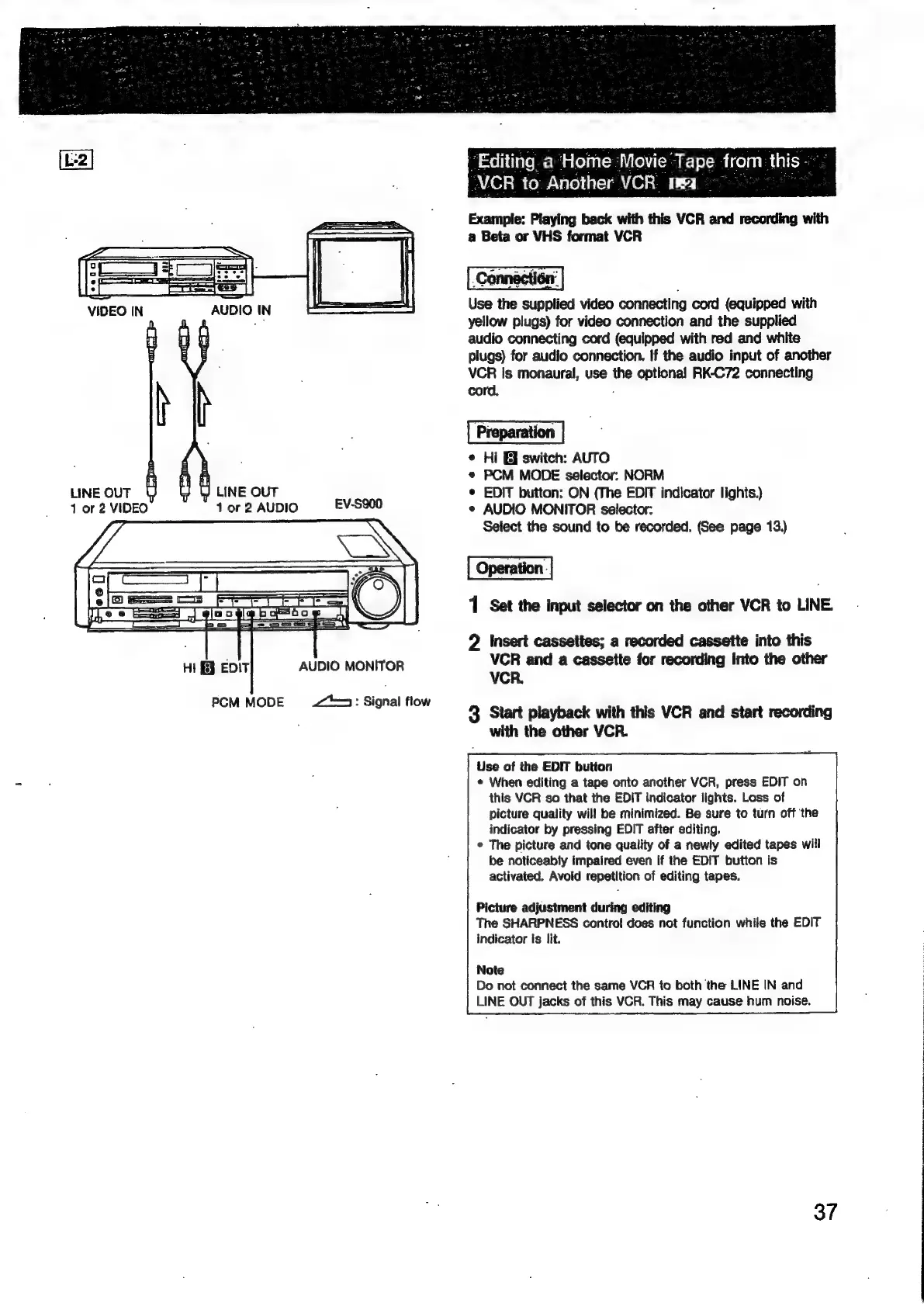
Sony EV-S900 - Editing Home Movie Tapes to Another VCR

Sony EV-S900
60 pages
Print Icon
To Next Page IconTo Next Page
To Previous Page IconTo Previous Page
Loading...
LINE
OUT
1
or
2
VIDEO
Uy
LINE
OUT
1
or
2
AUDIO
PCM
MODE
AUDIO
MONITOR
2:
Signal
flow
“Editing.
a
‘Home
Movie
@
Tape
from
this
VCR
to.
Another
|
Example:
Playing
back
with
this
VCR
and
recording
with
a
Beta
or
VHS
format
VCR
fice
the
supplied
video
connecting
cord
(equipped
with
yellow
plugs)
for
video
connection
and
the
supplied
audio
connecting
cord
(equipped
with
red
and
white
plugs)
for
audio
connection.
If
the
audio
input
of
another
VCR
Is
monaural,
use
the
optional
RK-C72
connecting
cord,
Preparation
«
Hi
&
switch:
AUTO
*
PCM
MODE
selector:
NORM
¢
EDIT
button:
ON
(The
EDIT
indicator
lights.)
¢
AUDIO
MONITOR
selector:
Select
the
sound
to
be
recorded.
(See
page
13.)
1
Set
the
input
selector
on
the
other
VCR
to
LINE.
2
Insert
cassettes;
a
recorded
cassette
into
this
VCR
and
a
cassette
for
recording
into
the
other
VCR.
3
Start
playback
with
this
VCR
and
start
recording
with
the
other
VCR.
Use
of
the
EDIT
button
¢
When
editing
a
tape
onto
another
VCR,
press
EDIT
on
this
VCR
so
that
the
EDIT
indicator
lights.
Loss
of
picture
quality
will
be
minimized.
Be
sure
to
turn
off
‘the
indicator
by
pressing
EDIT
after
editing.
°
The
picture
and
tone
quality
of
a
newly
edited
tapes
will
be
noticeably
impaired
even
if
the
EDIT
button
is
activated.
Avoid
repetition
of
editing
tapes.
Picture
adjustment
during
editing
The
SHARPNESS
control
does
not
function
while
the
EDIT
indicator
is
lit.
Note
Do
not
connect
the
same
VCR
to
both
the
LINE
IN
and
LINE
OUT
jacks
of
this
VCR.
This
may
cause
hum
noise.
37

Related product manuals