EasyManua.ls Logo

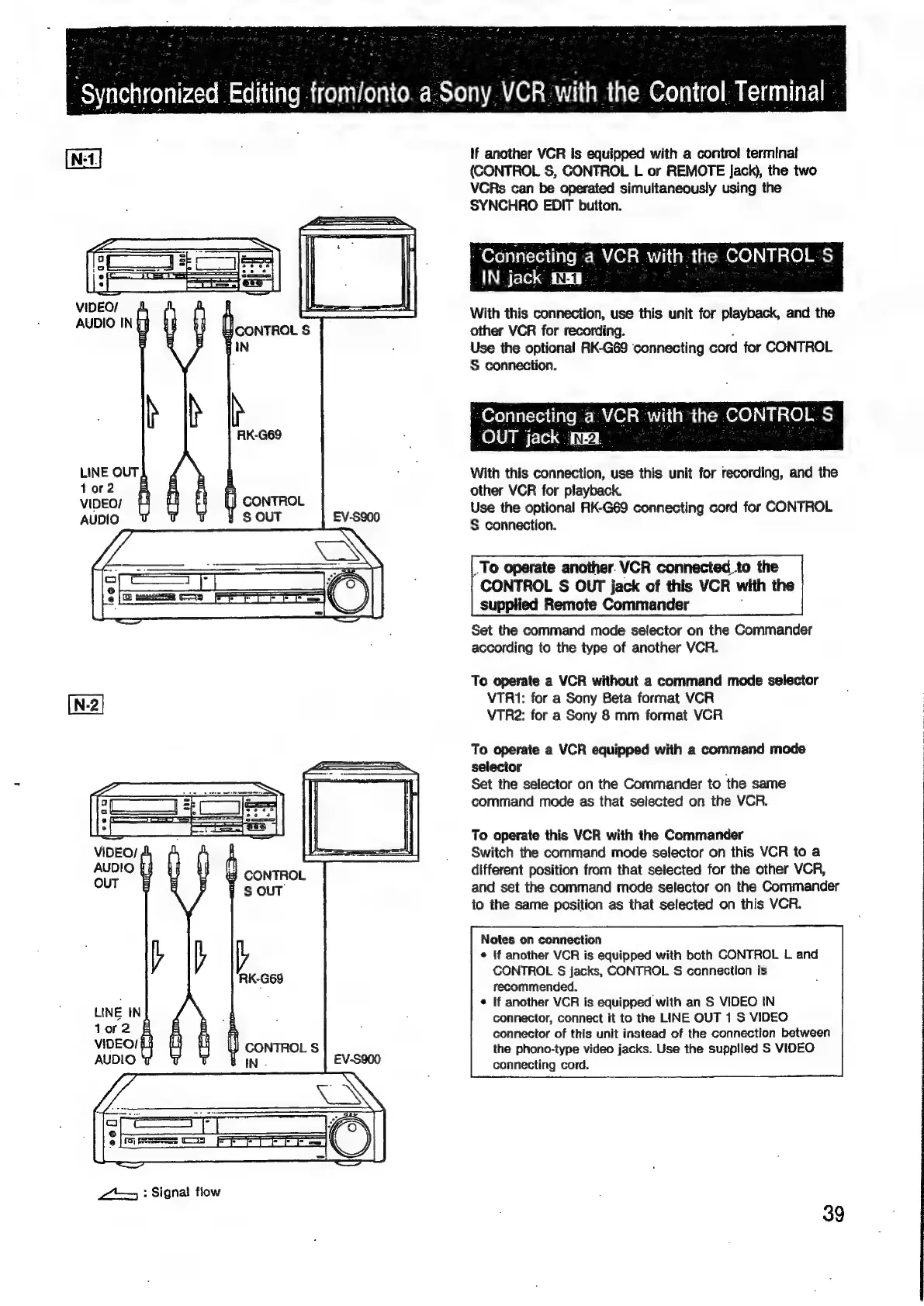
Sony EV-S900 - Connecting VCR with CONTROL S IN; Connecting VCR with CONTROL S OUT

Sony EV-S900
60 pages
Print Icon
To Next Page IconTo Next Page
To Previous Page IconTo Previous Page
Loading...
as
“gynchronized
Editing
trom
jonto.
a
Sony
VCR
with
the
Control
Terminal
~
,
If
another
VCR
is
equipped
with
a
control
terminal
(CONTROL
S,
CONTROL
L
or
REMOTE
Jack),
the
two
VCRs
can
be
operated
simultaneously
using
the
SYNCHRO
EDIT
button.
“Connecting
-
a
VCR.
with.
the
CONTROL
Ss.
IN-
jack
fe.
VIDEO/
AUDIO
IN
With
this
connection,
use
this
unit
for
playback,
and
the
other
VCR
for
recording.
Use
the
optional
RK-G69
connecting
cord
for
CONTROL
S
connection.
Connecting
a
VCR
with
hele
CONTROE
S.
_
OUT
jack
ita
LINE
OUT
With
this
connection,
use
this
unit
for
recording,
and
the
tor2
other
VCR
for
playback.
cable.
Use
the
optional
RK-G69
connecting
cord
for
CONTROL
§
connection.
.
To
operate
another.
VCR
connected
to
the
CONTROL
S$
OUT
jack
of
this
VCR
with
the
supplied
Remote
Commander
Set
the
command
mode
selector
on
the
Commander
according
to
the
type
of
another
VCR.
To
operate
a
VCR
without
a
command
mode
selector
[N-2]
VTRI1:
for
a
Sony
Beta
format
VCR
VTR2:
for
a
Sony
8
mm
format
VCR
To
operate
a
VCR
equipped
with
a
command
mode
selector
Set
the
selector
on
the
Commander
to
the
same
command
mode
as
that
selected
on
the
VCR.
To
operate
this
VCR
with
the
Commander
VIDEO;
;
Switch
the
command
mode
selector
on
this
VCR
to
a
AUDIO
1
CONTROL
different
position
from
that
selected
for
the
other
VCR,
OUT
:
:
f
S
OUT
and
set
the
command
mode
selector
on
the
Commander
to
the
same
position
as
that
selected
on
this
VCR.
Notes
on
connection
©
{f
another
VCR
is
equipped
with
both
CONTROL
L
and
y
|b
CONTROL
S$
jacks,
CONTROL
S
connection
is
RK-G68
recommended.
;
©
If
another
VCR
is
equipped
with
an
S
VIDEO
IN
LINE
IN
connector,
connect
it
to
the
LINE
OUT
1
S
VIDEO
Tor
2
connector
of
this
unit
instead
of
the
connection
between
VIDEO!
the
phono-type
video
jacks.
Use
the
supplied
S
VIDEO
AUDIO
connecting
cord.
2)
:
Signal
flow
39

Related product manuals