EasyManua.ls Logo

Sony EV-S900 - Connecting VCR;Camera with REMOTE;CONTROL L

Sony EV-S900
60 pages
Print Icon
To Next Page IconTo Next Page
To Previous Page IconTo Previous Page
Loading...
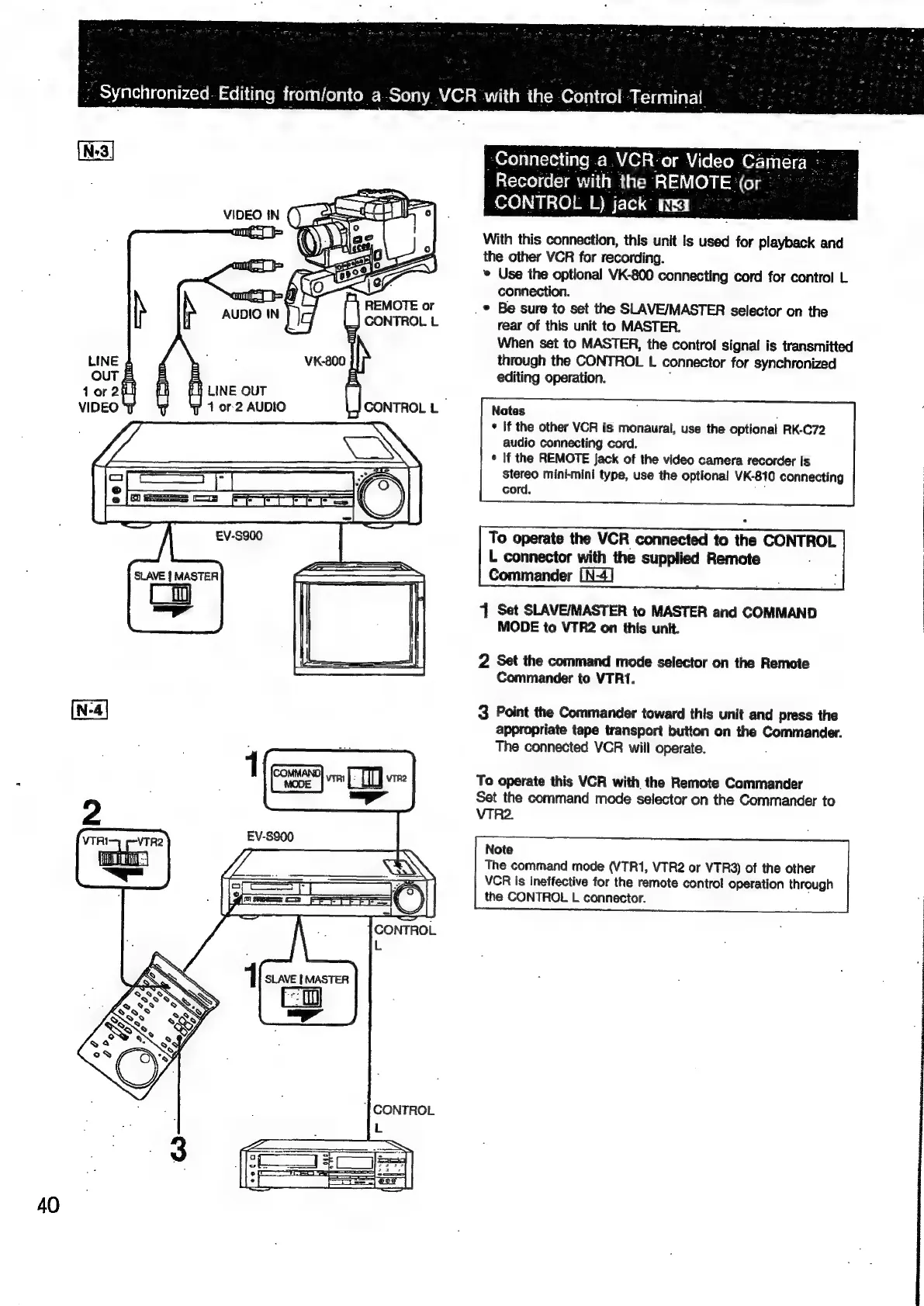
-Connecting
a.VCR-or
Video
Camera:
--
.
Recorder
with
the
REMOTE
(or
°°
CONTROL
L)
jack
MRE
With
this
connection,
this
unit
Is
used
for
playback
and
the
other
VCR
for
recording.
*
Use
the
optional
VK-800
connecting
cord
for
control
L
;
connection.
REMOTE
or
.
©
Be
sure
to
set
the
SLAVE/MASTER
selector
on
the
CONTROL
L
rear
of
this
unit
to
MASTER.
When
set
to
MASTER,
the
contro!
signal
is
transmitted
through
the
CONTROL
L
connector
for
synchronized
editing
operation.
LINE
fH
LINE
OUT
.
4
or
2
AUDIO
CONTROL
L
Notes
:
*
If
the
other
VCR
is
monaural,
use
the
optional
RK-C72
audio
connecting
cord.
¢
If
the
REMOTE
Jack
of
the
video
camera
recorder
is
stereo
mini-mini
type,
use
the
optional
VK-810
connecting
cord.
To
operate
the
VCR
connected
to
the
CONTROL
L
connector
with
the
supplied
Remote
.
Commander
[N-4]
4
Set
SLAVE/MASTER
to
MASTER
and
COMMAND
MODE
to
VTR2
on
this
unit.
:
|
2
Set
the
command
mode
selector
on
the
Remote
Commander
to
VTR1.
3
Point
the
Commander
toward
this
unit
and
press
the
appropriate
tape
transport
button
on
the
Commander.
The
connected
VCR
will
operate.
.
To
operate
this
VCR
with
the
Remote
Commander
Set
the
command
mode
selector
on
the
Commander
to
VTR2.
Note
The
command
mode
(VTR1,
VTR2
or
VTR3)
of
the
other
VCR
is
ineffective
for
the
remote
control
operation
through
the
CONTROL
L
connector.

Related product manuals