EasyManua.ls Logo

Sony EV-S900 - Assemble Editing Operation

Sony EV-S900
60 pages
Print Icon
To Next Page IconTo Next Page
To Previous Page IconTo Previous Page
Loading...
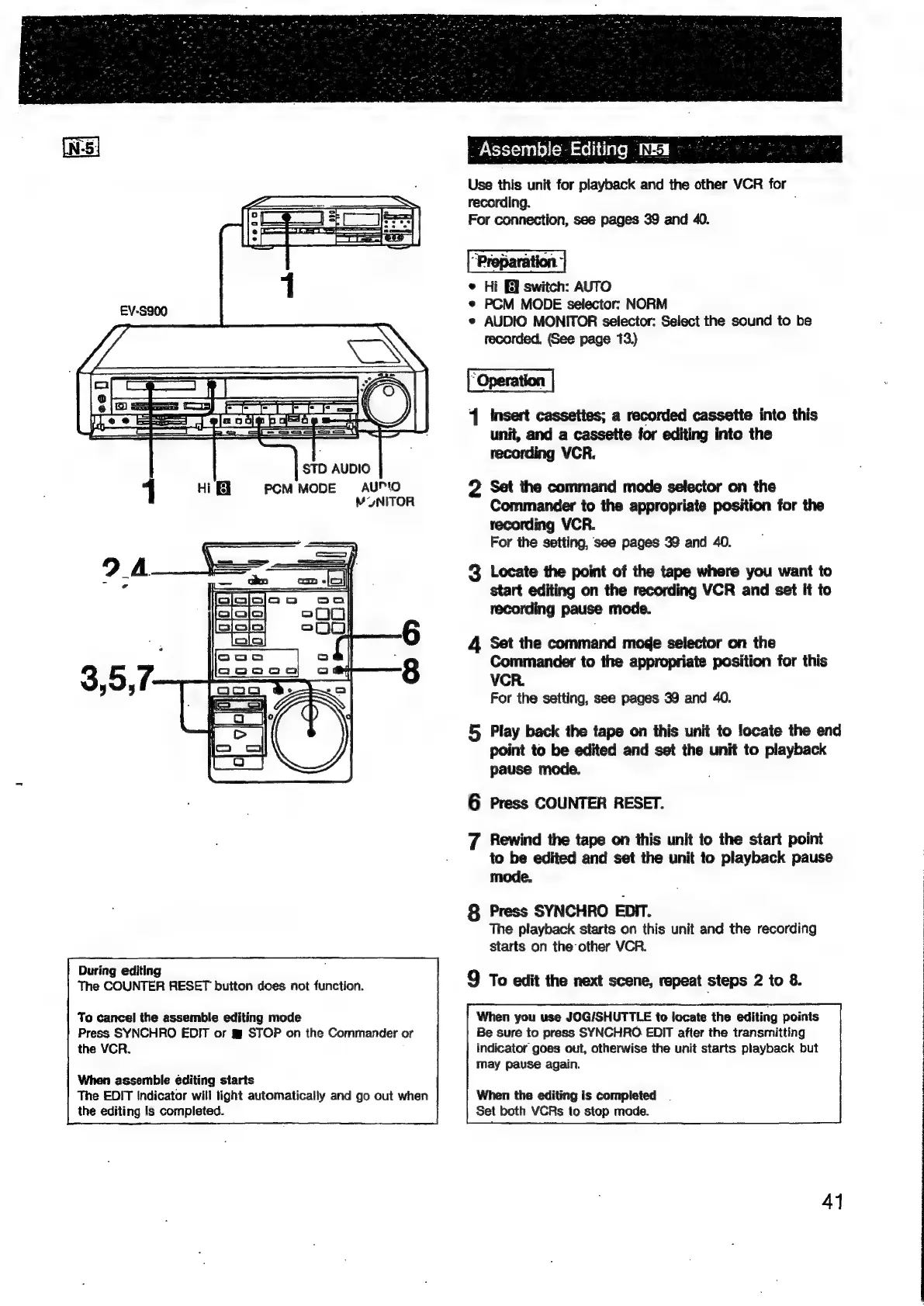
PCM
MODE
AUMO
MONITOR
During
editing
The
COUNTER
RESET
button
does
not
function.
To
cancel
the
assemble
editing
mode
Press
SYNCHRO
EDIT
or
g
STOP
on
the
Commander
or
the
VCR.
When
assemble
editing
starts
The
EDIT
Indicator
will
tight
automatically
and
go
out
when
the
editing
is
completed.
Assemble-Editing
Mma
Use
this
unit
for
playback
and
the
other
VCR
for
recording.
For
connection,
see
pages
39
and
40.
©
Hi
switch:
AUTO
*
PCM
MODE
selector:
NORM
e
AUDIO
MONITOR
selector:
Select
the
sound
to
be
recorded,
(See
page
13)
1
Insert
cassettes;
a
recorded
cassette
into
this
unit,
and
a
cassette
for
editing
into
the
recording
VCR.
2
Set
the
command
mode
selector
on
the
Commander
to
the
appropriate
position
for
the
recording
VCR.
For
the
setting,
see
pages
39
and
40.
3
Locate
the
point
of
the
tape
where
you
want
to
start
editing
on
the
recording
VCR
and
set
it
to
recording
pause
mode.
4
Set
the
command
moge
selector
on
the
Commander
to
the
appropriate
position
for
this
VCR.
For the
setting,
see
pages
39
and
40.
5
Play
back
the
tape
on
this unit
to
locate
the
end
point
to
be
edited
and
set
the
unit
to
playback
pause
mode.
6
Press
COUNTER
RESET.
7
Rewind
the
tape
on
this
unit
to
the
start
point
to
be
edited
and
set
the
unit
to
playback
pause
mode.
8
Press
SYNCHRO
EDIT.
The
playback
starts
on
this
unit
and
the
recording
starts
on
the
other
VCR.
9
To
edit
the
next
scene,
repeat
steps
2
to
8.
When
you
use
JOG/SHUTTLE
to
locate
the
editing
points
Be
sure
to
press
SYNCHRO
EDIT
after
the
transmitting
indicator
goes
out,
otherwise
the
unit
starts
playback
but
may
pause
again.
When
the
editing
is
completed
.
Set
both
VCRs
to
stop
made.
41

Related product manuals