EasyManua.ls Logo

Sony EV-S900 - Page 48

Sony EV-S900
60 pages
Print Icon
To Next Page IconTo Next Page
To Previous Page IconTo Previous Page
Loading...
“Antenna/Cable
and
TV/Monitor
Connection
-
Re?
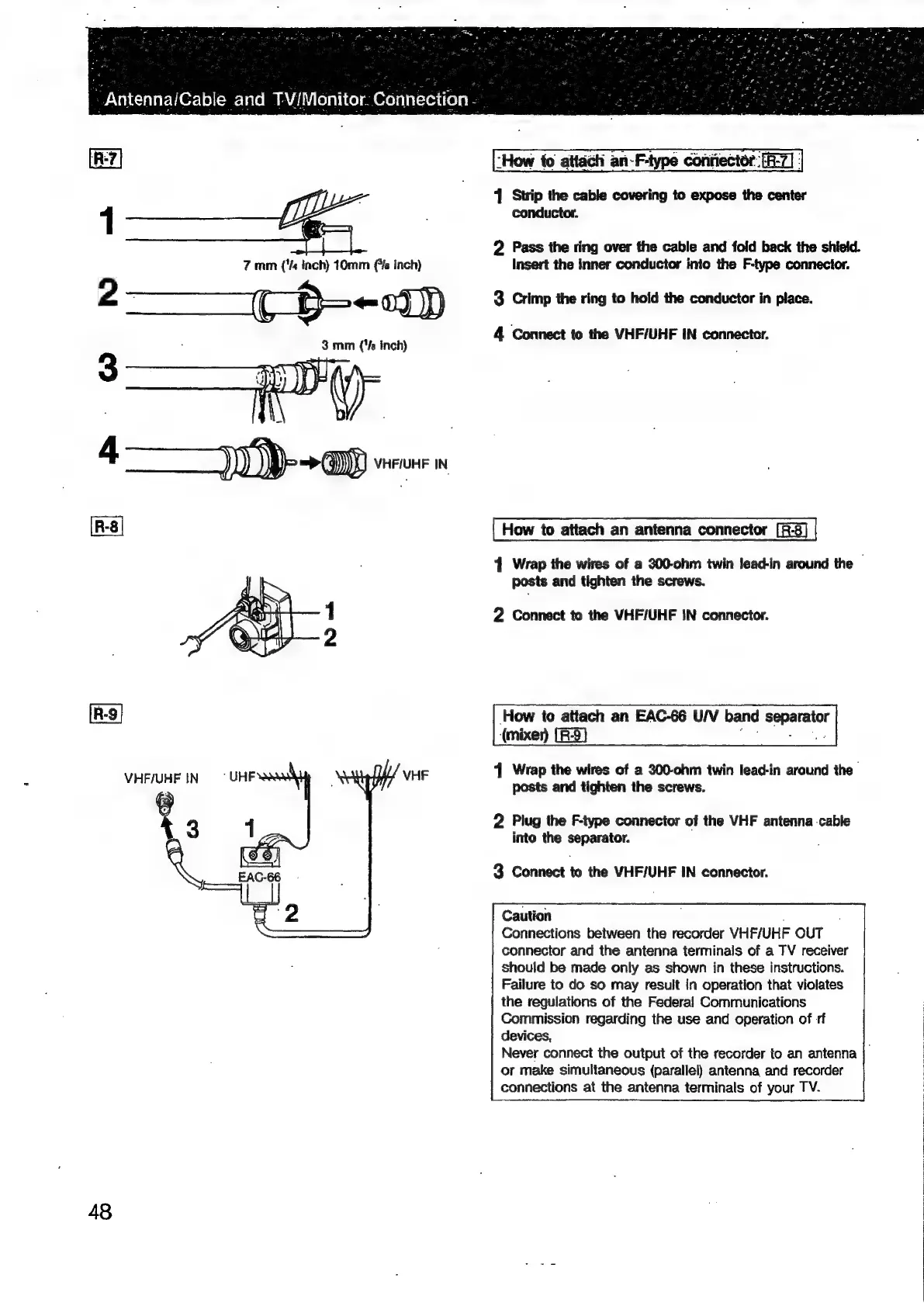
“How
to
attach
an-F-type
confiector:[F-7/
|
Z
1
Strip
the
cable
covering
to
expose
the
center
1
;
conductor.
2
Pass
the
ring
over
the
cable
and
fold
back
the
shield.
7
mm
('%
inch)
10mm
is
inch)
Insert
the
inner
conductor
into
the
F-type
connecior.
2
——C-$--D
3
Crimp
the
ring
to
hold
the
conductor
in
place.
4
Connect
to
the
VHF/UHF
IN
connector.
3
3mm
(‘/s
inch)
.
How
to
attach
an
antenna
connector
[R-3]
4
Wrap
the
wires
of
a
300-ohm
twin
lead-in
around
the
posts
and
tighten
the
screws.
2
Connect
to
the
VHF/UHF
IN
connector.
How
to
attach
an
EAC-66
U/V
band
pci
(mixer
(R53)
4
Wrap
the
wires
of
a
200-ohm
twin
lead-in
around
the
VHF
posts
and
tighten
the
screws.
“UHF
VHF/UHF
IN
.
3
4
2
Plug
the
F-type
connector
of
the
VHF
antenna
cable
into
the
separator.
3
Connect
to
the
VHF/UHF
IN
connector.
Caution
Connections
between
the
recorder
VHF/UHF
OUT
connector
and
the
antenna
terminals
of
a
TV
receiver
should
be
made
only
as
shown
in
these
instructions.
Failure
to
do
so
may
result
in
operation
that
violates
the
regulations
of
the
Federal
Communications
Commission
regarding
the
use
and
operation
of
rf
devices,
Never
connect
the
output
of
the
recorder
to
an
antenna
or
make
simultaneous
(parallel)
antenna
and
recorder
connections
at
the
antenna
terminals
of
your
TV.
48

Related product manuals