EasyManua.ls Logo

Sony EV-S900 - Preparation for Channel Presets; Adding and Erasing Channels

Sony EV-S900
60 pages
Print Icon
To Next Page IconTo Next Page
To Previous Page IconTo Previous Page
Loading...
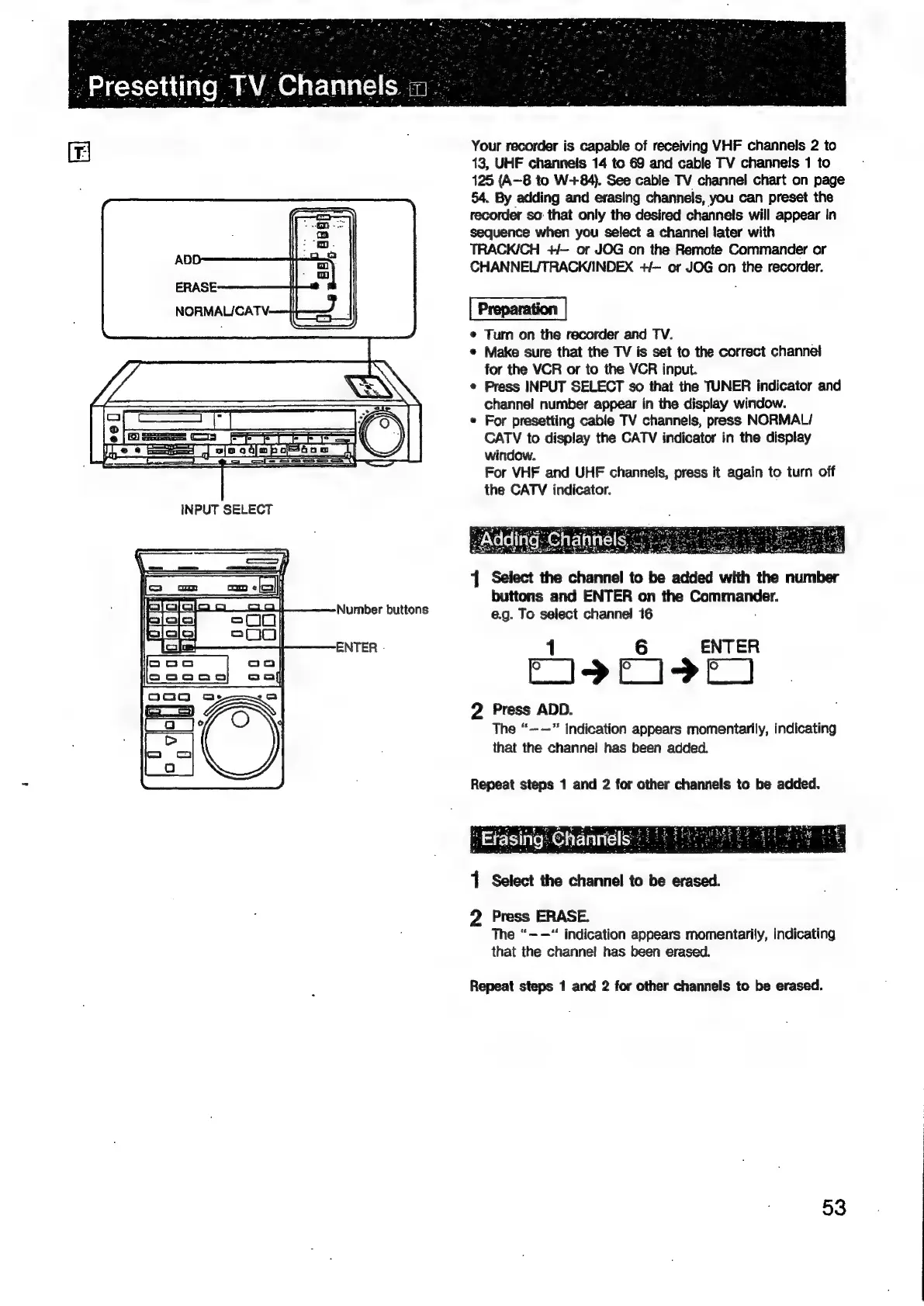
Number
buttons
ENTER
-
Your
recorder
is
capable
of
receiving
VHF
channels
2
to
13,
UHF
channels
14
to
69
and
cable
TV
channels
1
to
125
(A-8
to
W+84).
See
cable
TV
channel
chart
on
page
54.
By
adding
and
erasing
channels,
you
can
preset
the
recorder
so:
that
only
the
desired
channels
will
appear
In
sequence
when
you
select
a
channel
later
with
TRACK/CH
+/—
or
JOG
on
the
Remote
Commander
or
CHANNEL/TRACK/INDEX
+/—
or
JOG
on
the
recorder.
Preparation
¢
Turn
on
the
recorder
and
TV.
*
Make
sure
that
the
TV
is
set
to
the
correct
channei
for
the
VCR
or
to
the
VCR
input.
Press
INPUT
SELECT
so
that
the
TUNER
indicator
and
channel
number
appear
in
the
display
window.
For
presetting
cable
TV
channels,
press
NORMAL/
CATV
to
display
the
CATV
indicator
in
the
display
window.
For
VHF
and
UHF
channels,
press
it
again
to
turn
off
the
CATV
indicator.
1
Select
the
channel
to
be
added
with
the
number
buttons
and
ENTER
on
the
Commander.
e.g.
To
select
channel
16
1
6
ENTER
PISFCIDEI
2
Press
ADD.
The
“——”
indication
appears
momentarily,
indicating
that
the
channel
has
been
added.
Repeat
steps
1
and
2
for
other
channels
to
be
added.
“Efasiig:
Chanmidls
1
1
Select
the
channel
to
be
erased.
2
Press
ERASE.
The
“-—“
indication
appears
momentarily,
indicating
that
the
channel
has
been
erased.
Repeat
steps
1
and
2
for
other
channels
to
be
erased.
53

Related product manuals