EasyManua.ls Logo

Sony HCD-V5500 - Page 12

Sony HCD-V5500
48 pages
Print Icon
To Next Page IconTo Next Page
To Previous Page IconTo Previous Page
Loading...
— 12 —
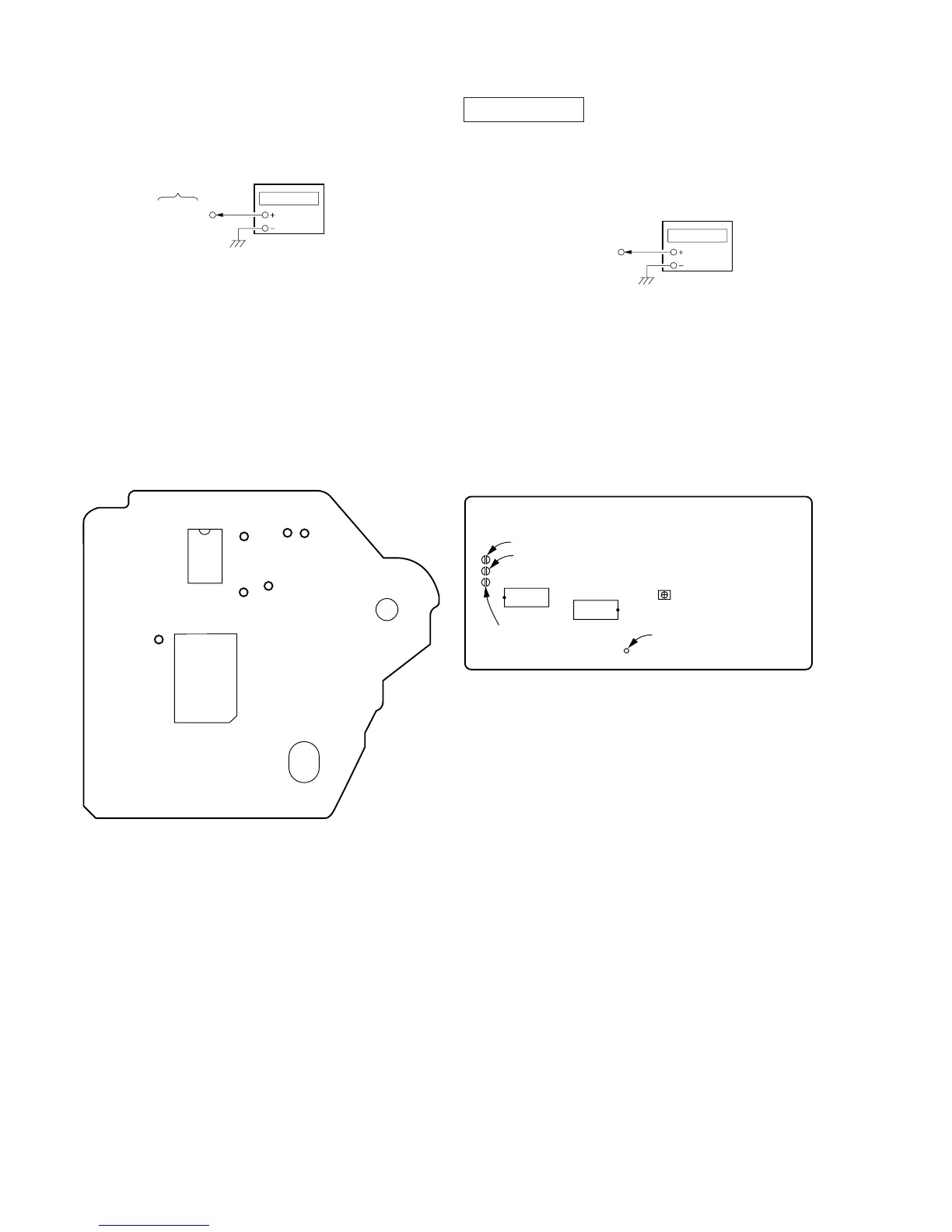
RF PLL Free-run Frequency Check
Procedure :
1. Connect frequency counter to TP (PLCK) with lead wire.
2. Turned Power switch on.
3. Put the disc (YEDS-18) in to play the number five track.Confirm
that reading on frequency counter is 4.3218 MHz.
Adjustment Location :
[BD BOARD] — SIDE A —
BD baord
TP (PLCK)
frequency counte
r
IC103
(PLCK)
IC101
(RF)
(FEI)
(FE)
(VC)
(TE)
VIDEO SECTION
Frequency adjustment
1. Connect the frequency counter to check point of the VIDEO
board.
2. Adjust CT401 of the VIDEO board so that the frequency counter
read 13.5 MHz ± 40 Hz at STOP condition.
[VIDEO BOARD] — SIDE B —
VIDEO board
TP410 (DCLK)
frequency counte
SL703 (AFADJ)
SL702 (ADJ)
IC751
IC251
SL701 (CAL BAR)
TP410 (DCLK)
CT401
Frequency

Related product manuals