24
Importing Selected Photos or Folders to
the Unit
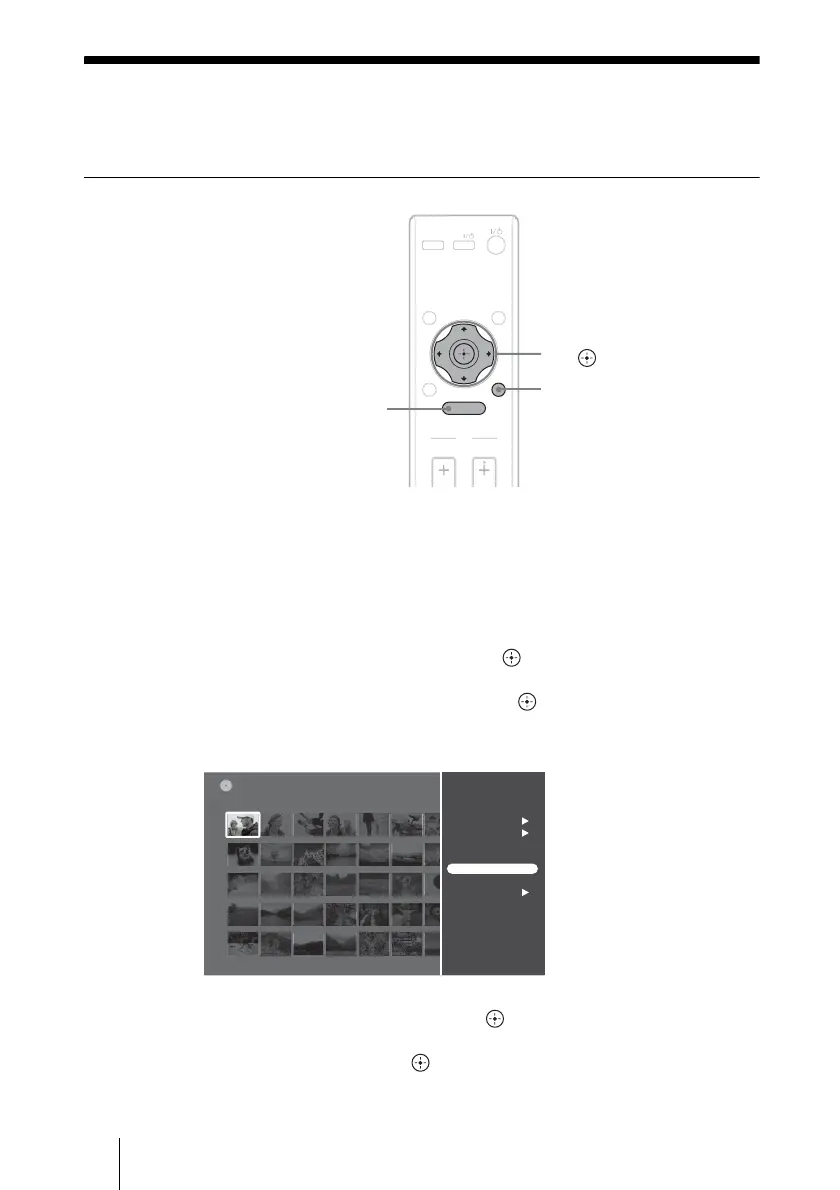
Importing a single photo to the unit
1 Insert a memory card or disc containing photos (page 19).
When importing from a digital still camera directly, connect to the USB
jack (page 21).
2 Press HOME.
3 Select [Photo Browser] and press .
4 Select a media or device and press .
5 Select a photo to import, and press OPTIONS.
6 Select [Import Photo] and press .
7 Select [YES] and press .
INPUT
INFO
RETURN
HOME
TV
VOL CH
DISPLAY
OPTIONS
TV
M/m/</
,,
OPTIONS
HOME
101msdcf
DSC00516
Sat 11/ 3/2007 9:33:06 PM
DVDPhoto Browser
Multi-Album Operations
Multi-Photo Operations
View
Slideshow
Album Operations
Import Photo
View Photo Info



 To Next Page