51
Connecting to a Computer
Connecting to the network
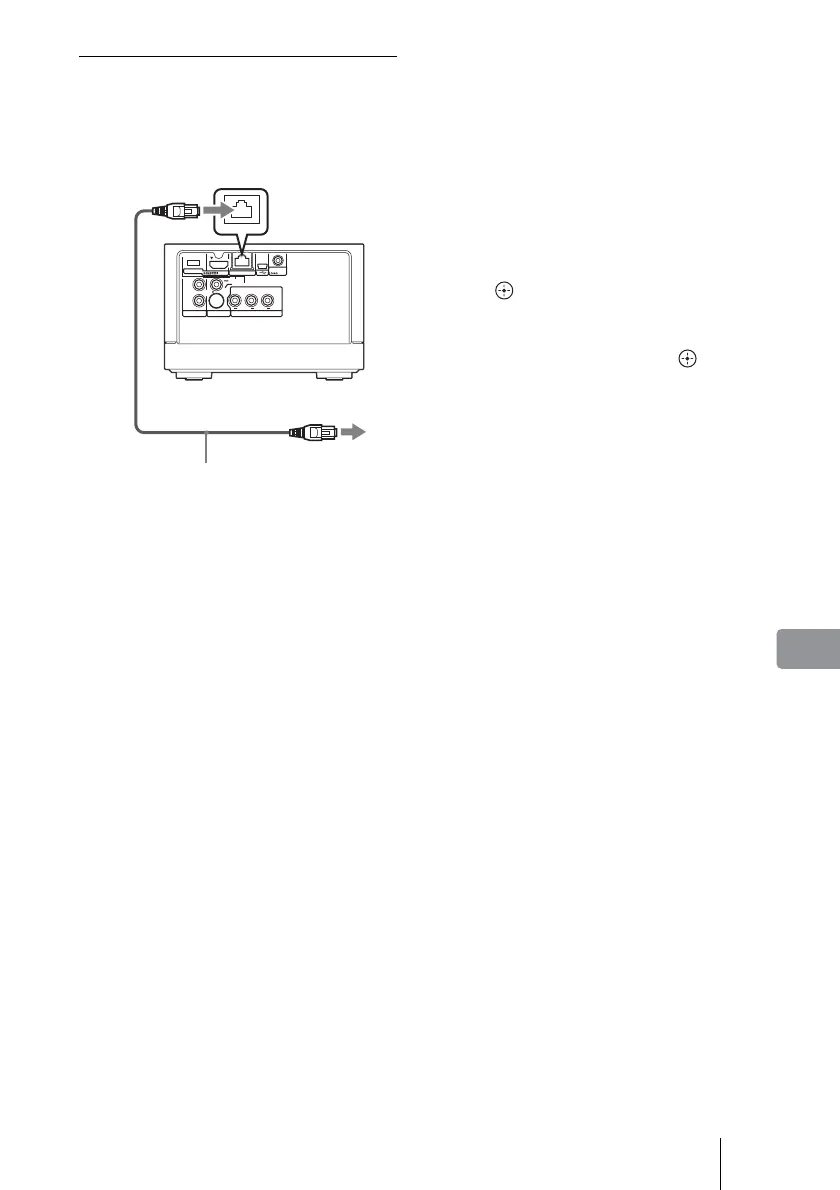
Connect the unit and computer using a
network cable. Connection differs
depending on your network
environment.
1 Connect the network cable
(not supplied) to the LAN port
on the rear of the unit.
2 Connect the other end of the
network cable to your home
network.
See pages 52 to 56 for connection.
To start up the server
1 When connecting to a hub (or
router with hub), make sure it
is turned on.
2 Turn on the computer.
480i/480p/
720p/1080i
RESOLUTION
OUT
S-VIDEO
VIDEO
L
R
AUDIO OUT VIDEO OUT COMPONENT VIDEO OUT
Y
LAN
(
10/100
)
DC IN
16V
P
B
P
R
LAN
(
10/100
)
to the LAN port
Network cable
(not supplied)
to the LAN port of
the hub, router with
hub, or your
computer
3 Turn on the TV, and switch
the input selector on your TV
so that the signal from the unit
appears on your TV screen.
4 Turn on the unit.
5 Press HOME.
6 Select [Settings] and press
.
7 Select [Server Startup] from
[Network] and press .
The unit starts connecting to the
computer, and the server starts up.
For further operations, see
page 58.



 To Next Page