48
B
Printing Photos
Printing Photos
Using a PictBridge
Printer
When you connect a PictBridge*-
compatible printer to the unit, you can
print photos or scrapbooks without
using a computer.
* PictBridge is a unified standard established
by the Camera & Imaging Products
Association (CIPA).
1 Press HOME.
2 Select [Photo Browser] and
press .
3 Select [HDD] and press .
4 Select a photo you want to
print and press OPTIONS.
5 Select [Photo Operations] (or
[Album Operations]) – [Print],
and press .
The waiting-for-a-printer-
connection display appears.
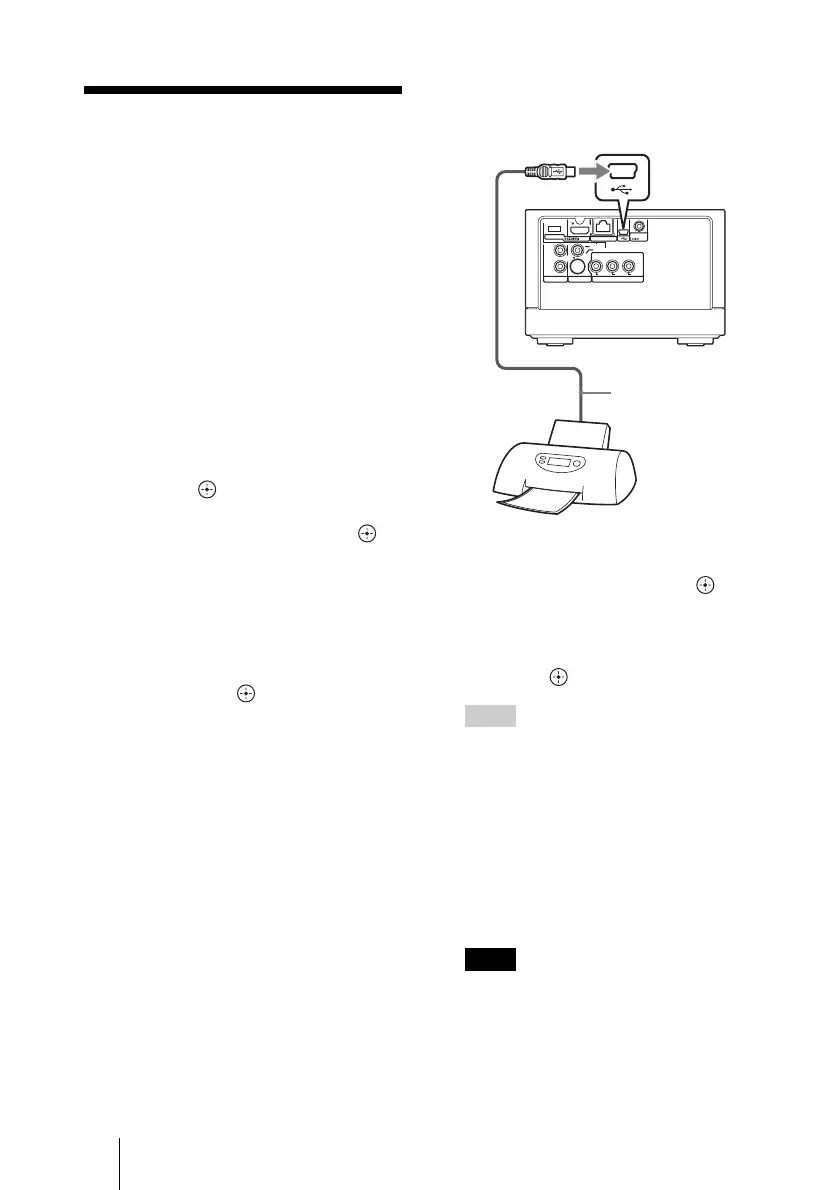
6 Connect a PictBridge-
compatible printer to the unit
and turn it on.
7 Select the setting items you
want to set, and press .
8 After you complete the
settings, select [Print] and
press .
Hints
• Some printers support printing the shooting
date on a photo. To print the date, set [Print
With Date] to [Yes] in step 7.
• When you select [Multi-Photo Operations]
– [Multi-Print] in step 5, you can print
multiple photos.
• When you print a scrapbook, select [x-
ScrapBook] in step 2, and select
[Operations] from the OPTIONS menu in
the thumbnail screen, and then select
[Print].
Notes
• Connect the printer directly to the unit. If
you connect through a USB hub, the unit
may not work properly.
480i/480p/
720p/1080i
RESOLUTION
OUT
S-VIDEO
VIDEO
L
R
AUDIO OUT VIDEO OUT COMPONENT VIDEO OUT
Y
LAN
(
10/100
)
DC IN
16V
P
B
P
R
USB cable (not
supplied)
to USB jack



 To Next Page